
Stacks Guru is born from the need to search the vast number of videos out there on stacks built for Stacks Pro and the Stacks 5 plugin for Rapidweaver.
We have scraped over 500 videos to get the transcripts for each in order to make the spoken word searchable.
Please use this free tool to help you learn and discover the awesome power that Stacks and the stacks made for Stacks have to offer.
00:07 hey everybody this is Joe workman and thank you very much for joining us today for the webcast it's been quite a while
00:14 since we've done one we're an episode 10 I don't know um it's been two months we
00:21 took a summer break I spent some time in Brazil with my wife's family had a blast
00:27 but I worked my tail to the bone I had a lot of updates some great new stacks
00:33 acquired a new company domain brain so more round that later in today's show
00:40 we're going to go over a few different topics we're going to go over kind of we're going to go over the summer
00:45 updates what new stacks were released what's changed since since we've last
00:51 seen each other then we're going to go over your head simple stacks your head
00:57 developed some really amazing simple stacks that I don't think a lot of users
01:03 know about and so we're going to we're going to show those texts to you and see how they can benefit you and hopefully
01:10 you can go pick up yourself a copy and lastly but definitely not least we're going to review a new service that I
01:17 started using called CloudFlare I started using them about a month ago and I really like them so i'm going to kind
01:24 of go over that service and my thoughts and opinions about them so without
01:29 further ado let's go ahead and jump in and kind of go over some of the summer updates that happened so let's let's
01:36 open up my website here
01:42 so here we are at Jennifer net net and let's just go ahead to my product page
01:47 and we're just kind of peruse through things the tumblr stack got some really
01:53 great it actually got three huge updates over the summer um and some really great
01:59 ones of course tumblr as you know released a new API so I completely
02:05 updated the tumblr stack to use their new api's everything is much more stable much faster the caching engine that was
02:12 built in tumblr three I completely rewrote it again from scratch it is much
02:18 more elaborate much more it's actually simpler less code base publishes less
02:24 files I no longer use any third-party software I rebuilt it all myself okay oh
02:29 so everything functioning is exactly how I want to function um and it's it's
02:35 quick it's crisp it's fast it's awesome
02:40 it's a lot more stable than previous versions another great feature to the
02:47 tumblr stack was it got a really great internationalization overview so all of
02:53 the the alerts and the labels can all be customized to exactly what you want to
02:59 your language so whether or not you're German or you're French you can also there's also a setting in the hoods to
03:05 set the locale for date format as well as the the social buttons so if you want
03:12 the social buttons such as Facebook and tweets and the Google+ button to be localized to your language you can
03:19 easily do that now the next update that
03:24 we had on was the all of our a lot of
03:30 our media stacks got some updates html5 audio html5 video Vimeo YouTube stacks
03:36 and most of these updates were mostly to
03:41 allow compatibility with our new expose stack and our new expose stack really is
03:47 the ultimate in lightbox tax it there's two stacks in the set
03:53 their first is a generic lightbox container that can really hold anything that you want okay this sample here is
04:00 going to be is going to be holding a video okay as you see it has my vimeo
04:06 stack and what's unique about its using the new version of the vimeo stack that
04:11 auto plays once the expose stack opens and will stop playing once the expose
04:18 stack closes okay there were issues before where videos you know from Vimeo
04:26 or my YouTube stacks or my html5 video stacks or audio stack would keep playing even though you close the lightbox that
04:33 knows that's no longer the issue and as long as you're using one of my media
04:38 stacks within the expose they will properly pause once expose closes so
04:45 that's really cool um but excellent expose it's it's really great okay put anything you want in it um this again
04:52 shows the video but you can have anything images text other stacks I've seen some really cool ones that actually
04:59 have cycler built in to expose and you know mix some of those things be careful
05:04 not mixing too much of course we don't want to have effects inside of effects too much but a little bit here and there
05:11 is is quite nice okay um a compliment to
05:17 this stack is the expose image stack and this is a similar cousin to the expose
05:24 stack but it's built specifically for images especially for photographers okay um so basically the large
05:32 high-resolution image that you just saw load was dynamically loaded from from my
05:39 server so therefore to increase page load times or decrease page load times
05:44 because this image didn't have to be downloaded whenever a user visited the page this image was downloaded only once
05:52 on the user clicked on the thumbnail okay now other features that that are
06:00 enabled on this i don't have this enabled on the demo but if you have exif
06:06 data for your particular image that will be displayed in a nice beautiful box
06:12 down here at the below here I will have to fix that so that's displays you're on my site but the exif data will display
06:19 properly and that's a great feature for photographers so the next step that we have here is our new stack is actually
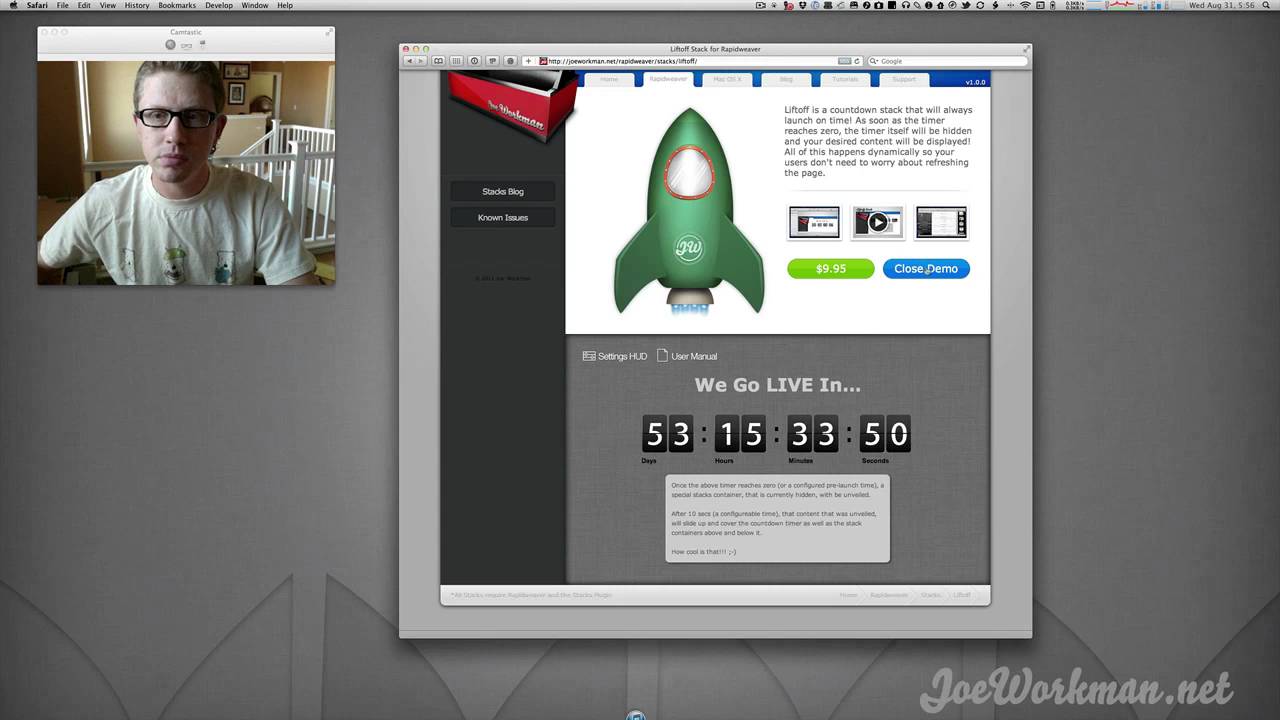
06:28 liftoff liftoff if you've gone to my live my live page you you've seen the
06:33 countdown that I have okay and basically this is a countdown that whenever it
06:40 counts down to particular time and that time is reached a hidden content will be
06:45 displayed okay so for example on my live page on 10 minutes before the counter is
06:51 done the the chat feed as well as the video feed are automatically unveiled so
06:58 that it can be it can be shown automatically this is great if you want
07:03 to automatically show off products at a particular time and you don't want to be there to to launch your website there to
07:09 publish it right you can publish it beforehand and have count and have the countdown or liftoff stack countdown to
07:16 that time and automatically unveil your content for you very cool the next
07:27 update that we have here a couple updates that we have is totem got a great update um really quick it just got
07:34 some some really custom you have can now have custom images as navigation headers
07:41 and footers RSS stacks got a huge great overhaul for look and feel and
07:47 simplicity um you know have more control over customization of shadows and how
07:53 totem looks and feels in your site it was a really great update to Totem so
07:59 make sure you check that out another great stack that got an update was
08:06 scroll you should check out we added some reflections to the scroll stack so
08:12 if you see down here we have reflections on our is um scroll can now have slower scroll
08:17 speeds so that was a really great update for scroll allows users to really
08:23 replace things like banners s that they have on their website with this great javascript HTML and CSS um you know
08:31 because this will work on your iOS devices on your iPhone or your mobile devices where banner zest uses flash and
08:38 things like that don't won't work on mobile devices so this is a great
08:44 replacement for things like banner zest if you have an image slide so with
08:49 things of that nature okay and last but definitely not least our last new stack that we had was called the comment stack
08:56 and these are generic comic containers um that you can put on any web page okay
09:03 we have two comets tax here the first is the disgust stack which integrates with
09:09 the disgust comments commenting system as well as facebook comments um so again
09:16 you can have either of these stacks there's two stacks in this set and allows you to put commenting systems on
09:22 any page whether it's product page maybe it's a you want users to be able to have a guest book on your website so they can
09:28 sign in or or comment on a particular event page that you have things of that
09:33 nature um these are great stacks to have around so that your users can can have a
09:39 full-blown commenting system baked directly into their website we had a few
09:47 other minor updates here and there cycler got a minor update PDF embed did as well as like it got the new Google+
09:54 button um and and that's about it so I
09:59 hope you enjoyed these updates go ahead and peruse you can also always check out our stacks blog and we detail out every
10:07 single update is all DJ doc detailed out here um you know we show it we tell
10:12 exactly what was fixed that in every single release so please go ahead and
10:17 check out this our stacks blog for the latest and greatest in terms of updates and I'm going to jump into a second part
10:24 of our of our screencast now and that is going to review the some new stacks or they're
10:33 actually old stacks bye-bye your head so Isaiah over at your head develop some
10:39 awesome stacks and they are called the simple stacks and if you go to your head
10:44 calm / stack / simple yo you can see that mean you can purchase them right
10:50 there they're awesome stacks we're just going to kind of play with them really quick show you what they are what they
10:55 can do and how useful they are for for your everyday workflows okay so this
11:02 first one is the the simple list stack okay so this is a really great stack
11:08 that allows you to build a lists of things so it could be maybe you want to
11:14 build out a feature list for your app right so let's go ahead and and and do
11:21 that I'm just going to drag in a couple little text samples here okay I'm gonna
11:28 do
11:33 awesome feature number one oops if I can spell just really quick i'm just going
11:45 to paste in here do number two and number three so here we've I've just
11:54 built out a really simple thing right um if we preview this as you see here we
12:02 have a nice list we have an ice bullet list of items where you know the the
12:08 label for each item is a is part of the bullet and then there's a paragraph or
12:14 whatever you want if we wanted to add some images in here we can easily add
12:20 some images let's go ahead and add an
12:27 image there and then go ahead
12:39 there and here's a total all right so
12:46 you can have whatever content you want in here and and it will show up okay so we have some text so we have our awesome
12:53 feature number one you know our paragraph and then an image okay so you can really happen whatever you want in
12:59 that stack area you could have videos if you want maybe maybe that's a great way of presenting lists of videos okay and
13:07 you can also as you see there there's a default of three but if we just go ahead
13:13 and remove some of these you notice that you can add as many as you like okay so
13:19 you can add in tons of different items each item has its own little drop box area okay refresh that and and you'll
13:28 see that even items if you don't have anything in the drop area you'll just have a nice little list okay without the
13:36 details within each bullet point okay so that's the simple list I kids it's
13:41 really it's what it is it's simple right on there's a couple other things you could do you can have it a numbered list
13:47 if you wanted instead of bullets okay so that's really nice you can have an
13:52 indented or you can have it not invented okay so if we look at the not indented you can easily go ahead and have
14:00 everything so it's all flush flush left okay so that's that's a nice little
14:05 feature there and last but not least you can of course you can change the text
14:12 size and indent or item margin between each item so if you want you know 26
14:19 pixels you want the tech speed of the bullet points be really big go ahead in
14:26 there and voila you know we have we have big you know big text to you know bring
14:34 out our lists you know we increase the indentation between each item okay so it
14:40 looks a lot cleaner a little bit nicer and simpler um and and that's the simple list stack
14:46 okay let's go ahead and jump into the
14:52 simple column stack now this is a great little stack actually um it so as you
15:00 know that everyone probably uses the out of the box the three column stack okay a lot of times what happens if you want
15:07 four columns or five columns right so a lot of times we do the trick if I want if I want four columns what do you do
15:13 right you do a double stack and then you do a double stack again and then you do a double stack again right ok there's my
15:19 four columns but that's kind of really made things a little bit messy I now
15:25 have you know three stacks just so that I can get you know four columns okay
15:31 plus the HTML market for this is going to be a lot Messier it's going to have a lot of gibberish that you know is
15:37 unnecessary it will work and it does work but you know as long as you play
15:42 with the padding's and margins and whatnot you know things it'll look well okay however simple column stack is easy
15:50 okay um basically you can have as many columns as you like okay now if the
15:56 columns override the wiffy width of your web page basically they'll just continue
16:01 down on the next line okay just as you see here so because for four columns
16:07 wide was too wide for this area they just kept on going okay excuse me so
16:14 basically you know I'm just going to go ahead and here let's add in adding some
16:21 stuff here okay let's just do hold you for columns
16:29 for now i'll reduce that okay so we have four columns here if we preview that
16:38 okay you'll now you'll notice that this image got cut off okay i have my text an
16:45 image a text and some image okay i'm basically it got cut off because inside
16:51 the stack you also have call them with okay so what's the width that you want
16:56 every single column to be so every single column is going to be the same exact width okay so let's go ahead and
17:05 let's just make this image a little bit smaller here
17:15 let's go make the column with a little bit smaller okay something like that and
17:25 there and voila so as you see if we make
17:32 it a little bit if we need to make a little bit smaller see you here oh it's
17:44 good okay so you know we experimented with with the column width as you notice
17:49 before the Wits were the width of the columns were too wide so this last column dropped down to the to the next
17:56 line okay but this is a great way of building multiple columns especially if
18:02 you have a fluid with sites 08 a ka naata a fixed-width it's a great way to
18:07 build um complete grids of things okay so let's say you have like for instance
18:13 my my product page is a complete grid right so if we were to go in head and
18:20 let's just do this really quick
18:35 okay so you have an entire grid of things it's a great way of just building
18:41 kind of a a quasi table that's not a table but they're basically floating
18:48 dibs on that everything floats to the left okay and it's a nice way of just building out columns of things so great
18:56 little stack I use this that quite a bit it's very useful so I i recommend this
19:02 one a lot okay the last simple
19:07 definition stack that we have is called simple definitions and it's a way of
19:13 just it's kind of quasi similar to the
19:19 excuse me the list stack but it's with a different twist okay so we have the
19:26 ability to basically have kind of a table where you can have a a label of
19:33 something and then over on the left you have a description of that okay of course you can have as many of these as
19:39 you like okay the number of items okay the indent so how you know how how far
19:47 do you want the gap between each item to be do you want the the title to be right
19:54 aligned or do you want it to be kind of indented a little bit what's the exact width that you want the the table
20:02 portion to be or the detailed data okay the size of your titles as well as the
20:08 the width between the gap between the two items okay or between the label and
20:14 its content okay so get a really simple stack that can be very elegant to make a
20:21 whole bunch of things um it's just a great way of letting out things nicely especially if you need a whole bunch of
20:28 these you know you could potentially replicate this let's say you have a two column stack right and you know you have
20:35 a two column stack in here and then you know basically you could have a you know
20:40 a text with your item title and then here is your so here you could do
20:46 you know item title okay and then you
20:52 can go ahead and try to replicate this down right so you can you know basically copy this stack come on you know you can
21:03 have multiple copies of the stack where is it though came at the bottom you know
21:12 so basically you know you could potentially try to do this okay but again you're going to have to try to
21:19 replicate this one stack you're going to have 50 stacks on your page it's going
21:25 to take you longer to build it out and it might not be as nice and fluid as as
21:31 this nice little simple definition stack would be um so again very useful um I
21:37 think these simple stacks that Isaiah developed we're brilliant they're very simple very simple just as they say and
21:44 you should pick up pick up yourself a copy um you can easily get them over at your head calm again just go to your
21:52 head calm / stacks / simple in a transition to our last topic here you'll
22:00 notice this awesome wallpaper and your pricing a few of them transition throughout the screencast here um all
22:07 these these wallpapers that you seen here are available on Joe workman net
22:13 just head over to Joe workman net / goodies if we hit there be no go to Joe
22:22 working net and go to the goodies page you'll see that we have a whole slew of
22:29 a great wallpapers that you can use they're all free to download just click on the download link it'll download a
22:35 zip file for you with all those wallpapers in it okay and actually this is the the expose image pro stack that
22:42 that is used to display these in a higher resolution for you guys so just
22:48 to show you a use that i use the the expose stack for
22:56 ok
23:03 so the last topic here is something new
23:09 I started using a service called
23:15 CloudFlare back in July about a month ago okay it's really great just
23:22 cloudflare calm and basically what cloudflare does is it it's a caching
23:31 system okay so essentially you transfer you all your DNS settings to CloudFlare
23:39 okay now you should watch this video go to cloud player com watch this video
23:44 that they have here and they explained it very well let me try to explain it in my layman terms so you go ahead and
23:51 transfer your DNS settings for your domain over to cloud player therefore every single request that is made to
23:59 your website passes through CloudFlare okay basically it is kind of thinking
24:06 that as a prize a proxy so every single request to Joe work not net flows
24:11 through CloudFlare cloudflare sees every single request to Joe work wind net
24:17 whether it's index.html file or whether it's a CSS file or whether it's a
24:24 javascript file or whether it's an image file or a video file or a font file okay
24:29 it sees every single one of those requests from the web browser okay and
24:35 what they do is they use their global network of servers to cash your static
24:41 files therefore jorc nut net sits on a
24:47 server in Los Angeles okay um so therefore whenever a user in China goes
24:54 to Joe work and net every single image in every single file that is requested
25:01 comes from Los Angeles all the way across the world all the way to China
25:07 okay therefore um you know potentially
25:12 users in China could have slower response times because they have to download all of those those files if as long as their local
25:20 browser as in cash though right all these files have to be downloaded every single time so what CloudFlare does is
25:26 it caches the files for you on their servers all around the world so
25:32 basically CloudFlare goes ahead and says hey I know you have these two hundred images and these font files and these
25:39 CSS files okay on your website and there static they're not going to change this
25:44 image file is this image file and this CSS file is this CSS file and I know that whenever someone requests this
25:51 they're going to be getting the same file every single time so they cash all these files across their servers across
25:57 the world and basically whenever someone goes to your website cloudflare goes hey
26:04 you want the image ABC well I'm I have it right here on my server I'm just
26:10 going to give it to you and it's closer than you having to go all the way to Los Angeles to download so very very cool
26:18 service it really speeds up it allows you to not only maybe if your hosting company charges you by bandwidth it can
26:25 help you save your bandwidth charges from your hosting company I use dreamhost myself and I have unlimited
26:33 bandwidth however from an end users perspective I really have noticed a
26:38 increasing gain from visiting Joe or net since I've started using CloudFlare okay
26:45 so if you were to go to jail green dot net now okay as you see my page loaded
26:54 almost instantly okay um now I have a relatively fast internet connection
27:00 anyway however when i was on a slower network speed during the summer time i
27:07 noticed a dramatic increase in page load times um I have some rather large images
27:14 on my page on my home page here and sometimes it could take a long time especially if if someone's in a foreign
27:20 country to load these images okay as well as CSS files and all these other things okay and in cloudflare greatly
27:28 reduce just the the download times for across my entire website um now i'm going to go
27:35 ahead and login to my cloud flower account and kind of show you um you know what other features cloudflare gives you
27:42 now i should note you should notice here that CloudFlare does have a free account okay so you can go ahead and sign up
27:50 your account within cloudflare for free one hundred percent free you get the website caching you get Sephora
27:57 performance and security okay there's also a pro account okay the pro account
28:02 is twenty dollars a month it basically gives you some more faster metrics more
28:10 active caching so clouds will actually go ahead and actively probe your site to find and cache files and you also get
28:17 some more threat protection which I've even talked about the threat protection yet but we'll see that exactly right now
28:23 okay let me go ahead and login um so
28:31 once we log into CloudFlare you'll be shown a list of your websites okay I
28:37 have two websites configured with CloudFlare domain brain app com and Joe workman net okay now domain brain app
28:45 com is actually configured as a free account I don't pay for that URL to be unpacked event or cached or or anything
28:52 it is just the free account so if we go ahead and if we look at domain brain app com you'll see you know you do get some
29:03 mile statistics you gets a really nice beautiful graph of page views that you've seen in the last seven days you
29:10 see the regular traffic is in green you see the purple is crawlers or BOTS so
29:15 that is Google Yahoo Bing on those things okay and the red line is actually
29:22 threats so um a future that I haven't really talked about what the cloud
29:27 player is that cloud fair keeps a database of known malicious users known
29:34 um you know threat box or virus servers and things of that nature that probe your webs
29:40 maybe it's a server that goes and tries to find your contact page in order to send you emails or send your customer
29:45 spam and things of that nature right so as you see here uh just with domain
29:52 brain app com within the last seven days it's found nine hundred unique visitors
29:59 it's found 17 crawl at 15 crawlers and 32 unique threats and you can actually
30:06 drill down and view your threat control browser if you wanted no I have it
30:11 immediately I haven't really played with this threat control stuff too much but you can actually go ahead and view
30:17 exactly all the IP addresses of people that have been blocked you can unblock
30:22 them and say you're their trusted if you were to click on one of these it'll go
30:28 ahead and tell you exactly why they blocked it so this particular visitor
30:34 got run antivirus scan seeing two times on your domain seen 12 times on the
30:40 cloud floor network so this user it wasn't not only seen on my website but they tracked this user and found him
30:46 being doing malicious activity on 12 other domains and they have effectively
30:52 blocked him from visiting my site okay so that's kind of cool um it's interesting I haven't had any complaints
30:59 yet just let you know I haven't had any complaints on users hey I can't get to your site I really want to buy something
31:05 so it doesn't seem to be blocking active real customers which is good excuse me
31:12 you can get some water here
31:19 there's some really interesting statistics here that we have you know
31:24 how many how many requests has clouds there flutter saved us so you know
31:31 within the last seven days it saved us 33,000 total requests so instead of of
31:38 those requests going to my web server CloudFlare automatically went ahead and
31:43 served those requests for images or CSS files and things of that nature okay and
31:50 things for bandwidth save so um CloudFlare saved us a total her almost
31:55 700 megabytes in the last seven days of bandwidth okay this is just for domain brain app com oh this is all pro sites
32:02 okay so um this is for Joe or not net that we're seeing here okay you can go
32:09 ahead and see what search engines are crawling you uh you know so goo Yahoo's
32:15 been crawling me lately I'm a few days ago I checked here and it was google that how was on top so depending on the
32:22 day or the activity you'll see you'll have you know your various search engines going ahead and um and crawling
32:29 your site and you can see all those statistics here which is nice um some
32:36 other features of of CloudFlare some quasi oddities so because CloudFlare is
32:45 serving as your dns okay if we go ahead and let's go into cloudflare settings
32:56 okay cloudflare setup um a whole bunch of things so you can go ahead and you
33:02 can say you know what is your caching level is it aggressive is it basic your security level do you want to adjust
33:08 that to meet high medium low um you know this is a pro account um you know do you
33:15 want to auto minify maybe you know so it'll actually auto compress your jas or
33:20 your CSS files or even your HTML files which is nice I don't have that turned on I just um I don't want potentially
33:28 you know automatically compressing things can cause issues with JavaScript or CSS and you know css3 have noticed so I
33:38 leave those off personally I haven't tested turning them on yet but but
33:44 they're there it's an interesting feature to have okay this rocket loader
33:49 I don't actually know what that is Evan played with that at all some other interesting settings here on you can
33:56 have IP geolocation so it'll actually you know determine the location of your
34:03 potential users you can integrate google analytics so that you know all your
34:09 analytics traffic will be flown properly through CloudFlare and last but
34:15 definitely not least we'll have a cache purge so you can actually purge all of the cash let's say you do a really major
34:22 site redeployment and you need to redeploy your site um you basically want
34:27 to make sure that cloudflare purges all of its cache Andrey gets it all again so
34:34 you could do that you know you can purge all your cash okay um and last this last
34:40 seven here development mode I've noticed that if I make minor changes to pages
34:45 especially with stacks the CSS files can potentially be renamed and things of
34:51 that nature so whenever I'm publishing the page or you know a few pages with
34:57 rapidweaver basically I turned development mode on and then I i
35:02 published my pages and then i turn it back off um and then basically all the
35:07 changes that were pushed um CloudFlare you know reflects those andrey caches
35:12 those pages that Yuri published okay um I actually even created if you do use
35:19 cloudflare and you and you asked me for them actually created a couple little automator scripts that allow me to you
35:27 know turn cloudflare if you see up here on launch bar on dev mode on and dev mode off so I could just hit that and
35:34 based on your turn dev mode on on the format abled so basically i can turn cloud for
35:41 dev mode on and then i can go ahead and i can go ahead and turn it mo disabled
35:49 so i can go ahead and disable dev mode so that's kind of cool um if if you do
35:56 end up using cloudflare and you'd like to have my little scripts I'd be more than happy to share those with you okay
36:02 um some other things that cloud floor has um there are lalola where are all of
36:12 the oh groups there they are cloudflare apps so you can set up if they have
36:19 partnerships with all kinds of companies to do sort of integration the only thing I've really turned on right now is
36:25 google analytics I haven't really turned on anything else webmaster tools
36:31 everything else I haven't really had time to really play with any of this other stuff but there are a bunch of
36:36 integrations with other companies so that you can see that here okay um for
36:41 really advanced users um if you want to track things by IP address basically
36:50 cloud FLIR changes your HTTP headers just a little bit this is getting highly
36:55 technical here so I'm sorry but basically the HTTP server address header
37:00 field is going to change its no longer going to be your site's IP address it will now be cloud flares IP address okay
37:08 go ahead and if you go in to help into cloud floor help villa they'll be help
37:14 for this um I think it's server address
37:24 you
37:36 here I think I don't remember so that
37:42 there is a setting that basically a cloud floor adds a new variable T or to your header that basically allows you to
37:49 easily determine the original IP address for your website or for the visitor okay
37:55 so take a look through out through the cloud flare documentation they have that
38:00 if you have any PHP scripts or server side stuff on the backend that filters
38:06 by anything by IP address so make sure you have a look at that okay so that's
38:13 cloudflare I think it's really cool I do enjoy the pro service basically gets me
38:20 more accurate statistics a little bit more threat control and whatnot um and
38:26 for twenty bucks a month I think it speeds up my website greatly for my customers I think it's it's definitely
38:32 worth it for me for my business um but you should definitely check out the free account um you know enabling on your
38:38 website and in and you know play around with it it's it's really cool basically
38:44 setups really easy during the setup you basically if you have a well-known
38:50 service provider I basically gave it my login credentials to dreamhost they
38:55 logged in to dreamhost pulled out my dns records automatically for me and automatically give you figured it it
39:01 took literally two minutes and I was up and going um I was a little nervous
39:07 because I I kind of just pulled the trigger on this really quick and did it on Joe Worknet first and luckily
39:14 everything went perfectly and cloudflare is awesome and but you may want to try
39:21 it on a smaller domain first but but everything worked well for me so I
39:26 definitely recommend it CloudFlare check it out watch that video that was on the
39:32 main page cloudflare calm and and that's it so and let me check out the chat room
39:39 so you grab any any questions here on the chat room
39:54 I see no more nothing more in the chat
40:00 rooms so thank you very much for joining everybody um hope you enjoyed this webcast hope you find a little bit
40:07 useful um again I will be doing another one on Friday it'll be more mac-based
40:15 less web-based and rapidweaver based so make sure you check us out on Friday um
40:20 you are looking at the new and improved cam tastic here um built just for lying
40:26 is you see I have some cool new toolbar icons we have full screen mode so we're
40:31 working on cam tastic to bring to you really soon and we'll probably see more of that on the on our Mac webcasts so um
40:39 thank you very much for joining everybody i hope you enjoyed it and i'll talk to you later bye


