
Stacks Guru is born from the need to search the vast number of videos out there on stacks built for Stacks Pro and the Stacks 5 plugin for Rapidweaver.
We have scraped over 500 videos to get the transcripts for each in order to make the spoken word searchable.
Please use this free tool to help you learn and discover the awesome power that Stacks and the stacks made for Stacks have to offer.
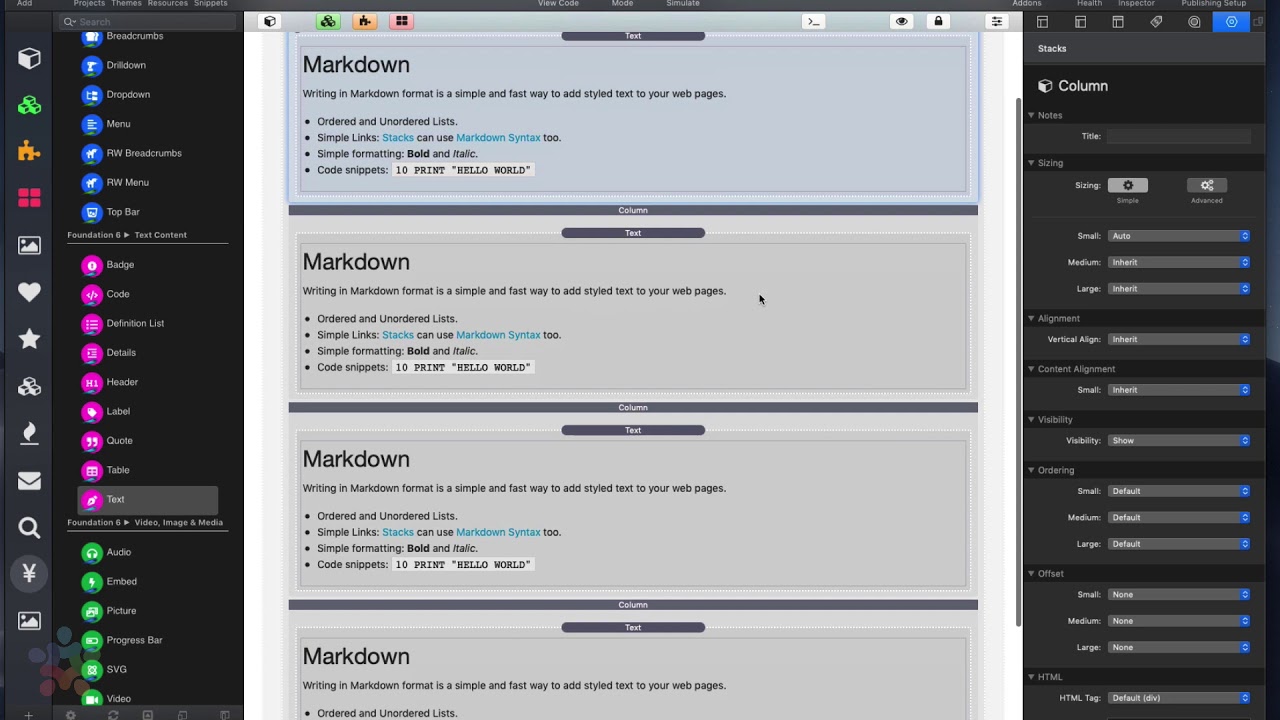
00:09 okay so columns Pro your your you're
00:13 probably watching this video if you've
00:14 used the normal default columns and you
00:17 just wanted more okay um no I'm not
00:20 gonna go through all these settings a
00:22 lot of these settings are exactly the
00:23 same as in the normal column stack so
00:25 the space seen here the alignment
00:28 options the content alignment visibility
00:30 right they're all the same now we have
00:33 dividers will go into dividers in a
00:35 little bit but I just wanted to dive in
00:37 to show you what we can do extra width
00:39 columns Pro now first thing you'll
00:43 notice is inside columns Pro no matter
00:46 how many columns you add they're always
00:49 going to be full width you're not gonna
00:52 actually be able to see the column
00:54 layouts within edit mode so here I've
00:57 just added a little bit of content and
00:59 what you'll notice is when you look at
01:01 each individual column there is sizing
01:04 settings for each column and there's a
01:06 lot more okay um so here we have the the
01:10 default sizing options that you're
01:11 probably familiar with from other
01:13 columns okay so you're 12 based grid um
01:15 and then you would set your sizing for
01:18 each one
01:18 within each column individually now what
01:22 you might notice is there's also an
01:24 advanced option within sizing to give
01:27 you the exact control that you might
01:29 need um if the simple sizing isn't
01:31 exactly what you want right I strongly
01:34 suggest that you use the simple sizing
01:36 options if you can the reason is is it
01:40 will give you a much more predictable
01:41 look and layout um you know to your
01:44 pages because these use predefined
01:47 layouts and grids that just kind of work
01:49 well together so if you start diverging
01:52 from that too much um you're gonna have
01:54 certain layouts that just don't look and
01:56 don't mesh properly okay so here but
01:59 here for the more advanced users we give
02:02 you the options right you can have
02:04 percentage with pixel with viewport
02:07 width um and you can have different
02:09 sizes for small medium and large you can
02:11 have a minimum and maximum
02:13 as well and then we also give you access
02:16 to the exact break points for that
02:19 sizing okay so we give you a lot of
02:21 options here um you know a lot of really
02:25 advanced stuff so for example here let's
02:27 say I wanted to give column one and a
02:29 percentage of 30% and if we look at
02:32 column two it's just set to be small
02:34 Auto
02:34 so essentially what that means is column
02:36 two is gonna eat up the rest of the
02:38 space and we should have a 30/70 split
02:41 let's preview and have a look there we
02:43 go
02:43 you see column 1 is 30% width and column
02:46 2 is auto so it's taken up the rest of
02:49 the width of the page that's exactly
02:51 what we defined now what you'll notice
02:54 is on each individual column we have the
02:56 ability to define vertical alignment
02:58 content alignment and visibility on top
03:02 of what is inside columns Pro so in
03:05 columns Pro we can define vertical
03:07 alignment and content alignment but then
03:10 we can override that for a particular
03:12 column so let's say for example by
03:15 default I wanted my vertical alignment
03:17 to be middle but on a particular column
03:20 I wanted a vertical alignment to
03:22 override it and be bottom for some
03:24 reason okay
03:25 this allows us a lot of control because
03:27 we can define if we have multiple
03:29 columns we could define a default at the
03:31 columns pro level then override that
03:33 value at the individual column size as
03:36 well so to add more columns to a stack
03:39 simply you can click on the plus button
03:41 you can add a column you can copy and
03:43 paste columns as well and like here I
03:47 have three columns by one of the fourth
03:49 I would just simply copy and paste it
03:50 and now I have four columns and when I
03:52 preview that you notice that I now have
03:54 a four column layout so again this is
03:58 definitely for pro because of the
04:00 various options and overrides um we
04:03 weren't able to build out the column
04:06 layout within edit mode you see
04:08 everything as if they're on top of each
04:09 other however you know using the
04:12 settings you can define exactly the
04:14 sizing of every single column
04:16 now there's a few new settings as well
04:18 inside columns and you'll notice that
04:20 there's ordering what ordering that
04:23 allows you to do is to swap the order of
04:26 your columns based on the break point so
04:28 for small medium large um you can have
04:31 different orders of your column so maybe
04:33 on small you have one two three and then
04:35 on medium you have two three one or
04:37 something like that this is really
04:39 common like for example in three column
04:41 layouts or maybe you wanted the middle
04:43 column to be at the top when it breaks
04:46 to small or something like that well I
04:49 have a specific video on ordering to
04:51 show you that so check out that video on
04:54 columns Pro ordering uh next is offsets
04:57 and offsets allows us to basically
05:00 offset by column so for example here if
05:03 I go and do let's say this is three and
05:07 then I do
05:09 let's do three here I don't we'll leave
05:12 that auto ok so this one I set to a size
05:15 of three and if I do an offset of one
05:18 basically that's gonna shift that column
05:20 over by one column unit okay does that
05:24 make sense so let's go ahead and preview
05:26 that and I'll go ahead and turn that off
05:31 well you'll notice is that shifted over
05:34 you notice that content shifted over on
05:36 the five shifted by five you'll notice
05:39 that it shifts everything over by five
05:41 right so um it allows you to basically
05:43 add some empty cells
05:45 um you know to the beginning of
05:47 something and lao's you just shift
05:49 content over there isn't too much this
05:52 is definitely a corner case when you
05:53 need this it's gonna be very helpful but
05:55 it's probably using a lot um and then
05:59 similarly to the container stack um we
06:02 actually allow you to do some semantic
06:04 HTML in here so you can actually define
06:06 things so like if you wanted to build a
06:08 layout using columns Pro that had a
06:09 sidebar and your main content you can
06:12 definitely do that now um within each
06:14 individual column right so you can
06:16 define your sidebar because this is
06:18 gonna be the sidebar because maybe it's
06:20 a two column layout or a three column
06:22 layout maybe you have two sidebars you
06:24 can set the this to actually be an aside
06:26 instead of having to add an additional
06:28 container stack to do that
06:39 you


