
Stacks Guru is born from the need to search the vast number of videos out there on stacks built for Stacks Pro and the Stacks 5 plugin for Rapidweaver.
We have scraped over 500 videos to get the transcripts for each in order to make the spoken word searchable.
Please use this free tool to help you learn and discover the awesome power that Stacks and the stacks made for Stacks have to offer.
00:06 hello everybody this is Joe workman and
00:08 today I'd like to introduce you to the
00:10 new dispatch to stack for Amazon s3 The
00:14 Dispatch stack allows you to add
00:15 beautiful file upload forms to your
00:17 website there could be a lot of great
00:20 uses for this whether it's exchanging
00:22 vows with your customers or maybe
00:24 handling a monthly photo contest so your
00:27 contestants can upload their photos to
00:29 your service let's jump on in and see it
00:32 in action so I have a dispatch form here
00:36 and all I'm going to do is I have two
00:38 images here that I'm going to drag and
00:39 drop directly on here now that
00:42 drag-and-drop functionality is only
00:44 supported currently in html5 browsers
00:47 essentially that's all the latest
00:49 versions of the major browsers out there
00:51 with the exception of Internet Explorer
00:53 that looks to become an Internet
00:55 Explorer 10 so we can't wait for that
00:58 now once we have added our files into
01:00 the file Q we can go ahead and click the
01:03 upload button as you see these were
01:07 really small files they uploaded
01:09 extremely fast but on you'll notice that
01:12 the once they were completed the
01:15 background color changed to green and we
01:17 got a nice completed message now let's
01:20 jump on in and look at some of the
01:22 dispatch settings now setting up your
01:25 Amazon s3 account inside dispatch is
01:27 really simple there's only a few things
01:29 that you need to get within your Amazon
01:32 s3 account you're going to need to get
01:33 your access keys in your secret key
01:35 these are very important is basically
01:37 how it authenticates with Amazon the
01:40 next thing is you're going to have to
01:41 configure which bucket you want to have
01:43 your files uploaded to remember buckets
01:47 are kind of like the top-level folders
01:48 within your Amazon s3 directory now by
01:52 default if you leave the folder blank
01:55 all files will get uploaded to the root
01:58 level of the bucket defined however if
02:02 you'd like your files to get uploaded to
02:04 a folder within your bucket then type in
02:07 the name of the folder or the you know
02:10 the full path to the folder if it is a
02:12 subfolder he
02:13 and the files would get uploaded to that
02:16 folder the last setting within the
02:18 Amazon s3 is the permissions these set
02:22 up the actual amazon s3 permissions
02:25 after the file has been uploaded to your
02:27 bucket so do you want the file once it's
02:30 on Amazon to be a private file on do you
02:34 want it to be public read public read
02:36 write or unauthenticated read so as you
02:40 see it's really simple to set up your
02:41 Amazon s3 account let's jump in and look
02:44 at all the great features now of the
02:47 dispatch stack now if you are familiar
02:50 with version 1 of dispatch you probably
02:52 recall that it really was just meant for
02:54 uploading files however we've really
02:57 taken your feedback and I'm glad to say
02:59 that dispatch to now supports full-blown
03:03 form fields so that not only can you get
03:07 files from your customers but you could
03:10 also get their name and email some notes
03:12 and also have a pass phrase or human
03:15 test so that you know you can really
03:17 control who's uploading files for you
03:21 now you'll notice as I added these
03:23 fields to my form that a bunch of
03:25 settings were revealed we can require
03:28 fields and then also give a full-blown
03:32 validation error if that field is not
03:35 provided by the customer you can also if
03:37 you don't want to use my out of the out
03:39 of the box labels let's say you want to
03:41 have um you know it's a class you know
03:45 what class are you in okay and this is
03:49 you know what's your address or
03:52 something of that nature you can
03:54 customize these forms to really suit
03:56 your needs so if we look at the
03:59 passphrase field it really has become a
04:00 dual purpose field now a by default it
04:04 is a password field so that you can
04:06 define a password and then users have to
04:08 type in that password in order to upload
04:11 a file now what's really nice is that
04:13 this is actually a password field we can
04:16 go ahead and as you see as we type it
04:18 now is the text is now hidden just as if
04:21 it was a password however if you didn't
04:25 want to use it as a password let's say
04:27 we wanted to use it as a human test you
04:29 can go ahead and uncheck the users
04:31 password then you can simply change the
04:33 label to say you know what is one plus
04:37 one of course then you would put your
04:39 answer as to now by clicking on custom
04:42 field styles you'll notice that we now
04:45 have a plethora of ways to really style
04:48 the actual fields to our liking now one
04:51 other setting is split form if you click
04:54 on split form you'll notice that
04:56 actually the form and the file field Q
05:00 are now separated and what's great is
05:03 this also supports full responsive
05:05 design so that if this form were on a
05:08 iphone or a smaller with device it would
05:12 actually respond so that it shrink it
05:14 would shrink down to one column instead
05:16 of being too now the next settings group
05:19 allows you to really customize the look
05:21 and feel of the file q this is the drop
05:24 area that contains all of the entries
05:26 that are going to be uploaded to our
05:28 service moving on will notice that the
05:30 next section deals with button Styles
05:33 here you can change the labels the size
05:36 and the coloring of the buttons now
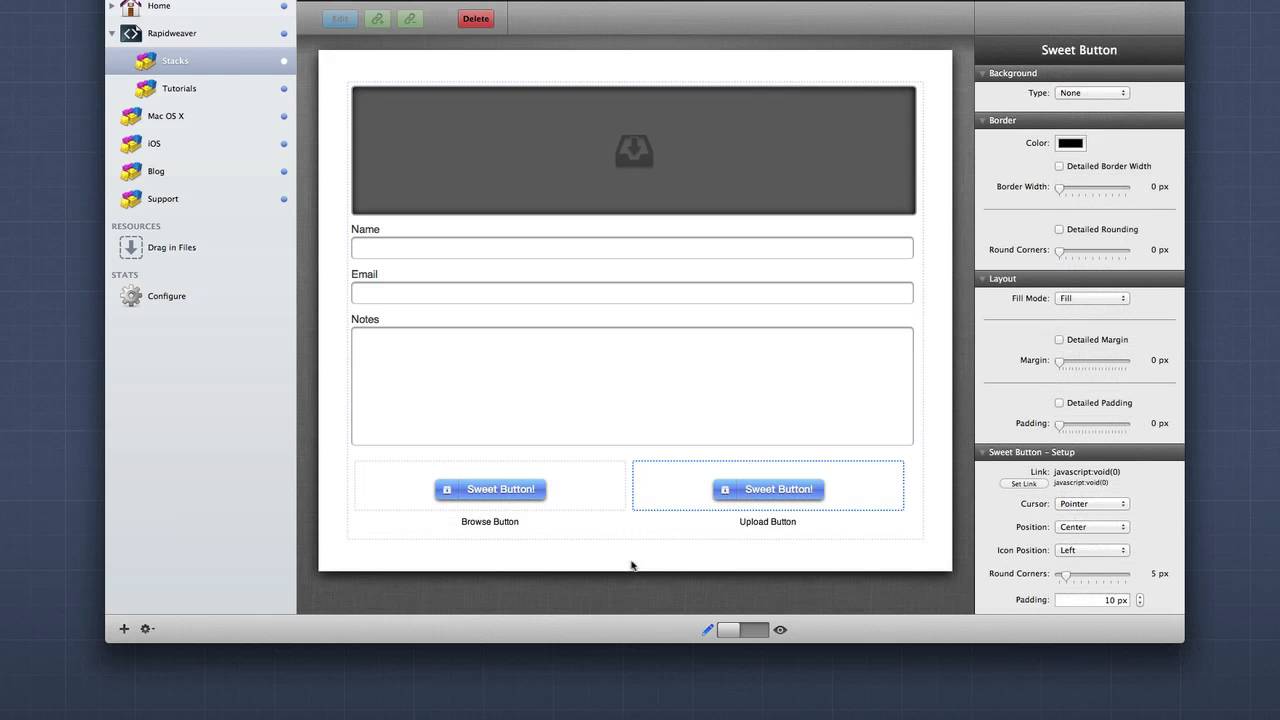
05:39 these buttons that ship with dispatch
05:41 are nice they are rather plain so we
05:45 actually gave you a great ability to use
05:48 any button stack within dispatch to do
05:52 that simply go to button style and say
05:54 use button stack when you select this
05:58 you'll notice that there are two drop
06:00 areas inside this these drop areas is
06:04 you can place any button stack that you
06:06 like I obviously recommend my really
06:09 powerful and flexible sweet button stack
06:11 now in the last couple settings groups
06:14 is where the real fun happens dispatch
06:17 has a bunch of action settings that you
06:20 that can be triggered once an upload is
06:22 complete you can redirect to a specific
06:25 URL and you can specify actually a
06:28 special effects stack to be launched or
06:31 unveiled the next option allows you to
06:35 upload a meta file along with the actual
06:38 file that the customer uploaded
06:40 this metafile is a text is a plain text
06:43 file that contains all of the data that
06:47 the user typed into the form now this
06:51 metadata file is actually named the same
06:54 exact name as the file uploaded with a
06:57 dot txt extension after that you can
07:02 also send an email this is great because
07:05 now users can upload data to your
07:08 service and then you will get an email
07:10 once they do now that email will contain
07:13 not only the name of the file but also
07:16 all of the contents of the form that the
07:19 user typed in now the last feature set
07:22 in on upload complete is the ability to
07:26 rename files this is great because if
07:29 your customer uploads a file with the
07:31 same name that maybe someone else had
07:34 already uploaded dispatch will actually
07:36 take care of that and rename the files
07:38 so that no files will get deleted or
07:41 overridden by accident now we have an
07:44 extensive set of rename rules where you
07:47 can maybe app end of the date and time
07:49 stamp of the actual upload time you can
07:52 append a unique ID and you can also
07:54 actually take the input fields from the
07:57 form that the user typed in and rename
08:01 the file to contain those fields now in
08:06 advanced forum logic we have the ability
08:08 to auto upload files what this means is
08:11 as soon as a file is added into dispatch
08:15 it will automatically be uploaded to
08:17 your service the user does not need to
08:19 click upload it will automatically be
08:21 sent you also have the ability to limit
08:25 file extensions this is a comma
08:27 delimited list of file types so if you
08:30 wanted to accept only images you could
08:33 do jpg comma PNG comma and all of the
08:37 other formats okay um you can define a
08:40 max size so the maximum size of the file
08:43 that you want to be allowed to be
08:44 uploaded and of course the number of
08:47 uploads so how many simultaneous uploads
08:49 do you want to limit a user from
08:51 uploading at one time
08:53 well thank you very much for watching
08:54 everybody I hope you enjoyed the new
08:56 dispatch stack it's a really amazing
08:59 update a lot of blood sweat and tears
09:01 went into this one so go out and make
09:03 your websites great thanks everybody bye
09:13 I


