
Stacks Guru is born from the need to search the vast number of videos out there on stacks built for Stacks Pro and the Stacks 5 plugin for Rapidweaver.
We have scraped over 500 videos to get the transcripts for each in order to make the spoken word searchable.
Please use this free tool to help you learn and discover the awesome power that Stacks and the stacks made for Stacks have to offer.
00:10 so in this video we're going to be
00:11 talking about how to create reusable
00:14 animations
00:15 with drift pro this is something that is
00:18 definitely only a feature with drift pro
00:20 and uh without further ado let's dive
00:22 into it here i am i am using foundation
00:24 6 here however
00:26 since a lot of this just uses classes
00:28 you can use the class feature baked into
00:30 any of the default stacks as well
00:33 so just to show you some setup here i
00:35 have a container that has a class of
00:38 drift container then i inside of there i
00:40 have this box that i've set to be green
00:44 okay
00:45 um so let's look at our timeline here
00:47 here i have it set to we have a hover
00:49 event
00:50 the hover the trigger class here is
00:53 drift container which is again so
00:54 whenever i hover over this container i
00:57 want to trigger this animation timeline
01:00 and this particular animation timeline
01:01 is pretty simple we have one action
01:04 inside of here and we're going to
01:05 animate box
01:08 okay we're animating the box 300 pixels
01:11 and rotating at 360 degrees
01:14 there's nothing else really fancy in
01:15 here we're just animating that box so
01:18 let's have a look so when we preview
01:19 this i hover over the box
01:21 and the box animates
01:23 and when i hover out it reverses the
01:25 animation based on those settings
01:28 but what if i wanted to reuse this so
01:30 let's go ahead and create
01:32 three boxes
01:36 so here i have and you might think oh
01:38 cool
01:39 each of these is its own little thing
01:41 i'm gonna hover
01:42 oh wait
01:43 i hovered over this box
01:46 yet everything animated
01:49 and guess what if i hover over this box
01:52 everything animates if i hover over the
01:54 top box everything animates as well
01:58 well if you think about it that makes
02:00 sense because
02:02 we said
02:04 hey this is a if we go to the timeline
02:06 this is a global animation so whenever i
02:10 hover over anything
02:12 called drift container
02:15 i want you to
02:16 animate anything called box
02:21 and that's exactly what's happening
02:23 right i'm hovering over a drift
02:25 container
02:26 and we're animating
02:28 all the boxes on the page
02:32 so how can we fix this how can we make
02:34 each of these independent
02:37 so let's go to our timeline let's go
02:39 ahead and turn on scoped animation
02:43 okay and what this does is this gives us
02:45 a scoped selector
02:48 and what is a scope selector it
02:50 basically is like um
02:53 a box or a container that you want to
02:56 encapsulate the animation within
02:59 so in this case um my drift container is
03:02 where i want everything to be
03:04 encapsulated
03:07 okay so
03:08 and in fact it's also going to be my my
03:11 hover action now those could be
03:12 different right um you can have the
03:15 scope be something different like for
03:18 example i could add an another container
03:20 around one of these and that could be
03:23 have a class that's a different scope
03:25 okay
03:26 but for right now
03:28 and probably a lot of times
03:30 your scope selector and your hover class
03:33 could be the same
03:35 now here it says there's a checkbox for
03:37 scoping your triggers
03:39 what does that mean
03:41 well that means
03:43 do we want this
03:44 trigger to be scoped inside of our
03:48 scoped selector
03:51 most time you're going to the answer to
03:52 that is yes but let's say you have maybe
03:55 external buttons or external elements
03:57 that you want to
03:59 affect something different
04:01 that allows you to basically centralize
04:04 your
04:05 your trigger elements whether that be
04:08 things that are clicked
04:09 or
04:11 scroll triggers as well
04:15 okay so if you want the scroll trigger
04:19 and the click triggers
04:21 and the hover triggers to all be inside
04:23 of make sure they're inside this scope
04:26 selector okay inside or is the scope
04:30 selector i should add right they could
04:33 be inside or is the same thing as the
04:35 scope selector if they're the same exact
04:38 thing then your scope selector is the
04:40 trigger okay
04:42 so again by unchecking this it allows
04:45 you to externalize your trigger so you
04:47 have something outside of this scope
04:50 container
04:51 to launch your animations
04:54 in this case i want them to be it's
04:56 going to be the same thing as the hover
04:57 so i'm hovering over this
04:59 all the animations are within the scope
05:02 okay and then for this animate here i
05:04 don't need to do anything
05:06 okay i just leave it by default this box
05:08 it's going to this timeline is going to
05:10 encapsulate everything within the drift
05:12 container
05:13 so let's go ahead and preview
05:15 so now when i hover over this one i only
05:17 get the one animation
05:18 and there we go we have a second one
05:21 and we have a third one
05:22 so in order to create an another one of
05:25 these animations all i need to do is
05:27 duplicate i need to have a box inside of
05:30 a drift container and this animation
05:33 will work
05:36 okay hopefully that makes sense this
05:38 allows you to again make these reusable
05:41 animations that you can use anywhere now
05:44 a perfect example of this actually
05:47 is all of these drift toggle controls
05:51 if you notice all of these demos have
05:53 this toggle control
05:56 and all of that is possible because of
05:59 scoping let's go ahead and look at that
06:01 animation
06:02 it's inside the drift demo styles inside
06:04 the demo project
06:06 and here we have
06:08 a drift timeline
06:10 okay the scope trigger is similar to
06:12 what we had it's drift container
06:14 okay
06:15 we have uh toggle controls
06:18 is when i click on this it's going to
06:20 trigger that animation okay and let's go
06:22 look at what uh the the things that we
06:24 have
06:25 in here okay they're actually hidden
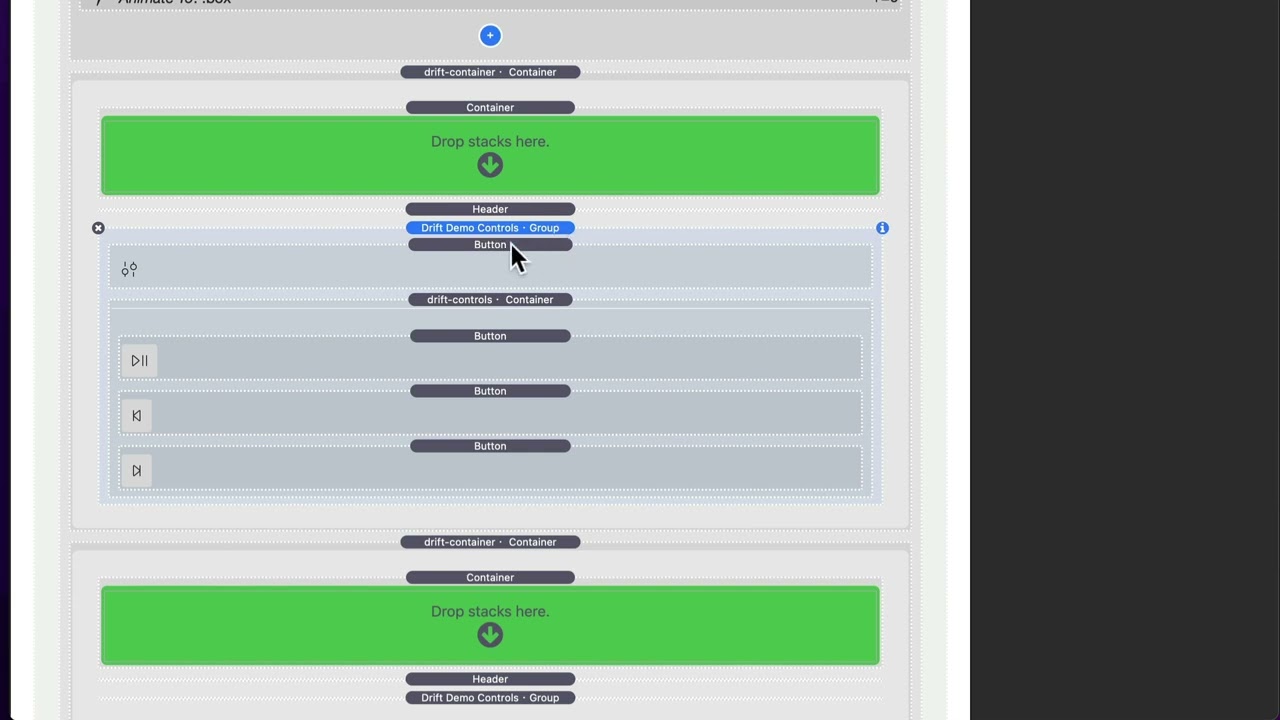
06:27 it's right here okay so inside this this
06:30 is a group
06:31 and i have a button here
06:34 this button with the little um controls
06:37 is has a class of toggle controls
06:41 okay
06:41 and then inside here i have a container
06:43 that has drift controls
06:47 okay i basically have some swatches that
06:50 assign this to be like um have a height
06:52 of zero so that by default this has this
06:55 container is a height of zero
06:58 and then when i click on this button i
07:00 want to trigger an animation that's
07:02 going to make this from height
07:05 to height auto
07:07 okay so let's look at that
07:12 so here i have a timeline
07:14 again we're scoping it within a
07:16 container
07:18 um i'm going to look for clicking on a
07:22 toggle controls button
07:25 okay
07:26 and i also have a hover action on drift
07:28 container which basically on enter it
07:30 does nothing on leave it does reverse
07:33 and let me show you why that is
07:36 okay
07:37 so what i wanted is when you click on
07:39 this button
07:40 those those display
07:42 but when you hover out of this container
07:44 i want the animation to be reversed
07:47 so the animation can only be triggered
07:49 by clicking on this button
07:52 but it can also be reversed by clicking
07:54 on this button or
07:56 hovering out
07:57 of the container
07:59 so let's go back to that um that swatch
08:03 here so in our timeline
08:05 we uh we have a hover class on drift
08:08 container
08:09 on enter is none because i don't want to
08:11 do anything when we hover in
08:14 i only want to
08:15 on leave when we when we hover out of
08:18 drift container i want to reverse this
08:21 timeline animation
08:24 okay
08:25 so there we go uh let's go ahead and by
08:28 the way toggle i should say this click
08:30 action for toggle basically it'll
08:33 it'll play the animation
08:35 and then if the animation is at full
08:37 it'll toggle it so basically it's like
08:39 you know play reverse play reverse so no
08:43 matter if you keep clicking on it it'll
08:45 either play it or reverse it so that's
08:47 what toggle is
08:48 okay
08:49 um so that's how we trigger this
08:51 particular animation and then here's our
08:53 animate we just go to drift controls
08:55 which is that box i said earlier is set
08:57 to be height zero
08:59 and i'm i'm setting this a from
09:01 animation we're animating from height
09:03 zero
09:04 um to transform origin and i do some
09:07 custom things okay so
09:10 you can make sure you watch the video on
09:12 custom animation controls for um
09:15 advanced animations and i kind of go
09:16 over some of this
09:19 okay so that pretty much does it for
09:21 scoping um animations i hope you uh got
09:24 a lot out of this
09:25 play around with things that i've done
09:27 here i have a very simple example here
09:31 but hopefully you can take this and you
09:33 know morph it for your needs um the
09:35 concepts are the same with the hover
09:38 controls as they are with the with the
09:40 toggle controls so this trigger selector
09:42 for the scroll i could definitely have
09:44 the same thing here i can have drift
09:45 container in there as well
09:47 okay
09:48 so hope you're enjoying drift go out
09:50 there and make your websites great bye


