
Stacks Guru is born from the need to search the vast number of videos out there on stacks built for Stacks Pro and the Stacks 5 plugin for Rapidweaver.
We have scraped over 500 videos to get the transcripts for each in order to make the spoken word searchable.
Please use this free tool to help you learn and discover the awesome power that Stacks and the stacks made for Stacks have to offer.
00:10 okay guys so now we're gonna look at the
00:12 responsive animation uh abilities within
00:15 drift and drift pro now they're very
00:17 different how they function or how
00:19 useful they are uh the functionality is
00:22 the same but how useful they are is very
00:23 different between drift and drift pro
00:26 so let's have a look at the normal drift
00:28 here's a drift animate stack
00:30 and you probably noticed all the way at
00:31 the bottom is this responsive setting so
00:34 essentially this says
00:36 responsive medium and large what this
00:38 says is
00:39 this animation is going to happen at
00:41 medium and large
00:43 so if we look at this animation we'll
00:45 see that on desktop this animation
00:48 happens yet if we go to the iphone view
00:51 um and we we look at this on the iphone
00:53 you'll notice that the animation does
00:55 not happen
00:56 okay now one thing i should note is that
00:59 this
01:00 all of this logic happens on page load
01:03 so since i loaded this preview in mobile
01:06 view if i were to resize it up to
01:08 desktop it doesn't magically happen um
01:10 i'd have to refresh and go go to that
01:12 view and then it will work okay so um
01:15 these don't
01:16 trigger off of browser resize
01:18 essentially it's on page load it checks
01:21 to see what device you're on and if you
01:23 are on in this case medium and large the
01:26 animation will run
01:28 so with the normal drift stacks this
01:31 essentially allows you to turn on
01:33 animation or turn off animation on
01:35 particular breakpoints but doesn't allow
01:38 you to customize
01:40 the animation on a per breakpoint basis
01:42 we can however do that with drift pro
01:45 and let's look at this demo
01:47 so in the second demo we'll see that i
01:49 have i'm animating this green box
01:52 and here i have the first animation um
01:54 is set to small only
01:56 and it animates to the right 300 pixels
02:00 but if i look
02:02 at the second one
02:04 i have a different setting for medium
02:05 and large and that animates it 60
02:08 pixels
02:11 and because drift pro and drift timeline
02:14 exist outside of your content they're
02:16 kind of like animation swatches we can
02:19 have this really great logic where you
02:21 can then you know
02:23 customize the animation
02:25 for each device all within your timeline
02:28 so let's have a look at that so here we
02:29 are on desktop view and if i go ahead
02:31 and run this animation it moves over 60
02:34 pixels
02:36 and if we load it on iphone we'll notice
02:38 that here we go it only goes 300 pixels
02:42 so hey everybody this is joe the day
02:45 after i just recorded what you watched
02:47 and
02:48 if you noticed the settings here were
02:51 set to be only working inside foundation
02:54 six so
02:55 however i thought better of that and i
02:58 wanted to make sure that everyone no
02:59 matter what theme you're using was able
03:01 to have some sort of responsive
03:03 animation settings so while all the
03:06 easy to use foundation sticks the small
03:08 only medium large small medium medium
03:11 large things are all there there is now
03:14 a new custom setting that will work in
03:17 any theme
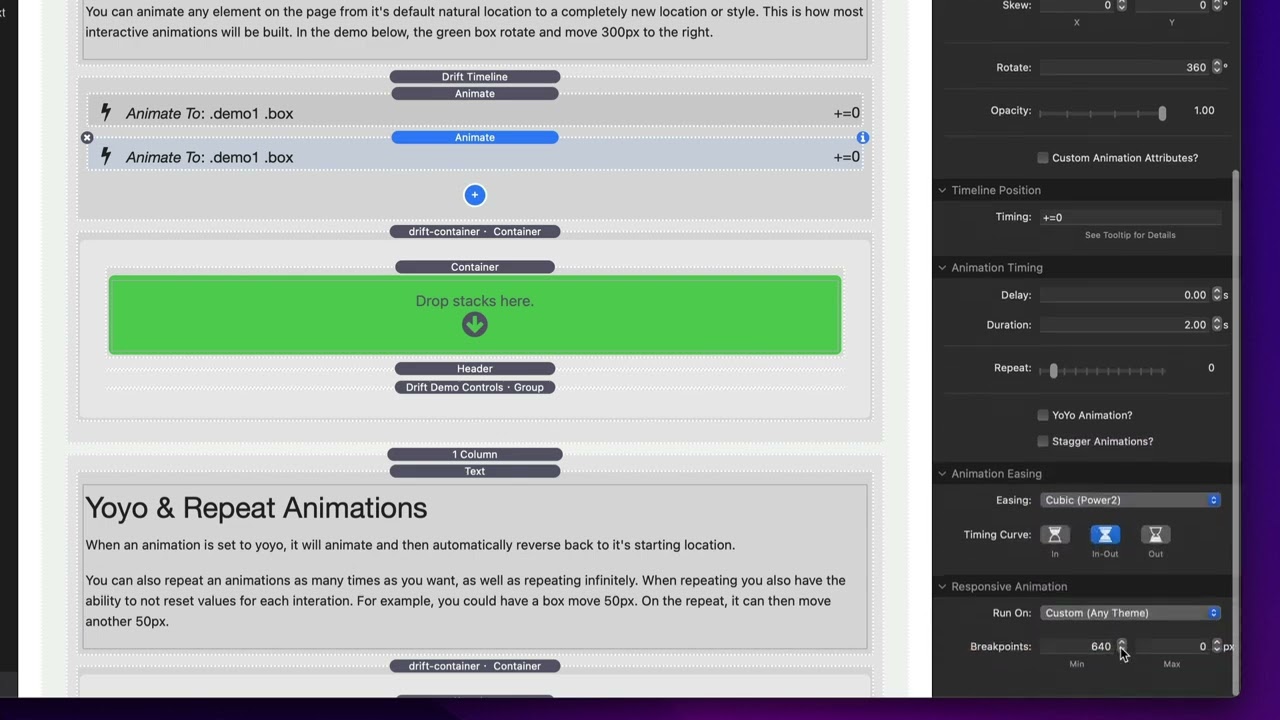
03:19 so when you set this to be custom and
03:21 this is actually useful for even
03:22 foundation foundation 6 users because
03:25 then now you can set custom break points
03:27 right
03:27 but you can set a minimum and maximum
03:30 value to where
03:32 this animation is going to run now if
03:35 you set maximum to zero that essentially
03:37 disables maximum so
03:39 in this case here anything that's 64
03:41 pixels and above
03:43 will run this animation
03:45 if you want you know let's say just
03:47 mobile you would set this to like be
03:49 minimum 600 maximum 64
03:52 and that would probably set up all small
03:54 devices
03:56 okay so this allows us to do custom
03:58 break points it allows us to define
04:00 the animation um at in any theme
04:04 for to work on custom break points and
04:07 all of these are in both drift pro and
04:09 drift
04:10 so uh yeah hope you enjoy these they're
04:13 pretty awesome and it will work now in
04:15 anything
04:17 now before i go i should note that there
04:18 is a possibility with some animations
04:22 okay to
04:23 nest
04:25 drift and drift animate stacks okay and
04:28 then do
04:29 um the responsive nature here so let's
04:31 say in this particular one i want it to
04:33 be
04:34 small only
04:36 and let's keep it to 300 and then this
04:38 one here
04:40 medium large we're gonna make it 50
04:45 okay
04:47 this works with some animations this
04:50 will not work in all
04:52 animation types it depends on your on
04:54 the animation you're trying to
04:56 accomplish
04:57 um it's hard to explain
04:59 um
05:00 but there are circumstances where this
05:02 will work and there are some
05:04 circumstances where nesting drift stacks
05:06 inside of each other won't
05:09 so
05:10 let's have a look at this particular
05:11 example here
05:13 as we see here
05:15 i'm using a rotate
05:17 and
05:18 rotates do not work with nesting drifts
05:21 inside of each other very well however
05:24 if we were to just go ahead and take
05:26 oops
05:29 however if we were to turn the rotation
05:31 aspect off
05:33 and we just had the move
05:36 it should work fairly well
05:42 there we go
05:45 all right so enjoy the responsive
05:47 settings um inside drift and uh thank
05:49 you very much hope you're enjoying drift
05:51 go out there and make something great
05:52 bye


