
Stacks Guru is born from the need to search the vast number of videos out there on stacks built for Stacks Pro and the Stacks 5 plugin for Rapidweaver.
We have scraped over 500 videos to get the transcripts for each in order to make the spoken word searchable.
Please use this free tool to help you learn and discover the awesome power that Stacks and the stacks made for Stacks have to offer.
00:09 okay guys so in this video we're going
00:11 to be looking at split text and split
00:14 text is going to take a little bit of
00:15 imagination here okay you can do some
00:17 amazing things here
00:19 as you see in these demos
00:21 what split text does
00:23 we see that we have three of the same
00:25 paragraph here
00:27 okay and what we're doing is this first
00:29 example is it's taking that paragraph of
00:32 text and it's breaking it up into
00:34 individual lines
00:37 and then animating those lines
00:38 individually
00:41 next up is it's going to take individual
00:43 words so here we are breaking up this
00:47 sentence into individual words and
00:49 animating each word
00:52 independently
00:53 and then the last example
00:56 is we're breaking it up into individual
00:58 characters
01:01 then animating those characters
01:03 individually
01:05 okay pretty crazy it's the the settings
01:09 are very simple to set this up
01:11 but you know kind of coming up with your
01:14 own version of these animations is
01:16 definitely going to take some
01:17 imagination and some tinkerine
01:19 uh here we are let's look at this first
01:21 example and this example was the ability
01:24 to split up into individual lines
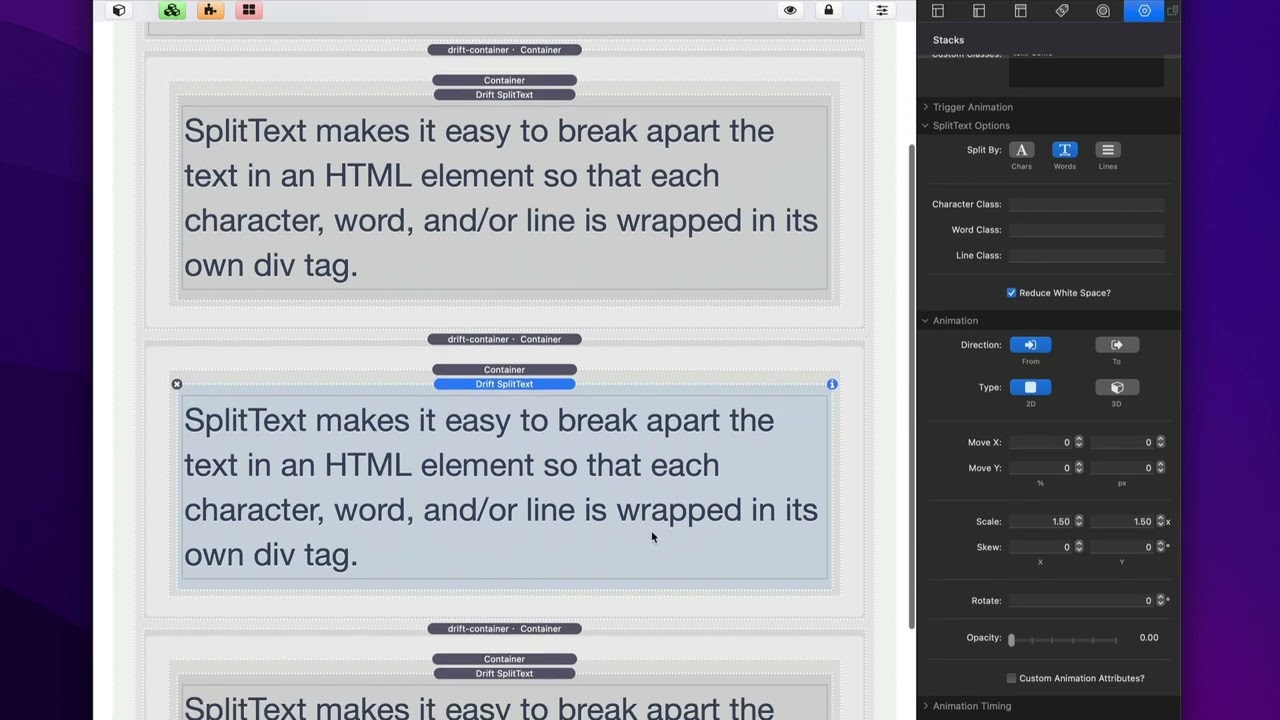
01:27 okay so here we are and basically all
01:30 you need to do is
01:32 check the check the box that says lines
01:34 and essentially you're done now you can
01:37 add individual classes so if you want to
01:40 add a special class to each line so that
01:42 maybe you want to style it a certain way
01:45 or things of that nature you can do that
01:46 with either css or foundation six
01:48 swatches okay
01:50 these are just optional not requirement
01:53 but essentially all you need to do is
01:54 check this box whether or not you want
01:56 to split this up by characters words or
01:59 lines
02:00 okay
02:01 now here's the tricky bit
02:04 so now we need to look at the animation
02:06 settings and these are the same exact
02:08 animation settings that we have
02:09 available to us
02:11 with the animate stack okay but now what
02:14 we're doing is these animation settings
02:16 are getting applied to each individual
02:19 character word or line
02:21 okay so look at these demos you can kind
02:23 of see what we're doing here so for
02:26 example i think the easiest one to kind
02:27 of look at is the uh this words one okay
02:31 um and essentially what we're doing is
02:34 we're scaling each word
02:37 from
02:38 1.5 so imagine we're doing from we're
02:41 scaling it from 1.5 to its default so to
02:44 one so it's going from 50 larger down
02:48 and it's going from opacity zero
02:53 so essentially that's all it's doing
02:55 right let's look at that second demo
02:56 that's the simplest one here
02:58 where it's they're just
03:00 scaling from opacity zero fifty percent
03:03 larger down to the
03:04 original size of the default size of
03:07 that text
03:08 pretty simple right
03:10 now how do we get it so that
03:12 each word is kind of going in
03:14 sporadically
03:15 now the
03:17 split text has some special timing
03:19 options inside of animation timing now
03:23 the drift pro has this across all of the
03:25 drift pro stacks but this is the only
03:27 drift stack that has it
03:29 and this allows us to stagger our
03:31 animations
03:32 so i have an entire video just on
03:34 stagger but just really quickly um this
03:37 allows you when you turn this on you
03:38 define how to stagger your elements so
03:42 these particular ones it's going to
03:43 stagger each word by 0.1 seconds
03:47 and we're gonna do random you can also
03:50 do start
03:51 okay so if we if we set this to be start
03:54 let's go ahead and change that
03:56 you see how how the animation goes from
03:58 the beginning over to the end rather
04:00 than it's kind of like more random like
04:02 i had it in the default so if we set
04:04 this to random again you'll see how it's
04:06 definitely more random okay so
04:09 staggering allows you to stagger each
04:12 the timing of each word in this case or
04:15 each line or each character


