
Stacks Guru is born from the need to search the vast number of videos out there on stacks built for Stacks Pro and the Stacks 5 plugin for Rapidweaver.
We have scraped over 500 videos to get the transcripts for each in order to make the spoken word searchable.
Please use this free tool to help you learn and discover the awesome power that Stacks and the stacks made for Stacks have to offer.
00:00 such a cool update hey everybody top of
00:10 the morning to you and today I am so
00:12 excited to show you easy CMS 1.3 now
00:17 this is seriously the biggest update
00:20 that easy CMS has gotten right up until
00:24 this point
00:24 easy CMS was great it allows you to do
00:27 you know images and text and you can
00:29 obviously still do that but we've added
00:32 a lot of really great functionality to
00:36 take your easy CMS instances even
00:38 farther allowing you to edit video
00:41 toggle on and off various layout
00:44 components um it now has a full-blown
00:48 WYSIWYG editor right it's really matured
00:52 a lot and I think that this update makes
00:56 easy CMS a no-brainer right for your CMS
01:01 needs if you don't need something bigger
01:04 and larger like total CMS right I think
01:07 if you don't want to use total CMS for
01:10 budget reasons or something like that
01:12 this update of easy CMS seriously just
01:16 makes it a no-brainer right because you
01:20 really get access to a lot of very
01:22 powerful components in this update
01:25 like I said video the image editing has
01:29 been really revamped a lot of really
01:32 powerful great features were brought in
01:33 from total CMS for images right in terms
01:37 of image requirements and making sure
01:40 that the proper images and the proper
01:41 sizes are uploaded right we have number
01:45 inputs okay we have a protect stack has
01:48 been improved we have select boxes to
01:53 allow your users to pre select from a
01:57 drop-down menu right predefined content
02:00 areas for their site right so a lot of
02:03 again a lot of really great powerful
02:05 things let's jump on in and see some of
02:08 the stuff in action so here we are
02:11 inside the easy seam
02:13 demo project and this has been
02:15 completely revamped with all the latest
02:17 and greatest stacks and easy CMS as you
02:22 will see inside the Stax library the
02:23 number of stacks that shipped with ease
02:25 easy CMS has really grown okay we have
02:28 the new numbers stack for the admin the
02:31 new select box stack a new toggle stack
02:33 and video right and on the content side
02:36 we have the new toggle and videos okay
02:39 let's dive in and see what these
02:41 actually do for us so here we are on the
02:45 admin page and at the very top we'll see
02:47 that we have the new toggle stack and
02:49 what this does is this allows us to turn
02:52 on and off various components on the
02:55 content side right so right now on the
02:58 content side there is a summary at the
02:59 top of the page let's say I wanted to
03:01 turn that off I'm gonna go ahead and
03:03 turn that off and when we look at the
03:07 content side the paragraph that is at
03:09 the top of this page is now gone let's
03:12 go ahead and turn that back on so now
03:14 let's go ahead and turn that back on and
03:16 preview it again
03:18 and what you see is that pare that
03:21 summary paragraph is here again because
03:25 I toggle that on and off now this is
03:27 very simple I'm just turning on a
03:28 paragraph but you can turn on and off
03:30 entire layouts
03:32 maybe um you know a weekly special
03:34 section or a holiday section or a whole
03:37 bunch of things right but this is really
03:40 powerful the toggle stack can be used
03:42 for so many things to turn things on and
03:45 off and give your clients the ability to
03:48 turn things on and off directly from the
03:51 admin area now if we scroll further down
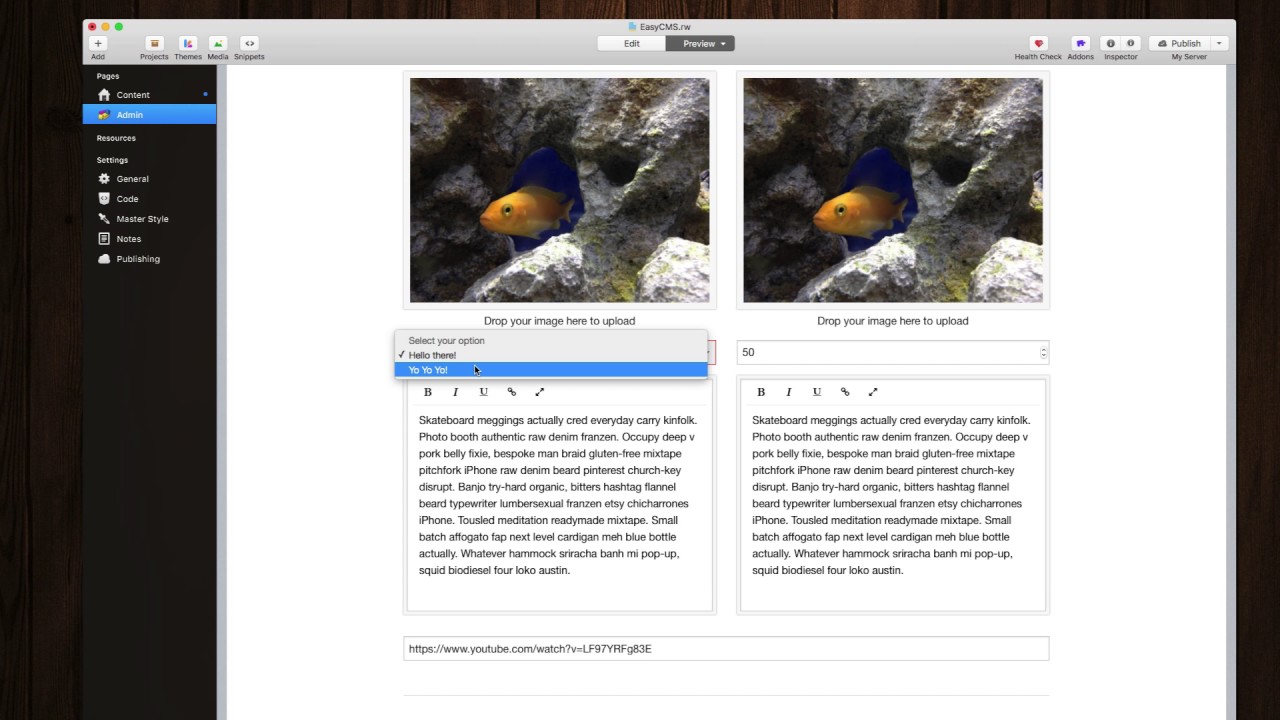
03:54 we will see that we have a couple other
03:58 new admin stacks here the first one is
04:01 the select box and this allows you to
04:05 define a predefined content right so if
04:09 my customer chooses hello there they can
04:12 you know it will then display whatever
04:14 is associated with that item on the
04:16 content side so this is a nice way of
04:18 providing predefined bits of content for
04:22 your users to be able to toggle on
04:24 between right and then
04:26 that these particular areas are treated
04:29 exactly like text areas on the content
04:32 side so you can use the text macros or
04:34 the text stack to insert these into the
04:36 actual page next on the right here we
04:40 have a number input box and this also
04:43 interacts exactly like text it saves
04:46 just this text would okay but it
04:48 provides us an additional way for our
04:52 customers to input just numbers right so
04:55 you know it could be you know 100 200 so
04:58 it just gives us a nice way for our
05:00 customers to have a number style input
05:03 box so that we can make sure that our
05:05 customers are only inputting the data
05:07 that we want them to input now below
05:10 here you'll probably notice is the new
05:12 WYSIWYG editor called hip wig on easy
05:16 CMS now this was brought down from total
05:18 CMS and it is now the new default editor
05:21 inside easy CMS and is really simple to
05:24 use simply select the text you want you
05:28 can bold things you can add links just
05:31 by clicking the link button type in your
05:33 URL right um you can make things italic
05:36 now there are a slew of other buttons
05:39 that you can add here you can embed
05:41 videos you can embed images you can
05:43 embed a whole bunch of other things
05:46 directly into the hip wig editor okay so
05:50 this is a very powerful and feature-rich
05:53 way for your customers to have an even
05:56 nicer and easier experience using the
05:59 CMS now lastly here is you'll notice we
06:04 have a text box okay that has a YouTube
06:07 URL and this controls a video portion on
06:11 the content side so you can paste in any
06:14 YouTube Vimeo or Wistia URL directly
06:18 into this box and it will embed that
06:21 video directly on the content side as we
06:24 see here it really couldn't be any
06:27 easier to swap out videos on your
06:29 website now earlier I said we had a lot
06:32 more powerful way of validating images
06:36 when users are up
06:37 loading them right if we look at the new
06:39 image admin stack you'll notice there
06:43 are some new upload validation rules
06:45 that and this allows us to validate
06:47 whether or not the image is landscape
06:51 portrait or a square image we can then
06:53 validate the size so we can provide a
06:56 maximum size that our customers aren't
06:58 uploading humongous images right we can
07:02 define a minimum and maximum height of
07:05 an image as well as the minimum and
07:07 maximum width of an image as well right
07:11 so this gives us a lot of control in
07:13 terms of making sure that our customers
07:15 are uploading the correct image and the
07:19 proportions image that we need to make
07:21 sure that the website still looks
07:23 beautiful now another nice gem here is
07:26 inside the alt tag you can actually
07:29 insert image metadata by default
07:31 directly into the alt tag so if your
07:34 customers have tagged their images with
07:37 metadata we can actually leverage that
07:40 and insert that metadata into the alt
07:42 tag for an image when it's uploaded we
07:45 have access to a file name title caption
07:49 and copyright information that is inside
07:51 the image metadata so that does it for
07:54 all of the major changes here in easy
07:57 CMS 1.3 now there are a bunch of more
07:59 little settings and tweaks and updates
08:01 all throughout the various CMS stacks
08:03 right for instance in the image stack
08:06 you can now have circular images and a
08:08 bunch of other really great options in
08:09 the image stack okay but I hope you see
08:12 the power now that easy CMS has it can
08:15 do a lot more than it could be for now
08:17 which is really exciting it gives you a
08:20 really superb CMS for your budget
08:24 websites right I think it's just a great
08:27 solution for pretty much any website out
08:30 there so I hope you're enjoying easy CMS
08:33 and I hope you even like easy CMS 1.
38:36 even more so until next time drop it


