
Stacks Guru is born from the need to search the vast number of videos out there on stacks built for Stacks Pro and the Stacks 5 plugin for Rapidweaver.
We have scraped over 500 videos to get the transcripts for each in order to make the spoken word searchable.
Please use this free tool to help you learn and discover the awesome power that Stacks and the stacks made for Stacks have to offer.
00:07 hi this is Rob from the
00:10 I'm going to show you how to easily
00:11 integrate
00:13 acts with a product called Direct Mail
00:15 you can see on the screen there there's
00:17 a URL to find out more information about
00:20 Direct Mail Direct Mail is a mail
00:22 sending application that you can use to
00:24 send out lots of emails to I'm not going
00:27 to show you how to use that app other
00:28 than importing the code from the mail
00:31 stacks into it if you need more
00:33 information go to that URL they have
00:36 lots of good information about their
00:37 product there so once you make your
00:39 email and I'm not going to go through
00:41 how to make an email today that's we
00:43 have many other videos and stuff on how
00:46 to do that I am just gonna show you how
00:48 to get the code from it
00:50 so I just decided to use the newsletter
00:52 one template the only thing different I
00:54 added from the template is I change this
00:56 to a warehouse image from the
00:58 placeholder image added a link to an
01:01 image of an airplane and this can be an
01:03 airline newsletter or something like
01:05 that that's all what I'm going for
01:07 I'm gonna preview this real quick so you
01:09 can see what it looks like this is what
01:11 the email would look like when it got
01:12 sent to somebody has an image some
01:14 formatted text here two paragraphs two
01:18 columns with links and then another
01:19 paragraph at the bottom with an
01:21 unsubscribe link at the bottom okay
01:23 now you can't just save it this way and
01:26 import it into Direct Mail Direct Mail
01:28 needs to use an HTML file and here's how
01:31 you can make one so let's go back into
01:33 the edit mode you need to add the
01:35 inliner stack here it's the only green
01:37 colored stack that comes with the email
01:39 stacks the other ones are purple and
01:40 blue add that to your page and preview
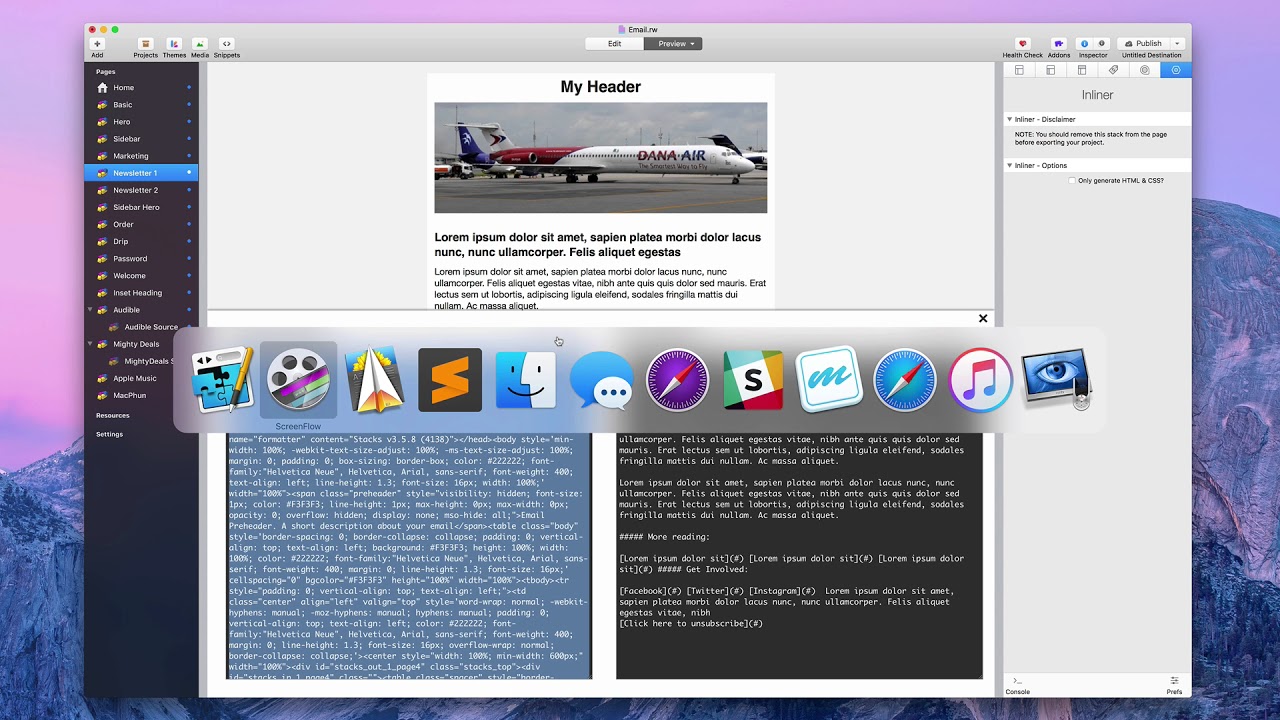
01:43 the page again and you will see now a
01:46 difference you'll still see the email up
01:47 above but in front of that are two
01:50 different types of emails now there is a
01:52 text email and there is an inline email
01:54 the text email is just a plain text
01:57 email there's no image in it there is
02:00 some formatting of some text too like
02:02 making it bigger and bolder these
02:05 hashtag symbols
02:07 this is markdown we'll make this a
02:10 header for okay but it also has links
02:14 but that's it it's just plain text it's
02:16 it's nothing too spectacular the inline
02:19 email on the other hand has everything
02:21 else you need to make your emails look
02:24 like this okay so first thing you need
02:26 to do is
02:27 copy this information to the clipboard
02:29 you want the inline email don't worry
02:31 about the text email okay once you do
02:34 that now you want to put it into a text
02:36 editor in fact you want to put it into a
02:38 plain text editor Macintosh makes one or
02:42 Apple makes one for Mac it's called text
02:45 edit but that will save it if you don't
02:47 make some changes as a rich text and you
02:50 want plain text I prefer to use a
02:52 product called sublime text there's
02:55 another one called text wrangler but any
02:57 plain text editor will work just fine
03:00 I'm gonna open up sublime text though
03:02 here's my basic empty page I'm gonna
03:05 paste in that code and it is a quite
03:08 amount of code lots of different things
03:10 to worry about in there but all the code
03:12 is there now you're not what we have to
03:15 do is you have to save this as an HTML
03:16 file so I'm gonna save it I have a
03:19 little folder here called email and you
03:21 can save it whatever you want let's say
03:23 you're gonna do monthly newsletter you
03:26 could save this as April 201
03:31 dot HTML okay and then every month you
03:34 just make a different one May 28th EHT
03:37 ml so on so I'll just call this April 2
03:40 1880s click on save now it's saved now
03:44 we need to get into the Direct Mail app
03:46 so I'm gonna pull that up I already have
03:48 one started when you first start the the
03:51 app it'll ask what you want to call this
03:53 I call the test and saved it and will
03:57 then bring you to this window and you
03:59 can go ahead and start making up your
04:01 own email if you want but we already
04:03 have the code for something so we need
04:05 to import that there's a little button
04:07 up here called import if I click on that
04:09 it'll ask where is your file and it's
04:11 looking for an HTML file so I have the
04:14 April 20 1880s and I'm gonna open that
04:17 and once I do it'll load that in the
04:19 page and there's my email looks exactly
04:23 like the rapidweaver one back let's get
04:25 out of here and delete the inliner stack
04:27 go back and look at it there is wrap
04:30 weaver and there is direct mail now what
04:34 you need to do to finish this is is what
04:36 you need to know about the direct mail
04:38 app is fill out all the rest of the
04:40 formation you can learn more about that
04:42 again on their website this is not a
04:45 tutorial about direct mail just how to
04:47 import the code from the email stacks
04:51 into a product like direct mail so I
04:55 hope you found this a very learning
04:57 experience I hope you get some good
04:59 information on how to use the email
05:01 stacks with a the app called direct mail
05:04 hope it's been a good learning
05:06 experience and we hope you make some
05:08 great emails thanks have a great day


