
Stacks Guru is born from the need to search the vast number of videos out there on stacks built for Stacks Pro and the Stacks 5 plugin for Rapidweaver.
We have scraped over 500 videos to get the transcripts for each in order to make the spoken word searchable.
Please use this free tool to help you learn and discover the awesome power that Stacks and the stacks made for Stacks have to offer.
00:07 hello everybody this is Joe workman and
00:10 today I'd like to introduce you to the
00:12 new expose stacks the new expose stacks
00:15 are really the ultimate in lightbox
00:16 experience for your rapidweaver websites
00:19 the expose stacks set contains two
00:23 stacks that should cover all of your
00:24 lightbox needs the first stack is the
00:27 expose stack this is a general purpose
00:30 lightbox stack that allows you to put
00:32 anything that you want within it videos
00:35 images anything that you like the expose
00:40 image pro stack is this image specific
00:43 lightbox stack that contains beautiful
00:46 full high-resolution images that are
00:48 dynamically loaded when the light box is
00:51 clicked this allows for much faster page
00:54 load times and for all the photographers
00:56 out there you'll notice that we also
00:57 display all of the exif data for your
01:00 images now let's jump over and look at
01:02 some of the configuration options for
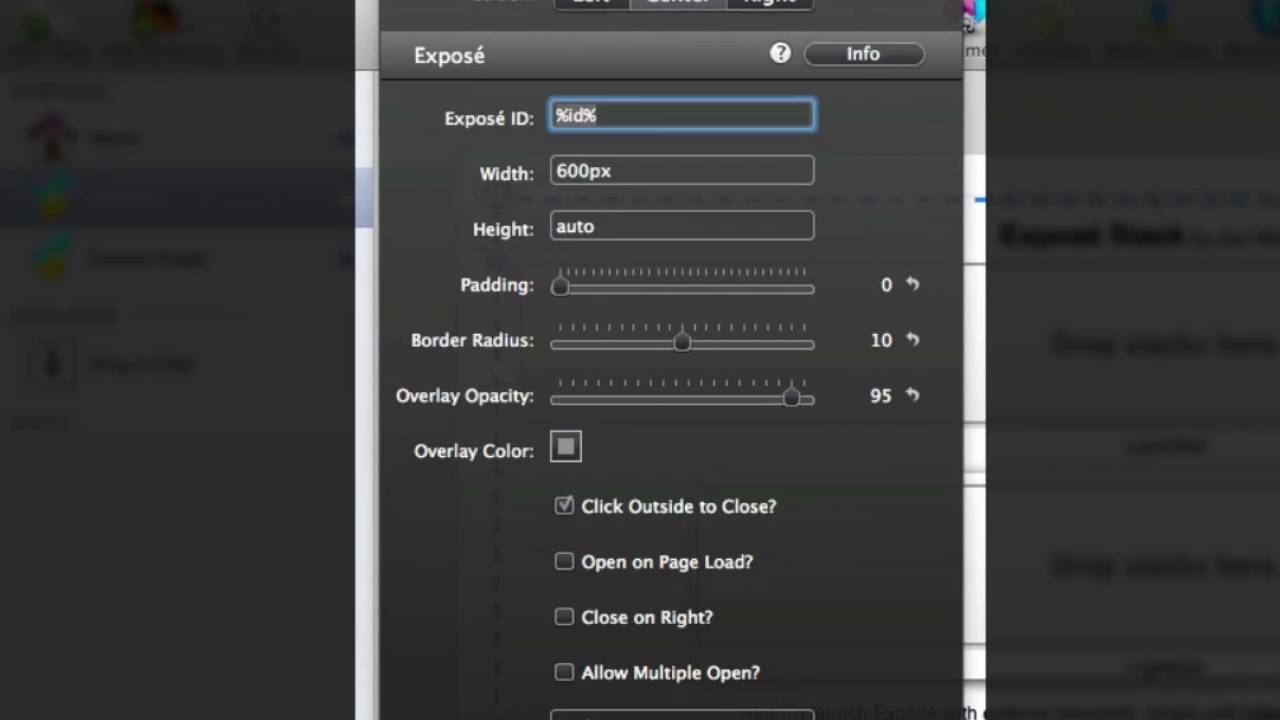
01:04 the new expose stack as you can see from
01:07 the expose settings HUD there are a ton
01:09 of settings here to customize the stack
01:11 to fit your website I'm going to review
01:14 some of the really interesting settings
01:16 here that really make expose stand out
01:18 you of course have the expose ID which
01:20 allows you to open up the expose stack
01:23 from an external link you then have
01:25 common settings such as width and height
01:27 and padding border radius to give you
01:30 rounded corners and of course opacity
01:32 and color settings for your background
01:34 overlay the first really interesting
01:37 setting that sets expose apart is open
01:40 on page load this allows expose to open
01:44 up once your page has completely loaded
01:46 with in the web browser this means the
01:48 user does not need to click on anything
01:50 the light box will open up automatically
01:53 the next interesting setting is allow
01:54 multiple open expose stacks at any point
01:58 in time when you have this turned on
02:01 essentially you turn expose into a quasi
02:04 pop up window you can position your
02:07 windows in certain areas on the web
02:09 browser so when the user clicks on
02:11 multiple links
02:13 lightboxes will open up in different
02:15 positions within the window you of
02:17 course have complete control over shadow
02:20 settings for your lightbox and even
02:22 provide an inset shadow to make your
02:24 lightbox look like it is embedded into
02:26 the web browser the last set of settings
02:29 that we have here in the hood allow you
02:31 to provide a custom background image for
02:33 your lightbox this really allows you to
02:36 take your lightbox to the next level and
02:37 really customize the look and feel of it
02:40 just for your website now let's jump
02:43 over to the expose image pro stack as
02:46 you'll see set up is if the stack is
02:48 extremely easy you just drag your image
02:51 into the stack and then define your
02:53 caption here that is displayed in the
02:54 full resolution image in the lightbox
02:57 now if we look at the settings for
02:59 expose image pro you'll see that the
03:01 first one is a full print URL this is
03:04 where you give the full URL to your high
03:07 resolution image this URL could be
03:09 anywhere could be on dropbox flickr 50
03:12 pixel com or your own web server the
03:16 other settings that we have here are
03:17 very similar to the expose stack we have
03:20 border radius overlay opacity in color
03:24 you can change the background color and
03:26 opacity of your of your caption as well
03:30 as configuration settings to show your
03:33 exif data the copyright field allows you
03:36 to add your own copyright if your exif
03:38 data does not contain the copyright tag
03:40 information now that concludes the
03:44 overview of our expose stacks I hope you
03:46 use them to make your website great


