
Stacks Guru is born from the need to search the vast number of videos out there on stacks built for Stacks Pro and the Stacks 5 plugin for Rapidweaver.
We have scraped over 500 videos to get the transcripts for each in order to make the spoken word searchable.
Please use this free tool to help you learn and discover the awesome power that Stacks and the stacks made for Stacks have to offer.
00:08 so in this video we're going to be
00:10 talking about data sources inside the
00:12 feed stack we're going to be focusing on
00:14 just the data sources kind of how to use
00:16 each one and the differences between
00:18 them okay so when you add a feed stack
00:21 to the page
00:23 as you notice you can click on this blue
00:25 button and you can add any of the
00:26 default feeds here
00:28 so if you buy just the feed stack you
00:30 get csv json rss and total cms blog
00:34 there is also a database pack
00:37 and in the future we'll be really seeing
00:38 more data packs that will add more
00:40 different types of data feeds
00:43 okay um but let's go with the data feeds
00:45 that we have now just so you can kind of
00:47 get an idea of how things are used
00:50 so
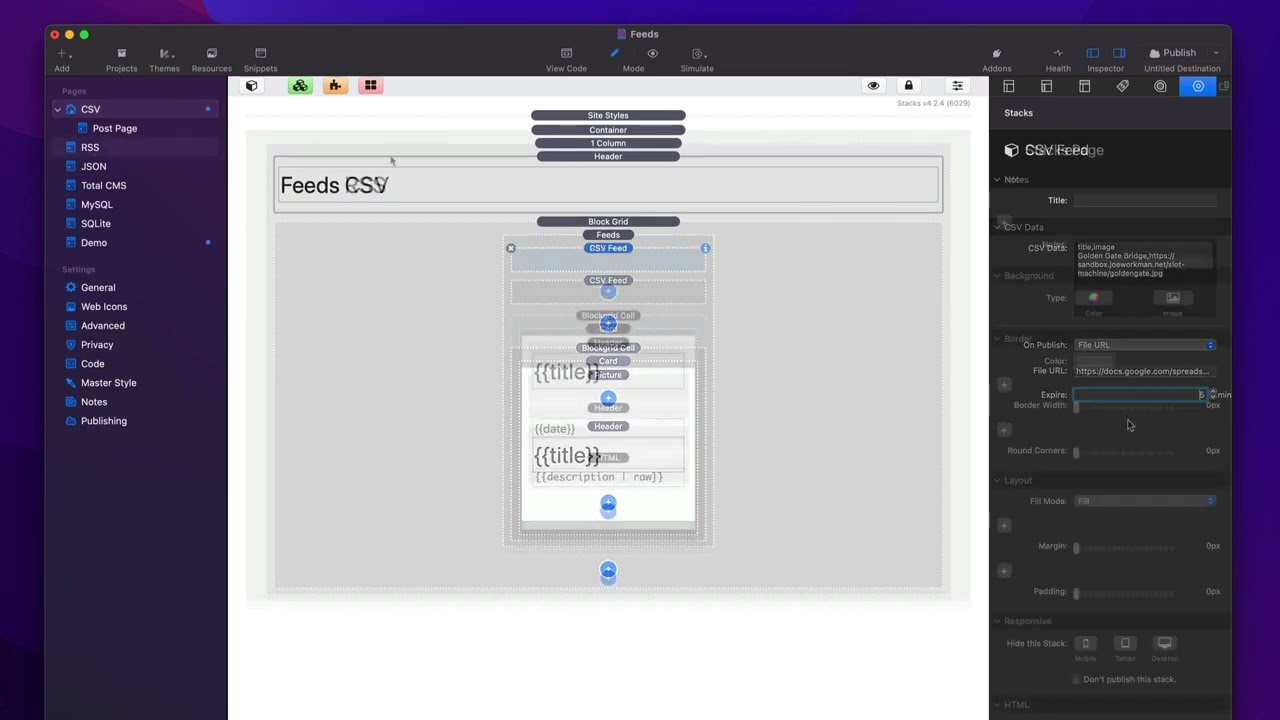
00:51 the csv feed
00:53 pretty simple um when you add the csv
00:55 feed stack to your page there are many
00:58 different ways to supply csv data
01:02 you can a just simply paste the csv data
01:06 directly into the csv data setting
01:09 now i should note that this is actually
01:12 used inside preview no matter what else
01:15 you supply this allows preview to be
01:18 super fast so even if you're bringing in
01:20 data from a csv on a url or a file on
01:23 your server just take a sample of that
01:26 data paste it into this setting so we
01:28 can ensure that preview is really fast
01:32 now on publish we can go ahead and use
01:35 file on the server this allows you to
01:37 give a path to the a csv file that is on
01:41 your server
01:43 and last but not least you can do a file
01:45 url which is a url to a csv file
01:49 this url can be on your website although
01:52 if it's on your website i'd recommend
01:54 using a file on the server instead
01:56 um where you're going to want to use
01:58 file url is when you're integrating with
02:00 an external service
02:02 one example of that is google sheets
02:05 google does allow you to share a google
02:07 sheet and get a csv url of that google
02:11 sheet
02:12 so you can definitely do that now one
02:14 caveat i
02:15 strongly
02:17 just
02:18 discourage you
02:20 from adding
02:21 google sheets into this workflow the
02:23 reason is google sheets is always going
02:25 down and having issues so i really am
02:28 going to discourage you from using
02:30 google sheets
02:31 but you can now when you use a file url
02:35 um there is an expire setting because
02:37 feeds will cache that so that it doesn't
02:39 need to fetch that csv file on every
02:42 single page load
02:44 i recommend you make this as
02:46 large as possible so that for
02:48 performance reasons it's just going to
02:50 you know use the cached csv that's going
02:53 to be cached on the server versus going
02:56 out and fetching the raw csv file from a
02:58 url
02:59 um every x number of minutes so i
03:02 definitely recommend making this as
03:04 large as possible an hour maybe um if
03:07 you're okay with that obviously what
03:09 that means is if you change that data
03:11 inside the
03:12 url
03:14 it could take up to that amount of time
03:17 for the data to be actually displayed on
03:19 the website
03:20 all right next up is rss and rss works
03:24 very similar to the csv feed okay um in
03:28 that you can give it a url it has the
03:30 same expire time um you can also get the
03:33 rss metadata instead of all the posts so
03:35 if you want the actual data about the
03:37 rss feed like the main website data um
03:40 you can get that um and then there's a
03:42 couple rss specific options for date
03:45 formatting and forcing the date order
03:47 not our not all rss feeds actually are
03:50 sorted by date
03:52 so if you want to force that date order
03:54 you can use that checkbox there
03:57 json um
03:58 json is very similar
04:00 we have the ability to give a url to a
04:02 json file
04:04 um here you can actually supply a data
04:07 path
04:08 okay to a sub part of a json file right
04:13 so in this example here um i'm going
04:16 down into products
04:17 dev inside the json file and then i'm
04:19 i'm actually analyzing the json data
04:22 that's within products dev
04:24 okay and then we have an expired date
04:27 for json as well
04:30 total cms super easy supply the cms id
04:33 of your blog and you're done
04:35 now why would you want to use a blog
04:37 feed versus anything else most because
04:40 fees has uh some more filtering and
04:42 sorting data that a blog list doesn't
04:45 have so
04:46 there is a use case of integrating feeds
04:48 with total cms
04:52 and lastly databases i'm not going to go
04:54 through every single database setting
04:55 they're all very similar
04:58 all of them have the ability to supply
05:00 csv data
05:01 so that you can preview your layout
05:03 inside preview
05:05 because we can't connect your database
05:08 from your mac um it would need to be an
05:10 external connection obviously because
05:11 your database is on your web server so
05:13 we allow you to provide csv data so you
05:16 can actually preview and build your
05:17 layouts
05:18 and then you have the various data
05:20 connections okay so here we have a mysql
05:22 so we can give the hostname port
05:24 username password and all that jazz okay
05:27 very similar
05:28 uh for database queries we allow you to
05:31 just bring in all data from a table um
05:33 you can limit the number of records from
05:35 a table
05:36 and then you can just do a custom sql
05:38 statement so this obviously requires
05:40 that you know a little bit of sql um so
05:42 you can write your own sql select
05:44 statement and paste that in there
05:49 now the last bit i want to review
05:52 for this is analyzing and knowing the
05:55 data
05:56 i'm going to use rss an example because
05:58 rss is kind of a
06:00 wild wild west standard now feeds does a
06:03 best job that it can to kind of
06:05 standardize it for you but knowing the
06:07 exact fields that are available within
06:09 an rss feed
06:11 is
06:13 not necessarily reliable
06:15 so inside the main feed stack there's a
06:17 data preview button
06:19 and when you click that and preview
06:22 what that will do is it will actually
06:24 display the raw data in a
06:27 readable format for you to see
06:30 so we'll see within this particular rss
06:33 feed i have access to the author field
06:35 contributor content copyright
06:38 so on and so forth we can actually see
06:40 the raw data for each of those fields we
06:42 can see which fields are being used
06:44 which aren't
06:45 and you can see it for every single
06:47 record
06:50 so this will allow you to easily build
06:52 and integrate that data with into your
06:54 layouts
06:56 and last but not least if you might have
06:59 noticed inside of this
07:01 csv feeds demo i actually have multiple
07:03 data points
07:05 so feeds allows you to actually
07:07 integrate as many data sources as you
07:09 want
07:10 into a single feed layout
07:13 now this could get interesting or odd if
07:16 you know the csv and the json have
07:18 different types of data you definitely
07:20 want to make sure that you know if
07:22 you're going to mix types then the data
07:24 has to be similar and have the same
07:26 values and whatnot so
07:28 um that definitely is a little iffy um
07:31 because you know making sure you have
07:33 multiple formats that have the same
07:34 similar data types is probably not very
07:38 it's definitely an edge case scenario
07:41 um but you can have as you see here i
07:43 can have multiple csv feeds i don't
07:45 think it's very common you're probably
07:47 only going to have one data source
07:49 but it is very interesting that we can
07:51 actually integrate multiple data sources
07:53 into a single feed
08:04 you


