
Stacks Guru is born from the need to search the vast number of videos out there on stacks built for Stacks Pro and the Stacks 5 plugin for Rapidweaver.
We have scraped over 500 videos to get the transcripts for each in order to make the spoken word searchable.
Please use this free tool to help you learn and discover the awesome power that Stacks and the stacks made for Stacks have to offer.
00:00 how do you know your math tutor is
00:02 always hungry he'll work for pie hey
00:13 you're on Joe workman here and in this
00:15 video we're gonna be going over the
00:17 financial functions and the advanced
00:19 math functions in pi we have two
00:22 examples in the demo file that we're
00:24 gonna be reviewing it is demo 13 and
00:27 demo 14 and there are more examples of
00:30 what you could do with finance and the
00:32 math things but we're just being looking
00:34 at those two ones and hopefully we can
00:37 let's dive into it so I said we're gonna
00:39 be looking at demo 13 and 14 of the PI
00:43 demo file and in here the first demo
00:46 we're gonna be calculating low paint
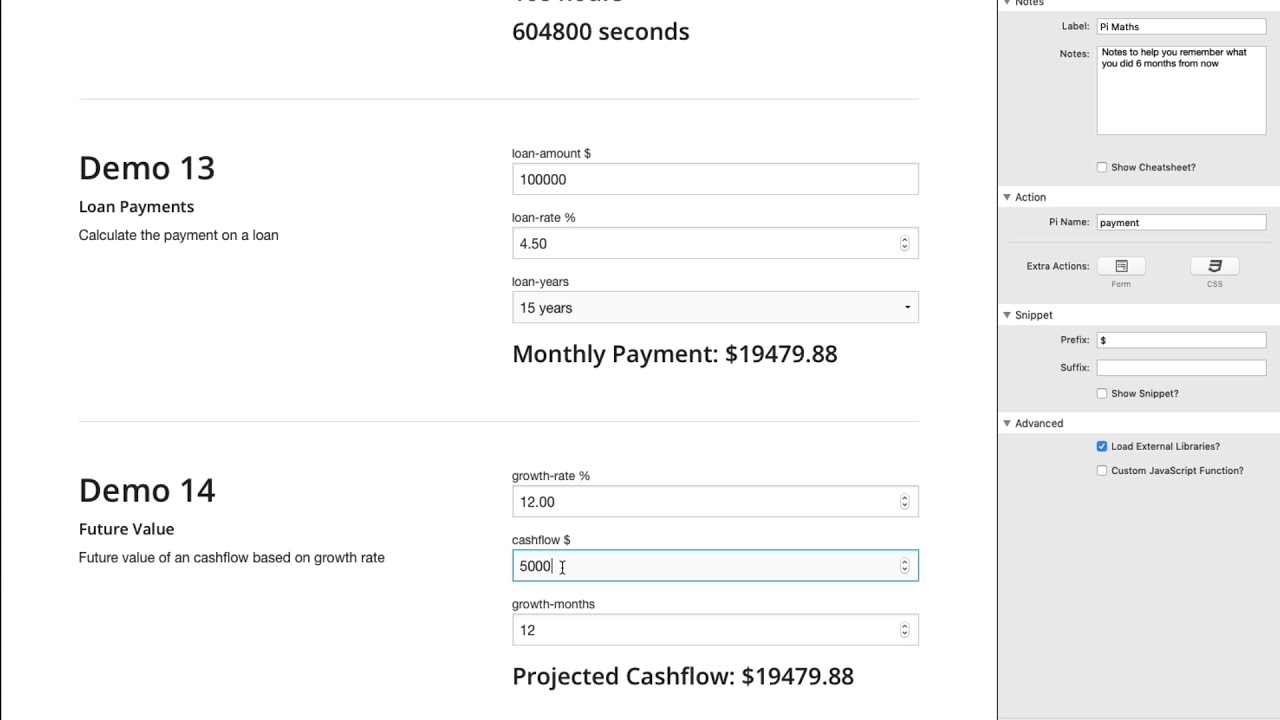
00:47 loan payments so here in this file here
00:50 we can enter in the loan amount we can
00:52 actually add the interest rate that we
00:54 have and the duration of the loan and
00:57 this will output the actual loan payment
01:01 so if we have a hundred thousand dollar
01:03 loan at a six point two five percent
01:05 Interest over thirty years our monthly
01:08 mortgage or payment will be six hundred
01:10 and fifteen dollars and seventy two
01:12 cents
01:12 it's pretty cool right I know this is
01:15 gonna be a very widely used function and
01:19 it is super super easy to do in PI let's
01:22 go ahead and have a look so here we are
01:24 in edit mode for demo 13 at the top we
01:28 have a text input that allows us to
01:30 input really large numbers so we could
01:32 do a million a hundred thousand whatever
01:34 it uses types in a number um next up we
01:37 can do a number input which has our
01:39 interest rate um and then I have a
01:41 select box that does five fifteen thirty
01:44 and forty years now if we if he check
01:47 out here I on the select box the value
01:49 is just the number right so it's five
01:51 and fifteen and thirty and forty is the
01:54 actual value even though what the label
01:56 the person sees is five years fifteen
01:58 years so on and so forth and this pie
02:01 couldn't be any simpler to actually do
02:03 okay so first off you're gonna want to
02:06 make sure in PI you go in load external
02:08 libraries and from the drop down button
02:10 you're gonna click on the finance
02:11 functions
02:13 now the finance functions actually has a
02:15 cheat sheet you can go ahead and show
02:16 that and there are some examples of how
02:18 you can use the various financial
02:21 functions right now we're going to be
02:24 using the amortization function so all
02:27 you have to do to use that is just
02:29 finance dot a.m. and then parentheses
02:31 and then you need to pass it a few
02:33 things so you need to pass it the loan
02:35 amount which we have as the loan amount
02:37 field need to pass it the loan rate and
02:40 you need to pass it the number of years
02:42 a loan is now this last one is zero that
02:45 means that we the time that we're
02:47 passing is going to be years if this
02:50 were going to be one if we change this
02:52 to 1 then the amortization expects this
02:55 amount of time to be actually be the
02:57 number of months okay and we'll see that
02:59 in the documentation in just a second
03:01 but that's really all we need to do
03:03 right so that complex calculation we
03:07 have this great little helper function
03:08 just a finance am pass it to three
03:11 particular variables that you need and
03:13 you're done it's going to output the
03:15 actual payment for you couldn't be
03:18 really any simpler right and if you here
03:21 is obviously the way that we are
03:22 outputting that is we're taking the
03:25 snippet and we're doing the monthly
03:26 payment and we're doing this snippet for
03:29 payment now pi is also doing a prefix
03:32 here for the dollar so it's actually
03:33 adding the dollar because obviously we
03:36 want it we want to output this in the
03:38 currency that we're displaying it as
03:40 next up in demo 14 we're going to be
03:43 calculating the future rate or the
03:45 future value of cash flow so here we
03:48 have our growth so let's say I want to
03:50 grow at 12% per year and my our 12% per
03:56 month
03:56 sorry 12% per month and then I my cash
03:59 flows currently 5,000 what is my cash
04:02 flow going to be after 12 months of
04:04 growing 12% per month right so if by
04:08 this value this calculation I'm gonna be
04:11 making almost $20,000 a month that's
04:13 pretty crazy I wish that was true
04:16 so here we are we're making 12% growth
04:19 that's pretty awesome and as you just
04:22 dynamically change these values you'll
04:24 notice that the cash flow will change
04:26 along with it and if you want to see
04:28 what you're making in 16 months you know
04:31 you're making a whole lot more money so
04:33 really exciting I'm excited to see this
04:35 and really simple to do as well so let's
04:38 jump in to
04:41 let's jump into so let's jump into edit
04:45 mode and see how all this is done here
04:47 we have three number inputs our growth
04:48 rate our cash flow and the number of
04:51 months and the Finance plugin gives us a
04:56 function called finance dot FV for a
05:01 future value and this calculates
05:04 basically all we need to do is pass in
05:06 three values our growth rate our cash
05:09 flow and the number of months and we're
05:11 done
05:12 right just like before I can prefix the
05:15 dollar amount and if I show the snippet
05:18 I just insert this snippet into wherever
05:20 I want and I did that here in the header
05:23 and my output is there really really
05:27 simple super easy so if we head over to
05:30 the PI fa Q's and we go to the external
05:33 resources learning page we'll go to the
05:35 finance Jas Docs and we'll see all the
05:38 various cool functions that we have here
05:41 so we saw amortization so here's the
05:43 amortization and here is all the various
05:45 things right we need to do Finance am
05:47 and then you have to pass your principal
05:49 your rate the total number of payments
05:52 and the type and the type is a they're
05:54 gonna be 1 or
05:55 whether it's years or months and you can
05:58 see actual examples here we have things
06:01 such as compound annual growth rate
06:03 compound interest discount factor as you
06:07 see there's just a lot of you know
06:09 financial equations that this plugin
06:13 makes it really easy to calculate on
06:15 your webpage another popular one is
06:17 gonna be the rule of 72 right so you
06:19 know at a 10 person you know at 1
06:21 percent annual rate how long does it
06:23 take to double my money basically right
06:25 so really simple to do I like this this
06:29 is a really cool thing I think it's
06:30 gonna save you tons of time you know
06:33 trying to find out and create these
06:34 equations on your own isn't easy so we
06:38 can do that really easily with this
06:39 finance plug-in now I currently don't
06:43 have any demos that use a lot of the
06:45 advanced mathematics plug-in but here's
06:48 the docs for the math Jas
06:51 and basically you'll know if you have to
06:54 use this plugin is for stuff for if you
06:57 want to need to algebraic equations if
06:59 you need to use big numbers if you need
07:01 to do derivatives some calculus right a
07:04 lot of objects or you know serialization
07:06 or stuff like that you know that you're
07:10 gonna need something like this so it's
07:12 really simple if we just go into some of
07:13 these here let's just do like
07:18 let's just go to sit like the algebra
07:20 equations okay and what you can see here
07:22 is is we could do stuff like math dot
07:24 simplify to string right so you can
07:28 simplify stuff you can do here's a
07:30 derivative right
07:32 and I've actually a good cheat sheet
07:34 cheat sheet for this baked right into
07:36 rapidweaver as well so if we were to add
07:39 the advanced math functions go here we
07:42 have advanced math we could show the
07:43 cheat sheet we'll see that we just have
07:46 some easy examples here there is a math
07:49 around this is similar to the math dot
07:52 round that's baked into JavaScript but
07:54 here that we have a tangent we have
07:56 logarithmic stuff for square root we
07:58 have derivatives so there's just some
08:01 more advanced mathematical functions
08:02 that you know a lot of people probably
08:05 don't need but if you need them they're
08:08 here for you so pretty cool um if you
08:11 know but there is a lot of stuff baked
08:13 straight into the JavaScript the math
08:16 javascript object so to have a look at
08:18 those first so that you don't have to
08:19 load any more external libraries to get
08:21 the job done so there we have it that is
08:24 the finance plugins and advanced math
08:26 plugins for pi the finance ones are
08:29 pretty cool right I think we're gonna
08:30 get a lot of use case out of those
08:32 especially for if you're doing customers
08:34 or you yourself need some sort of loan
08:36 calculator or some sort of financial
08:38 calculators right those function that it
08:40 provides just save a ton of time and
08:42 energy and they're really simple they're
08:45 easy to read and understand just pass
08:47 the few parameters that you need that
08:49 you pull in from the form fields and
08:51 you're good to go right can't be much
08:54 simpler than that so I hope you're
08:55 enjoying pi as always post to Weaver
08:59 space of what you're doing with it I'd
09:00 love to see it and show others that we
09:02 can all learn you know from what you're
09:05 doing that's cool because we all want to
09:07 be cool too
09:08 so take care I hope you're enjoying pi
09:10 and we'll see you in the Weaver space
09:12 community


