
Stacks Guru is born from the need to search the vast number of videos out there on stacks built for Stacks Pro and the Stacks 5 plugin for Rapidweaver.
We have scraped over 500 videos to get the transcripts for each in order to make the spoken word searchable.
Please use this free tool to help you learn and discover the awesome power that Stacks and the stacks made for Stacks have to offer.
00:06 hello everyone this is Joe workman and
00:08 today I'm really happy to show you the
00:10 Global Content stack now have you ever
00:15 been developing a Rapid River website
00:17 and wanted to replicate content across
00:19 multiple pages that could be a footer
00:22 maybe some images a header image or a
00:25 slider that could be on the top of every
00:28 single page there's a lot of data that
00:31 we replicate now using stacks it's
00:34 pretty easy to do that you can just
00:36 simply copy and paste the stack data
00:37 across all of your pages however if you
00:41 ever need to edit that content it
00:43 becomes very cumbersome because you need
00:45 to remember to go to every single page
00:47 that you added that content to and make
00:50 the same exact changes Global Content
00:54 completely revolutionizes that for you
00:57 so with global content what you could do
01:00 is you can specify either an image such
01:02 as this image here for gyro or this
01:05 tabular slider down here at the bottom
01:06 and those content is actually stored
01:10 centrally within your website and they
01:13 are imported dynamically on the server
01:15 if you were to import them into any page
01:17 that you'd like what's great here is
01:22 that your content your global content is
01:24 stored centrally and it is modified in a
01:28 central location and then you it is
01:31 simply imported on all of your other
01:33 pages so if you ever need to change an
01:36 image header or a footer or a slider you
01:40 only need to modify that content one
01:42 time within your wrap Weaver project
01:44 republish the global content and it will
01:47 be a dynamically displayed across all of
01:50 your web pages that import it how
01:52 amazing is that now while global content
01:56 works really well with stack data it
01:58 allows you to import a individual stacks
02:00 across pages it also supports built-in
02:04 and third-party page plugins so if
02:07 you've ever wanted to import a contact
02:09 page within a stacks page you can now
02:11 easily do that using global con
02:13 simply import your contact page into
02:16 your stacks page and you can easily add
02:19 stack content around your contact form
02:22 also the awesome rapidweaver photo
02:27 sharing page you can use that and import
02:29 that into your stack pages this is great
02:32 and it doesn't stop there we support
02:34 over 15 3rd party plugins from Weaver
02:37 pics to form loom to date loom allows
02:40 you to greet and had really great rich
02:43 calendars to your stacks pages so as you
02:47 see global content will really
02:48 revolutionize how you can use wrap
02:50 Weaver in a much more powerful way now
02:54 let's dive in to see really how easy it
02:57 is to implement now here we have a
02:59 global content demo project that really
03:02 shows you the power of all the Global
03:05 Content features now this file is
03:07 available on the disk image when you
03:09 purchase and download global content and
03:11 it's also available to download from our
03:13 documentation portal now as we see I've
03:16 created sample global pages for us that
03:20 we can then import into any pages that
03:22 we want so I have photo albums some of
03:25 the default pages third-party pages such
03:27 as weaver pics and obviously some stack
03:30 pages has things like tabulous or even
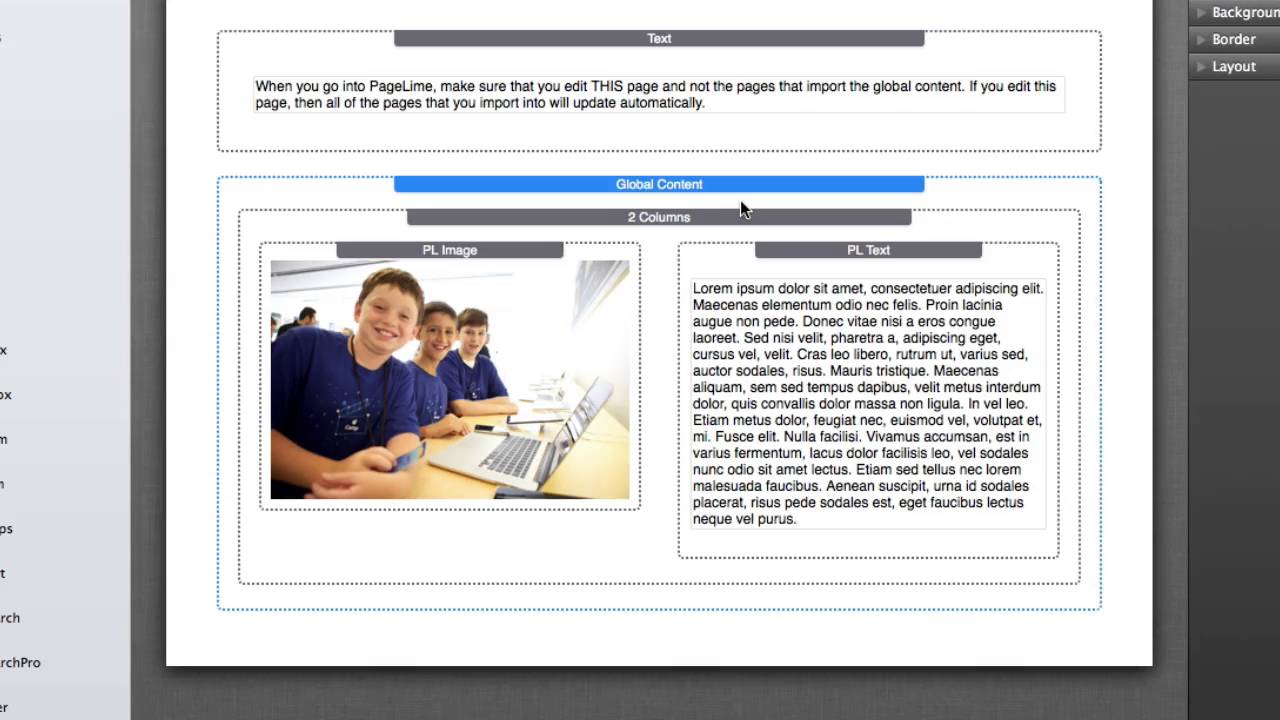
03:33 page line now with stack pages there is
03:36 a global content stack which actually
03:39 has no settings at all within it all you
03:43 do is you simply add the global content
03:45 to your stacks page and then drag it all
03:48 of the stack data that you'd like to be
03:50 global for that particular page now all
03:54 the remainder are the pages all of the
03:55 3rd party plugins you don't need to do
03:57 anything special just simply create the
03:59 page and configure it as you would like
04:01 now let's see how easy it is to import
04:04 this data into a stacks page so on this
04:08 page here I'm actually importing two
04:11 different global content pages into this
04:14 one single page so this top one is if
04:19 you notice here in the global import
04:20 settings all use need to do is simply
04:23 provide a link to the page so
04:26 click on set link and find the page that
04:29 you'd like in this particular instance
04:31 I'm going to be importing the image page
04:34 and earlier in the video you saw that
04:37 was in what that was a gyro image and
04:39 that's what we're going to be importing
04:40 here um now other things that you need
04:44 to make sure that you do is that you set
04:45 the page type to the actual type of page
04:49 that you are importing so in this
04:52 particular instance this image page is a
04:54 stacks page so I need to make sure that
04:57 I choose the page type of stacks okay um
05:02 lastly on this the bottom part of this
05:04 page on the global import I provide this
05:07 as a tabulous import now this also
05:09 allows us to do as you'll notice in
05:12 global import there's a label that you
05:13 can provide this is solely so that you
05:16 can actually determine what that content
05:19 is in edit mode this data is not
05:21 displayed within a published mode or
05:24 preview mode at all so it's just that
05:26 you know you can add notes for yourself
05:29 to know exactly what data will be
05:32 imported there and on this particular
05:35 instance here i have a tabulous page
05:38 that i've set the link to and i set the
05:40 page type two stacks now obviously for
05:43 the 3rd party plugins you want to set
05:47 the page link to the third party plug-in
05:48 and then set the actual third party page
05:51 type so it's going to be a contact form
05:53 page or if it's going to be an FAQ maker
05:56 page or if it's going to be a date loom
05:58 page or rapid maps page or a weaver pics
06:01 page you're going to set that page type
06:04 accordingly now Global Content will not
06:09 work within rapidweaver preview the
06:13 reason for this is that global content
06:15 all of its magic happens on the server
06:17 this means that you will need to publish
06:20 this page your global content and the
06:22 imported pages on to your server in
06:25 order to see them functioning now there
06:29 are some workarounds if you want to do
06:30 it locally um you can actually do a
06:33 local export and use something called
06:35 mamp and with a local web server in view
06:38 locally on your website on your
06:40 desktop and check out some of our other
06:43 tutorials on how to use mamp and things
06:45 of that nature it works really great for
06:47 global content and previewing it before
06:50 you actually publish it to your server
06:51 now one last important point with global
06:54 content is that it ships with a theme
06:57 called blank and you will need to you'll
07:00 want to make sure that you install this
07:01 theme it will be on the resources folder
07:03 on the disk image and that all of your
07:06 global content pages set that theme for
07:10 that particular page so let's see what i
07:12 mean by that let's just go to this
07:15 particular stacks page here this is page
07:17 line page and i'm going to go to page
07:19 info and then i'm going to go to the
07:25 Styles tab within my page inspector and
07:28 you're going to want to make sure that
07:29 the page specific theme is set to blank
07:34 ok now this blank theme has absolutely
07:37 no Styles associated with it it is a
07:39 very minimal blank theme you can't do
07:42 anything with it um and you can actually
07:45 preview this uh if we you can actually
07:50 preview this and if you do you'll notice
07:52 that i have my tabulous page it works
07:54 however it's just shown on a blank white
07:57 canvas there is nothing to this theme at
08:00 all um and the reason for this is it
08:02 just allows global content to process a
08:04 little bit faster on the server since it
08:06 doesn't have to go through any of the
08:08 theme code so this blank theme is
08:10 optimized just for global content pages
08:13 and that wraps it up for Global Content
08:16 um it is a really really simple stack to
08:19 implement yet it is very powerful and
08:22 should really revolutionize your your
08:24 work flows within rapidweaver I hope
08:27 this really makes your life a lot easier
08:28 and thank you very much everybody
08:31 bye-bye
08:38 you


