
Stacks Guru is born from the need to search the vast number of videos out there on stacks built for Stacks Pro and the Stacks 5 plugin for Rapidweaver.
We have scraped over 500 videos to get the transcripts for each in order to make the spoken word searchable.
Please use this free tool to help you learn and discover the awesome power that Stacks and the stacks made for Stacks have to offer.
00:06 hello everyone this is Joe workman and
00:08 in this video today we're going to be
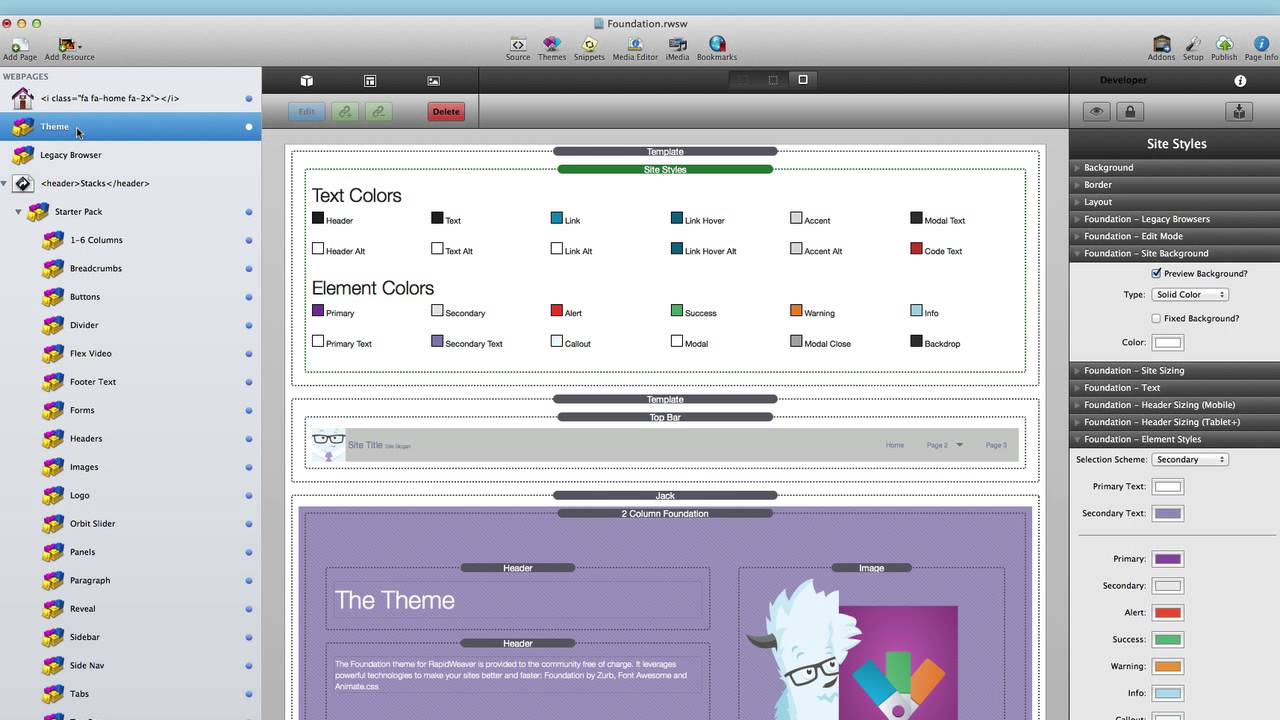
00:10 going over the new global templates in
00:13 the foundation stacks now what the
00:17 global templates allow you to do is to
00:19 actually define global settings for a
00:22 particular stack now as of this version
00:26 foundation ships with a dozen different
00:28 global templates and these are
00:31 everything from basic layouts like
00:33 floating body to pillar that you would
00:35 want to make sure are the same across
00:38 your entire site to navigation and
00:41 obviously site styles now let's jump
00:44 into site styles and see what this is
00:46 about now if you're not familiar with
00:48 site styles please go ahead and visit
00:50 the site Styles video that we've already
00:53 done that goes over all of the settings
00:55 now site Styles is a perfect example of
00:58 when to use a global template now as
01:02 this as the name of the stack kind of
01:04 alludes site Styles is going to be these
01:07 styles for your entire website the color
01:10 swatch for all the various elements and
01:13 text to the size of your text to the
01:15 size of your website you're going to
01:17 want to make sure that all of those
01:19 settings are the same across all of your
01:21 web pages
01:23 now in order to do that before we would
01:28 you know make a stack change the
01:31 settings to what we want and then we
01:33 would copy and paste that across all of
01:35 our pages or we would use my awesome
01:38 Global Content stack which we're not
01:40 going to really go into here but with
01:43 global templates what we're allowed to
01:46 do is if you add a global template to
01:49 the page all of the settings that you
01:52 use inside that stack will be synced
01:55 across all instances of the global
01:57 template throughout your project
02:01 so again this is great foresight styles
02:04 because I can now change the text size
02:06 and any of the colors of my elements and
02:08 those changes will be reflected across
02:11 my entire website let's see this in
02:14 action for example let's take my top bar
02:17 stack now on my foundation website I use
02:21 the top bar template and if you notice
02:25 the background of top bar is set to f
02:28 okay a kind of an off-white color now
02:32 let's change that color to be something
02:34 a little bit different
02:36 now if I go and let's change that to a
02:39 kind of an off gray color a bluish-gray
02:43 color okay if we go to another web page
02:47 will notice that that exact color is
02:50 also reflected in this other page and
02:53 doesn't matter what page you go to I can
02:55 keep going to different webpages and top
02:58 bar will still have that same color
03:02 this is because the global templates are
03:04 taking all of the settings and
03:06 replicating them across all of the
03:08 instances of that global template across
03:11 your entire project now there are two
03:13 caveats that I want to point out with
03:16 the site Styles template and that is any
03:19 of these image settings that you
03:22 actually drag and drop an image into the
03:24 settings pane will not work they will
03:28 not be transferred across the pages the
03:30 image won't therefore this is why we
03:32 have tiled image warehouse and cover
03:35 image warehoused settings now the last
03:38 caveat with site Styles global template
03:41 or really any global template that
03:43 you're using is that you should only be
03:45 working on one project that uses that
03:48 template at any time if you ever have
03:51 two projects open that are accessing the
03:53 same template you will notice that some
03:56 weird crossing over of data could
03:58 potentially happen this is a known issue
04:00 that your head is actually working on
04:02 but it is a caveat that oh I wanted to
04:05 make sure that you are aware of now to
04:07 be extra cautious I actually recommend
04:08 if you're working on a project that uses
04:10 templates to actually quit that project
04:14 when you're done before opening another
04:16 project that uses them this will ensure
04:19 that any sort of shared code and
04:22 settings are killed and they don't cross
04:26 over between your projects so I hope
04:30 that you enjoy using the global
04:32 templates inside foundation as you see
04:34 it's really going to save you precious
04:36 time with building your websites now
04:40 also a side effect is it's not only
04:42 going to save you time but it's going to
04:44 make your projects more exact or more
04:46 perfect because let's say if you're
04:50 copying stacks and data across you know
04:53 or settings across multiple web pages
04:54 you could forget a page or two but with
04:57 global templates it automates all of
05:00 that for you and you can be ensured that
05:02 your styles are going to be the same
05:03 across all instances of your web pages
05:07 so take this data and go forth and make
05:10 your websites great thank you very much
05:12 everybody I hope you enjoy foundation
05:15 and have a great day bye-bye
05:23 you


