
Stacks Guru is born from the need to search the vast number of videos out there on stacks built for Stacks Pro and the Stacks 5 plugin for Rapidweaver.
We have scraped over 500 videos to get the transcripts for each in order to make the spoken word searchable.
Please use this free tool to help you learn and discover the awesome power that Stacks and the stacks made for Stacks have to offer.
00:00 how do you make seven an even number
00:05 remove the s hey everyone in this video
00:15 we're gonna be doing some intermediate
00:16 stuff with PI right so in the hopefully
00:19 you've watched the basics video already
00:21 we review demos 1 2 & 3 4 pi and in this
00:25 video we're gonna be looking at demos
00:27 6 and 10 ok so a little bit more
00:31 intermediate stuff some how to leverage
00:33 multiple form fields and a couple other
00:36 cool things so let's jump on in okay so
00:39 here we are back inside the PI demo
00:41 project that ships with PI and right now
00:45 we're gonna look at demo 5 and it's
00:47 pretty simple demo right let's have a
00:49 look
00:50 essentially it calculates the area of a
00:53 room you give the length and the width
00:55 of the room and it calculates and gives
00:57 you the square meters of that room
01:00 pretty simple let's see how to set that
01:02 up so here we have two sliders instead
01:05 of just one oh as you saw in the basic
01:08 examples we have length and width and as
01:11 you might expect inside PI we're simply
01:14 just going to multiply those together
01:15 and we do that by just specifying you
01:18 know curly brace length close curly
01:21 braces times the width inside curly
01:23 braces because remember this is the
01:26 syntax for getting the value of length
01:29 and width so pi is going to retrieve the
01:31 values from the sliders and multiply
01:33 them together now in this example I
01:36 assigned it to a PI name of room area
01:40 and if we look at these suffix there's
01:43 one other thing that this stack does and
01:45 we haven't seen this before this applies
01:48 a suffix so if we look inside the header
01:52 for area if you notice I have area and
01:54 then I have my my snippet just like we
01:57 saw in the basics video but I don't have
01:59 M squared at the end like I'd had in
02:02 previous examples in the basics video
02:04 and the reason I'm doing that is because
02:08 I'm actually utilizing the suffix part
02:10 of Pi so what PI does this is some HTML
02:14 that does a square so a superscript
02:17 right so we're doing MS
02:19 weird and pi is going to append that to
02:23 the value
02:25 now if we have prefix it'll basically
02:27 prepend the data right this is great if
02:29 you have dollar values such as like a
02:31 dollar symbol or a pound symbol or
02:33 whatever currency symbol you want right
02:35 so that's what prefix would be good for
02:39 but in this example the answer since
02:42 we're multiplying length and with it the
02:44 the resulting is going to be square
02:46 meters right so that's what we're gonna
02:49 reira turning so if we preview this
02:51 again you'll see that that's how we get
02:53 these suffix here the cipa is adding
02:57 this after the value so pi is doing that
03:00 for us so that's a nice alternative if
03:02 you needed to you know append data but
03:05 not have it inside the content somehow
03:07 right so it's just another great option
03:09 that pi provides now here's demo six
03:13 demo six is a little bit more involved
03:15 here basically the the idea of demo six
03:18 is that we're going to be calculating
03:19 the number of cans that we need to paint
03:23 a room so there's a lot of data we need
03:26 to gather here so up at the top we split
03:29 this up in a few different sections we
03:31 have we need the to find the area of the
03:34 walls so we have the length the width
03:36 and the height of the walls and
03:39 basically we have a formula that
03:41 calculates the area of all the walls
03:43 that we need then the second set of data
03:46 is our paint info so we need to know
03:48 coverage how much paint can can we use
03:51 to cover right so if does it you know is
03:56 it 7.5 meters per liter right or and
03:59 then how many coats do we want and then
04:01 what is the size of a can of paint and
04:04 based on all this data we can then
04:07 provide the data of how many cans we
04:09 need and how many cans we actually need
04:11 now this is different because our
04:13 calculations here said that we need to
04:15 point six cans of paint well you can't
04:18 buy point six cans of paint so we
04:20 actually round that number up so that we
04:23 can have the actual cans that are
04:24 required let's see how all of this magic
04:28 is done so here on the room info part we
04:31 have three sliders we have room lengths
04:33 room width and room height just as you
04:35 would expect and then the pie here is
04:38 for the wall area and I see we have a
04:41 little equation here that takes the room
04:43 length times two plus the room with
04:45 times two and multiply that by the
04:48 height of the room and that gives us the
04:50 area of the
04:52 all okay and you see we're using little
04:55 suffix trick here as well to apply the
04:59 the actual unit to the end of the area
05:03 metric very cool so let's go down we
05:07 have the paint info and here we have a
05:09 slider for coverage slider for coats and
05:12 a slider for cans sighs now this is a
05:16 little bit different instead of having
05:17 one big huge pie we decided to actually
05:20 break this up logically so here the
05:24 first pie stack we have we're
05:25 calculating the liters per coat and we
05:29 do that by taking the wall area divided
05:32 by the coverage so that gives us how
05:34 many liters we need per coat then here
05:38 we have the leaders required so we take
05:40 the that the leaders per coat times the
05:43 number of coats that we want
05:46 at that point we need to know the cans
05:49 are required right so we take their
05:51 leaders that are required / the cans
05:53 size which is how many litres are each
05:56 can and then we apply a to fix because
05:59 we only want three decimal places in
06:01 that results and then further we then
06:04 want to take that and round it up right
06:07 because you again you can't by a
06:08 fraction of a can so we're doing math
06:11 dot sealing for cans required and that
06:14 is always going to round the to the
06:16 nearest whole number up and then
06:19 obviously here in the header we have our
06:21 snippets that we then apply and add to
06:25 the headers so that PI goes ahead and
06:27 add the data that we want inside of
06:29 there and we're done right
06:32 so this is an interesting example
06:34 because we we took instead of having one
06:36 big equation we split it up into smaller
06:38 simpler equations that reference to each
06:40 other right so this pi reference is this
06:43 one this pi reference is this one so on
06:47 and so forth
06:48 now we can do this all in one and we've
06:52 done it here in stem o6b okay so here's
06:55 an example if we were to take all of one
06:57 two three four five pies so it takes all
07:03 the way up to the the room info and all
07:05 the paint info pies and consolidates it
07:08 all into one big huge equation here now
07:11 if you look at this it's a little
07:13 scarier right it's a little a little
07:15 more complicated there's a lot of syntax
07:17 in there it's doable to do it all on
07:20 your own
07:20 and as we recommend it in the basics
07:23 video if you're gonna do something like
07:24 this definitely break out something like
07:26 an app like vs code or sublime text a
07:29 code editor that'll give you some syntax
07:31 highlighting and maybe let you know if
07:33 you have some syntax errors going on
07:34 right but it's it's very interesting to
07:37 see how this can be done here as one big
07:40 equation or broken up into several
07:43 smaller equations that reference each
07:46 other now the last demo that we're gonna
07:49 check out in this video is demo ten and
07:51 this is interesting and allows us to
07:53 build a pricing package for an event
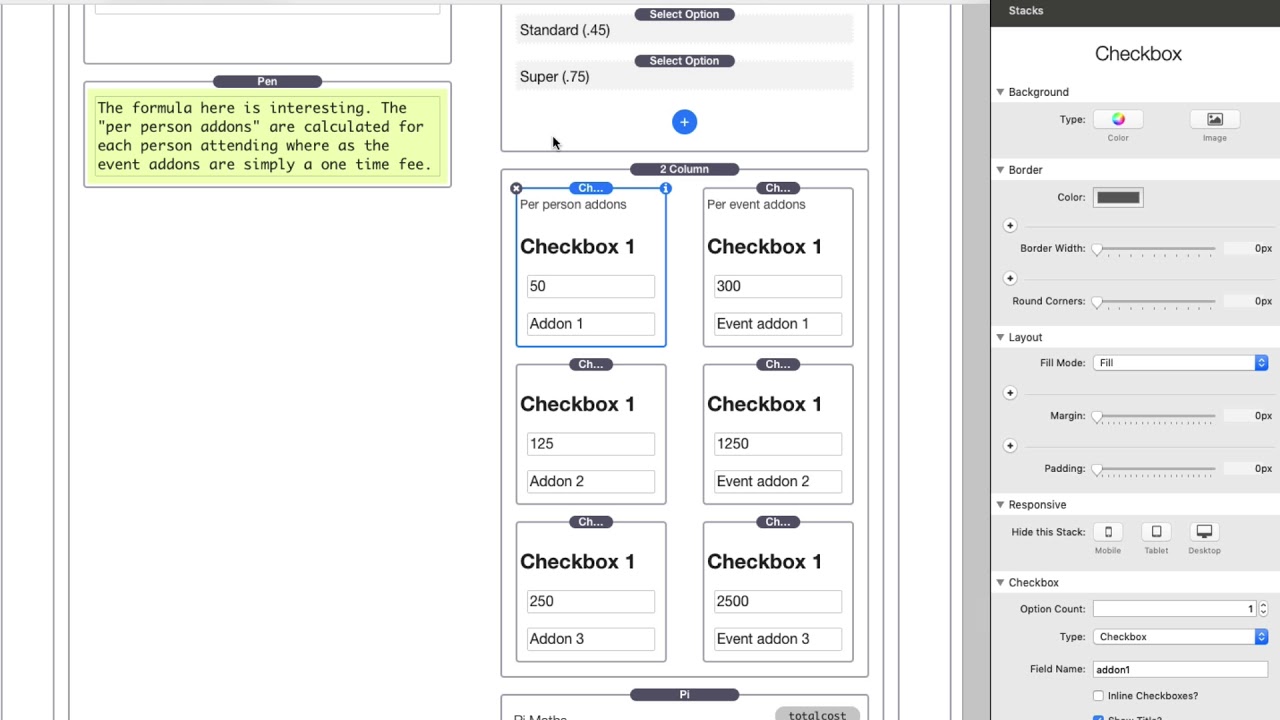
07:55 okay so here we have a slider for the
07:59 number of people that are gonna be
08:00 attending the event your package
08:04 and then we have add-ons per person so
08:07 these add-ons are multiplied by the
08:09 number of people so if you have five
08:11 people this add-ons gonna be charged
08:13 five times and then we have per event
08:16 add-ons which are simply one-time it
08:19 doesn't matter how many people they're
08:21 just add-ons for an event total so
08:23 they're added on to the total of the
08:24 event let's see how something like this
08:27 is built so at the top we have a common
08:30 slider that we've seen many times and we
08:32 have that assigned to an ID of people
08:34 okay a name of people now here's a
08:36 select box this is something we haven't
08:38 seen yet so basically in this select box
08:41 we have three different packages we had
08:42 basic standard and super now if you look
08:45 at the values for these select boxes
08:47 well notice that the values are actually
08:49 numbers so when a user selects basic in
08:53 the backend pi is going to retrieve zero
08:56 and when the user selects standard PI's
08:59 gonna retrieve 0.45 and same thing for
09:02 super it's going to retrieve 0.75 so
09:05 then we can use that number inside of
09:07 our equations in our formulas inside pi
09:10 same thing for check boxes here we have
09:12 the per person add-ons and the per event
09:15 add-ons and we'll notice that the value
09:18 here is add on one or the the label but
09:20 the value is actually a number so check
09:22 spot check box one for add on one will
09:24 be 50 and on 2 is 125 add on three is
09:29 250 and then we have the same thing
09:31 going on here for events
09:35 and then here in our equation we put it
09:38 all together in one big equation where
09:40 we take the number of people multiplied
09:42 by the package and multiplied by the
09:45 add-ons and then we had on the event
09:48 add-ons after that right so you see this
09:52 is one kind of a big equation but we're
09:54 referencing many many different fields
09:57 and we're all compiling it under and
10:00 remember math if you want to do like per
10:02 add-on we're using parentheses to you
10:04 know your order of operations right for
10:06 going back to algebra the order of
10:08 operations is very important here
10:10 because we're those parentheses are
10:12 inside your equation is going to
10:14 differentiate whether or not you can
10:15 have these per person add-ons versus the
10:17 event add-ons right and of course this
10:20 is a complicated one so you probably
10:22 want to have this out inside of some
10:24 sort of code editor so you can check
10:25 your syntax and whatnot
10:28 and then we output the header now here
10:31 instead of doing the the snippet okay
10:34 we're actually using the class so if we
10:37 look at PI here here's an example of our
10:40 total so we have total colon and then a
10:43 pound symbol so we've seen this work in
10:46 a suffix area this is using the prefix
10:48 now the PI name here is total cost so
10:52 remember we could use this snippet just
10:54 by saying show snippet and I could put
10:56 this snippet anywhere I want now
10:59 remember that another thing that we
11:00 could do is if we look at this snippet
11:01 there is a class pi - total cost we can
11:05 add that to a header stack or anything
11:07 else that we have if you look at this
11:09 foundation header we can add a custom
11:11 class pi total cost and what pi is going
11:15 to do it's going to replace that with
11:17 the actual contents so if you see here
11:20 it prefix the value with total colon and
11:23 a pound symbol and then it gets the
11:25 actual value from the formula that we
11:28 built and as we add all of these things
11:31 together
11:31 it's going to dynamically update that
11:34 total for us
11:36 so hope you learned a little bit more
11:38 what you could do with PI on how he can
11:40 use multiple fields not just one right
11:42 to leverage you know to create more
11:46 complex forms and formulas and stuff
11:48 like that right chests are this probably
11:50 gonna be the stuff a lot of you really
11:51 want to do right so I'm taking multiple
11:54 inputs building a formula that takes all
11:57 those and does some sort of mathematical
11:59 formula to make it all happen right now
12:03 also remember you could break things
12:04 down you don't need to have one big huge
12:06 pi formula right you could break it up
12:09 into multiples if you need to okay they
12:12 again shouldn't worry you can reference
12:14 other PI's with no problem at all
12:17 now if you're gonna do a complex formula
12:19 please remember that it definitely is
12:21 recommended that if you're gonna do it
12:23 don't type it all straight into rap
12:25 believer it could be a little tough so
12:27 make sure that you're going to use some
12:29 sort of code editor right and you know
12:33 format it that way so that way you can
12:35 read everything maybe eat this hypes a
12:37 little bit bigger and get a little bit
12:39 of hints from you know JavaScript fancy
12:42 JavaScript stuff in these code editors
12:43 that tell you about some maybe some
12:44 potential syntax errors so make sure
12:48 that if you have any questions on your
12:51 JavaScript or stuff like that go ahead
12:54 and post it on Weaver space again we
12:56 cannot officially support and help you
12:58 build your JavaScript I'd love to be
12:59 able to do that but we give you the
13:02 power to figure it all out now there are
13:05 some great resources we have some fa Q's
13:07 on a lot of other math functions i know
13:11 we've we've seen rounding and sealing
13:13 and pi and you know the power to things
13:16 there's a lot more right a lot more
13:19 obviously javascript is a full-featured
13:21 a programming programming language
13:24 that's been around for 20 years probably
13:26 more and so there are some resources on
13:30 our doc portal the FAQ on the product
13:33 page that allow you to learn more about
13:36 what you can do with JavaScript and
13:38 other kind of cool little fancy things
13:39 that you can do so please post what
13:43 you're doing I'd love to see I hope this
13:44 pie is going to allow you to build
13:47 things that you've always wanted to but
13:49 never could before
13:50 so I hope you're enjoying pie and we
13:52 will talk to you later also make sure to
13:53 check out all of our other videos we
13:55 have some more advanced videos on pie
13:58 such as date functions financial
14:00 functions doing things with like some
14:03 CSS write some really exciting stuff we
14:05 can do with pie so I can't wait to suit
14:07 your building and we'll talk to you soon
14:17 you


