
Stacks Guru is born from the need to search the vast number of videos out there on stacks built for Stacks Pro and the Stacks 5 plugin for Rapidweaver.
We have scraped over 500 videos to get the transcripts for each in order to make the spoken word searchable.
Please use this free tool to help you learn and discover the awesome power that Stacks and the stacks made for Stacks have to offer.
00:06 hello everyone this is Joe workman and
00:08 today I'm excited to show you
00:10 letterpress letterpress enables you to
00:12 have beautifully styled text on your web
00:15 page using some amazing 3d and css
00:19 effects you can apply these styles to
00:23 your web page headers as well as your
00:25 paragraph content so let's dive in and
00:28 show you how easy letterpress is to use
00:30 when you add letterpress to your page
00:32 simply double-click the text and change
00:34 the text to what you desire now if we
00:38 have a look at some of the settings the
00:40 first setting allows you to add a link
00:42 to your letterpress stack so that when
00:44 users click it it will take them to a
00:46 particular URL next you can define what
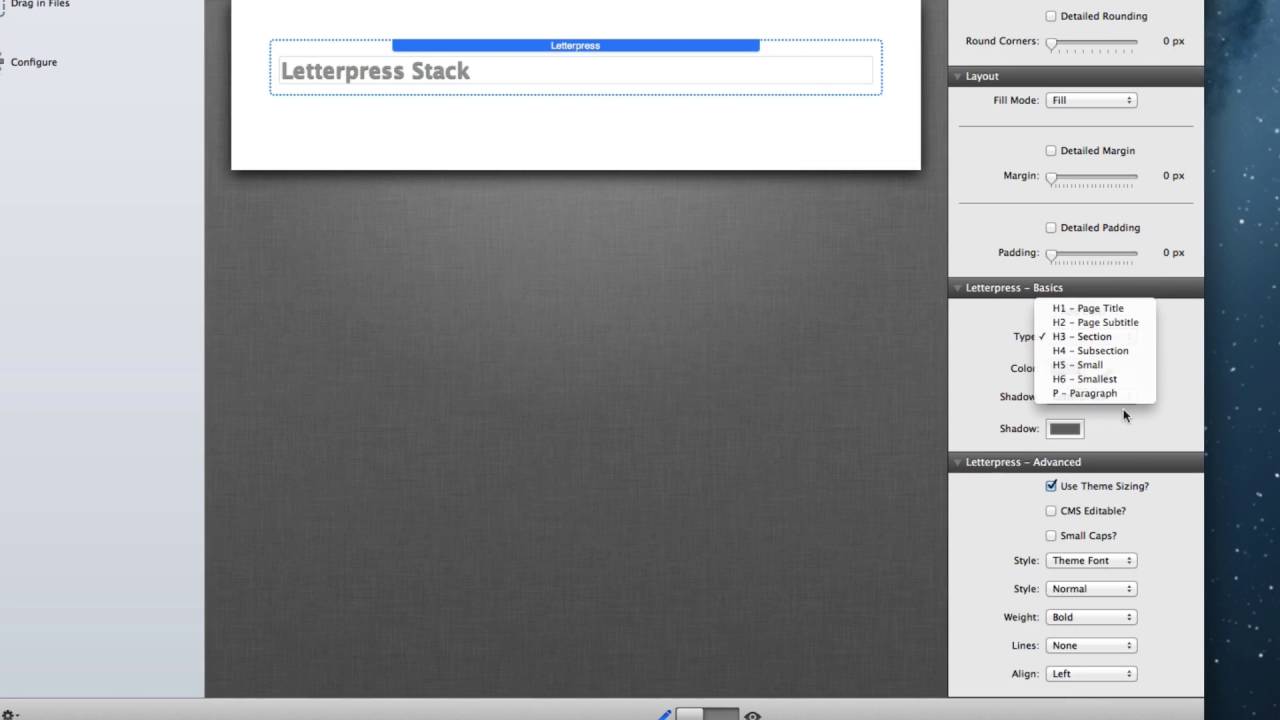
00:48 type of HTML element that your letter
00:51 press will become by default it is a
00:54 heading 3 tag you can make it anything
00:56 from an h1 through h6 or a paragraph tag
01:00 you can then customize the color the
01:02 shadow style and the shadow color of
01:06 your stack now if we look down into the
01:08 advanced settings by default letterpress
01:11 will use the sizing designed by the
01:14 theme however if you do not want to use
01:17 the theme sizing options you can uncheck
01:19 that and provide an override for the
01:22 size of font that you'd like there's
01:25 also a responsive sizing option that
01:28 allows you to define the size of a year
01:30 font for the desktop tablet and mobile
01:32 devices the CMS editable option allow
01:37 the letterpress text to be editable
01:39 within certain online CMS systems such
01:42 as page line the remaining settings
01:45 allow you to really control the style of
01:47 your text the small caps allows you to
01:50 have small caps instead of lowercase
01:52 letters the style allows you to use the
01:55 theme font or a custom font you can then
01:58 set such things as italic bold fonts do
02:02 you want it to be underlined and
02:03 obviously the alignment left center
02:06 right or justified now
02:10 also included with the letterpress stack
02:12 is the letter press box stack and while
02:16 all the options are the same with in
02:18 letterpress and letterpress box
02:20 letterpress box allows you to add any
02:22 stack content within it and then these
02:25 Styles provided and configured within
02:27 the letter press box stack will be
02:29 applied to the text within those stacks
02:32 that you've added this is extremely
02:35 powerful in adding additional styling to
02:38 some of your favorite stacks out there
02:41 thank you very much for watching I hope
02:43 you enjoy letterpress and I hope that it
02:45 makes your website pop have a great day
02:48 bye bye
02:55 you
02:57 you


