
Stacks Guru is born from the need to search the vast number of videos out there on stacks built for Stacks Pro and the Stacks 5 plugin for Rapidweaver.
We have scraped over 500 videos to get the transcripts for each in order to make the spoken word searchable.
Please use this free tool to help you learn and discover the awesome power that Stacks and the stacks made for Stacks have to offer.
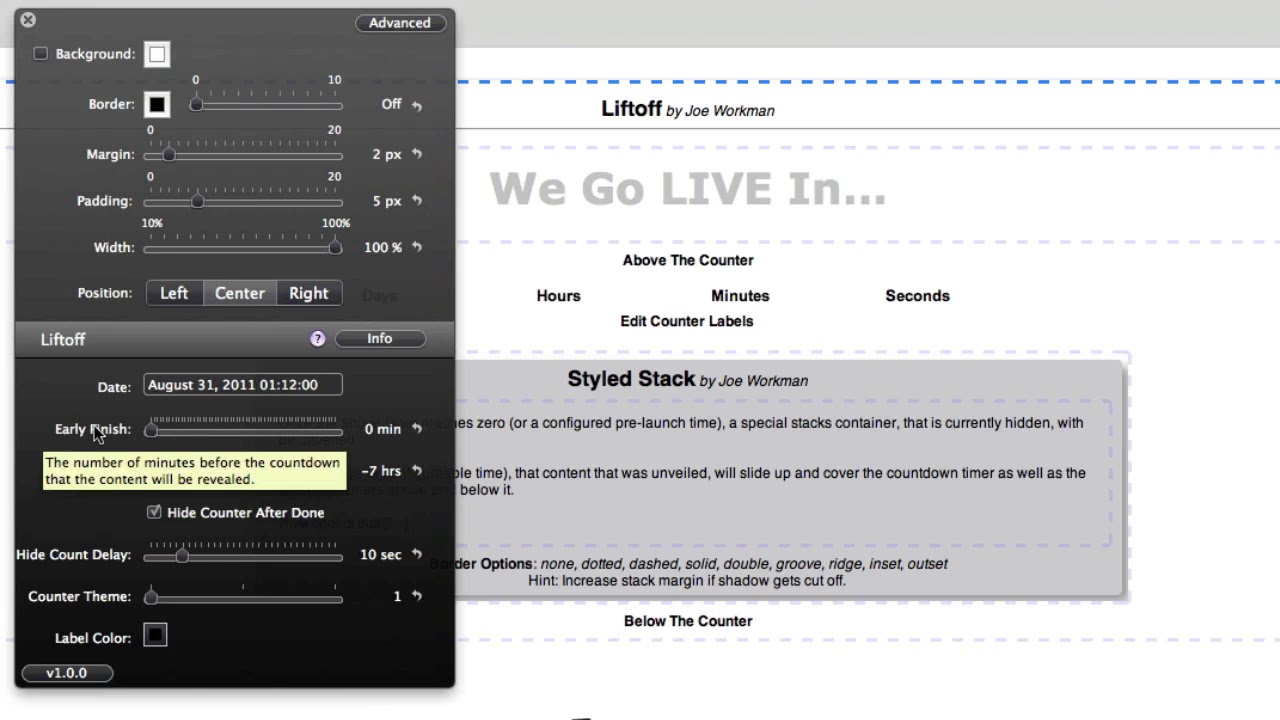
00:07 hi this is Ryan from rap Weaver
00:09 classroom comm and I'd like to introduce
00:11 you to the liftoff stack from Joe
00:12 workman liftoff is a great solution for
00:15 launching new products announcements or
00:18 even a new version of your website with
00:20 rapidweaver you can see here that it
00:22 presents a nice countdown clock with
00:24 some information above and below the
00:26 clock and once the countdown is
00:28 completed it will reveal hidden content
00:30 to your viewers and so I'm going to jump
00:33 into edit mode and you'll see how this
00:34 is all set up this entire stack is the
00:37 liftoff stack and it contains several
00:39 drop zones inside the first of which is
00:41 content for above the counter so you can
00:43 place any type of content using stacks
00:45 above the counter in the liftoff stack
00:48 next you will have the place where the
00:50 liftoff stack places the counter and
00:53 here you can change out the wording for
00:56 the labels so if you're using a language
00:59 other than English for example you could
01:00 change out the words in those text areas
01:03 for the labels of the counter next is
01:06 content that is displayed below the
01:08 countdown clock and so this again can be
01:11 any type of content added using the stax
01:14 plugin finally at the bottom we have the
01:16 hidden content this is the content that
01:18 will be displayed once the counter has
01:20 completed and so you can again place any
01:22 type of content using stacks into that
01:25 hidden content space and liftoff
01:27 let's jump into the inspector head for a
01:29 moment and take a look at all of the
01:30 options you need to apply the date that
01:33 the countdown is set to expire and so
01:36 this is the recommended format with the
01:38 month the day the year and then the time
01:40 based on the 24-hour clock located there
01:43 next is early finish if you would like
01:45 the content hidden content to actually
01:48 display ahead of time you can set an
01:50 early finish there based on the number
01:52 of minutes next if you want the
01:55 countdown to end based on your time zone
01:57 then you'll need to set your time zone
01:59 using a plus or minus amount of hours
02:02 based on GMT time and so that will be
02:05 modified in this location if you'd like
02:08 to hide the counter after it's completed
02:10 you can do so by selecting this option
02:12 otherwise you can have a display all
02:13 zeros
02:14 by unchecking this box if you do want to
02:17 hide the counter there can be delay
02:18 before that happens and that's based on
02:20 this slider in this example it will
02:22 remain on the screen for 10 seconds
02:25 before disappearing after it's completed
02:27 finally there are three different themes
02:29 for the counter that will display the
02:31 counter and different styles and you can
02:33 also change the color of the counter
02:35 labels using a color picker option here
02:37 and so those are the different variables
02:39 for the liftoff stack you can see it's a
02:42 very nicely designed option for counting
02:45 down to a great moment with your website
02:47 so that is the liftoff stack from Joe
02:50 workman
02:59 you


