
Stacks Guru is born from the need to search the vast number of videos out there on stacks built for Stacks Pro and the Stacks 5 plugin for Rapidweaver.
We have scraped over 500 videos to get the transcripts for each in order to make the spoken word searchable.
Please use this free tool to help you learn and discover the awesome power that Stacks and the stacks made for Stacks have to offer.
00:07 hi this is ryan from wrap Weaver
00:09 classroom calm and like to introduce you
00:11 to the light gets tak from Joe workman
00:13 like it adds social networking widgets
00:15 to your website that enables your
00:16 visitors to share information about your
00:19 website with their friends through the
00:20 different social networks and so it's a
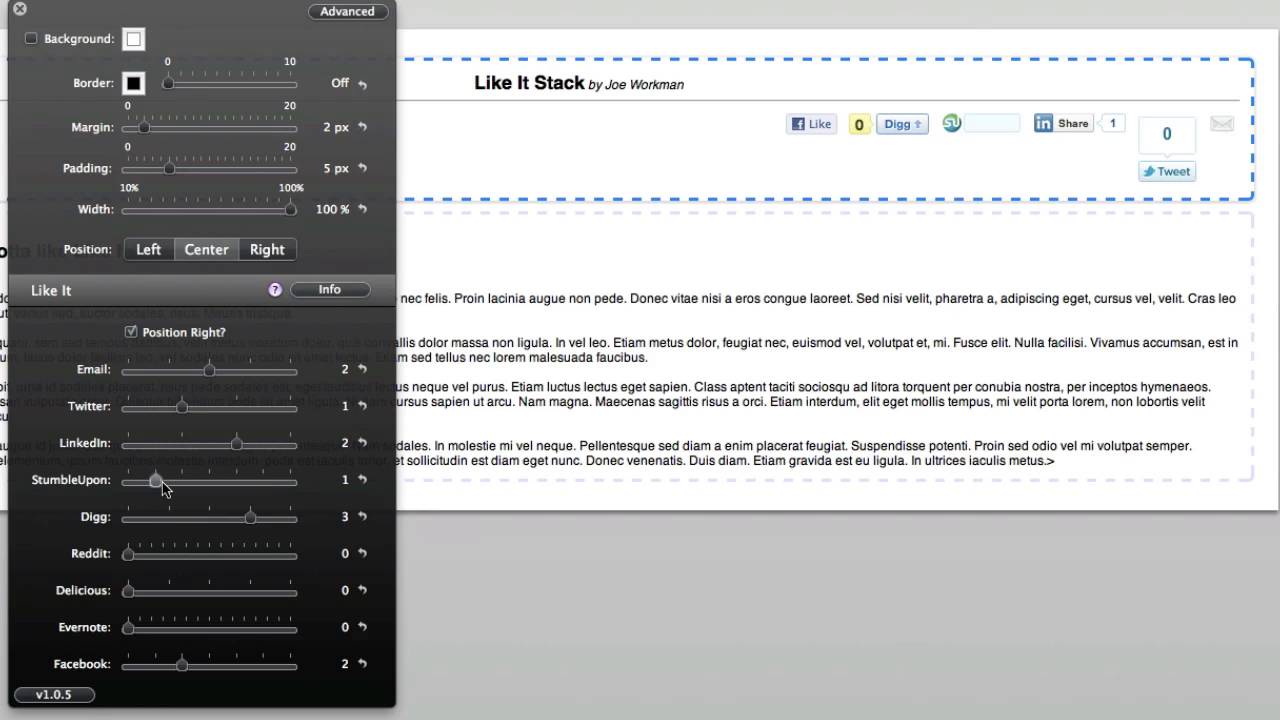
00:22 very simple stack to use it supports up
00:24 to 10 different networks and up to 5
00:27 different styles of icons for each
00:29 Network and so if we click into the edit
00:31 mode you'll see that it is a very simple
00:32 stack that's added to the page if we go
00:34 into the inspector hut you'll see the
00:36 option is located there you can position
00:38 your networking widgets to the right or
00:41 the left with this option and then you
00:42 can set the styles of each individual
00:45 widget so we've got widgets for email
00:47 Twitter Linkedin stumbleupon Digg reddit
00:50 delicious Evernote and Facebook and for
00:53 each of these there are different styles
00:54 of icons to choose from and so as I
00:56 slide these two different options you
00:58 can see in the background of edit mode
01:00 that these adjust their dynamically if
01:03 you would like to disable a network
01:05 altogether you can simply slide the
01:07 slider all the way down to zero value
01:09 and that will remove it completely from
01:11 the list and so you can see that's a
01:13 very simple stack to use and it is free
01:15 and you can't beat that and so this is
01:18 the like it stack from Joe workman


