
Stacks Guru is born from the need to search the vast number of videos out there on stacks built for Stacks Pro and the Stacks 5 plugin for Rapidweaver.
We have scraped over 500 videos to get the transcripts for each in order to make the spoken word searchable.
Please use this free tool to help you learn and discover the awesome power that Stacks and the stacks made for Stacks have to offer.
00:00 let's get down and dirty with all the
00:01 awesome settings in the match height
00:04 stack hey everybody Joe workmen here and
00:14 in this video we're going to be going
00:15 in-depth into the match height stack
00:17 we're going to look at all those
00:19 advanced options and see how we can
00:22 create really nice layouts with matching
00:24 the heights of various elements within
00:26 our layouts right so without further ado
00:29 let's jump on in and have some fun now
00:31 here is an example of a slightly more
00:34 advanced to layout using match height
00:36 inside this layout we're matching
00:38 multiple things if we look at this
00:41 particular layout without any sort of
00:43 match height going on we'll see that the
00:45 headers are different sizes and then our
00:47 middle content is different size as well
00:50 okay so how do we accomplish this so
00:53 that everything is uniform our header
00:55 areas as well as our middle content
00:57 areas are all matched first off we start
01:01 off by turning off single rule mode and
01:04 we're now going to be entering multiple
01:07 rule mode for this particular layout now
01:11 when you click on multiple rule mode
01:13 you'll notice that all the other
01:15 settings are gone from this stack and
01:18 the reason is there's now a child stack
01:21 that you can add multiple rules for your
01:24 layouts so you'll notice that there is a
01:26 plus button added to the bottom of my
01:28 match heights rules and I can just click
01:30 on that to add a new rule to my layout
01:35 so let's look at the existing rules that
01:38 I have set up here okay I have one
01:41 that's going to match the top and a rule
01:43 that's going to match the middle of my
01:45 layout okay so if we look at the top
01:47 layout will see that i'm going to target
01:50 inside this rule the match height ID and
01:53 if we look at this target list it's
01:55 exactly the same as we saw in the single
01:58 rule mode okay but in this particular
02:01 option we want to match a particular
02:03 height ID okay and i'm going to set that
02:06 ID to be top okay now we have multiple
02:10 rules here so now for this rule I want
02:13 to make sure that the hype is the same
02:15 on just the row I don't want to have a
02:18 stop rule and I want to set my property
02:20 to use the height property now for the
02:23 second rule here it's very similar setup
02:25 all i have to do is set the match height
02:27 ID to be something different in this
02:29 case i used the word middle
02:32 so how do we assign these particular
02:35 match height IDs to our layouts match
02:39 height ships with a second stack called
02:41 match column and we see that match
02:44 column here inside of our layout and if
02:48 we look at the settings for this match
02:49 column you'll see that the only setting
02:52 in here is for match height ID and this
02:55 is where I can set the ID to be top so
02:59 what I've done is I've added a match
03:01 column okay to the top of each of my
03:04 layouts and i set the match ID to be top
03:07 on all three of them and as you might
03:10 suspect the middle column that contains
03:13 the content in the middle ok has a match
03:16 ID of middle and it's the same on all
03:19 three columns inside my layout
03:24 now you can treat this match column as
03:27 just a one-column stack okay that's
03:30 essentially what it is it's a one-column
03:32 stack with a match-high tidy assigned to
03:34 it now there are some stacks out there
03:36 that are already have integrated with
03:38 the match height ID um sections pro and
03:41 sections box do on a future update to
03:44 foundations will bring the match ipad
03:46 the columns as well so we're gonna have
03:49 multiple options here if you don't want
03:51 to use the match a column stack see if
03:54 your favorite column stacks or elements
03:56 out there already support it so now that
03:59 I have set up my multiple rules for top
04:02 and middle and I've added my match
04:04 column inside my layouts and all of
04:07 those match columns are now going to be
04:08 matched right this is how we can achieve
04:11 this particular layout really simple
04:14 just by adding a couple you know column
04:16 stacks and adding some IDs to our
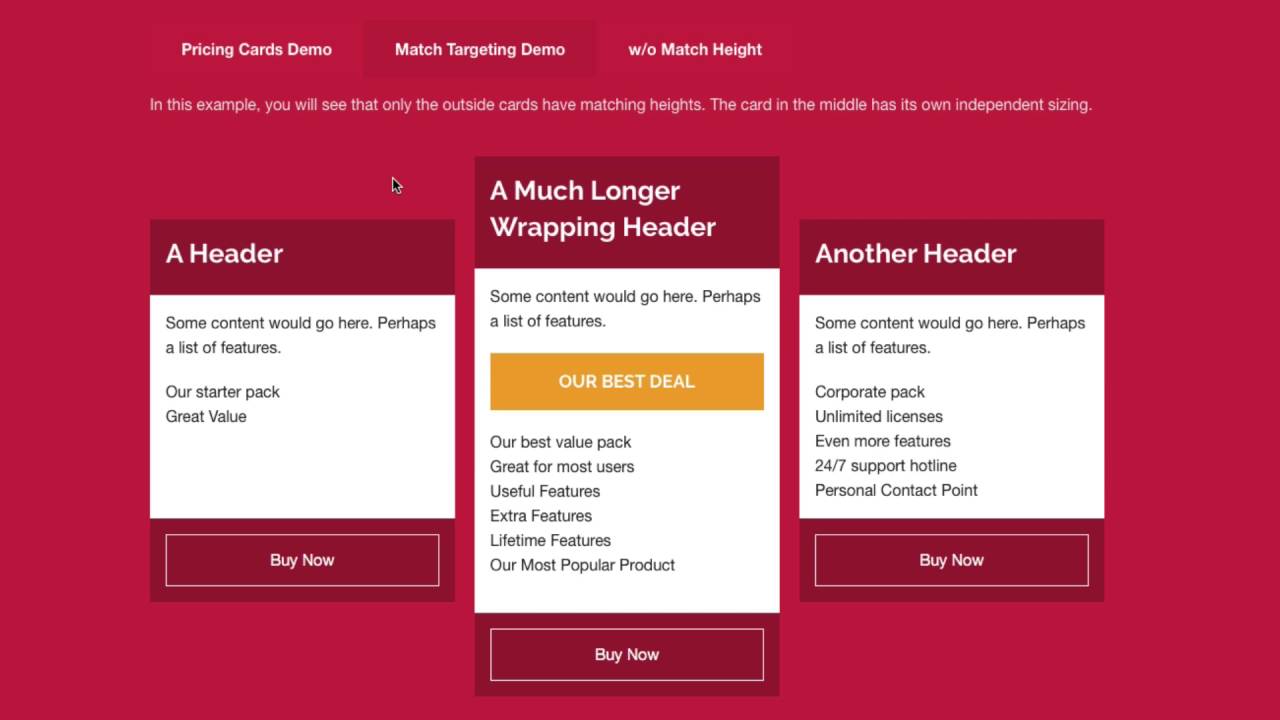
04:18 layouts now if we look at the second tab
04:20 in this example we have a slightly
04:22 different layout we have the first and
04:25 last columns matching but the second
04:27 column is blar jur and it makes it stand
04:30 out because it's different right this is
04:33 great for pricing tables okay how did we
04:36 accomplish this now achieving this
04:39 layout is super easy okay essentially I
04:42 have the same exact layout that we had
04:43 before I have the match columns on the
04:46 top and the middle for you know all my
04:48 columns now for the middle column what
04:51 I've done is I've just changed the match
04:53 Heidi to be something different other
04:55 than top in this case I just typed in
04:58 off and for the middle i typed off as
05:01 well so that means that the match height
05:05 IDs will only match the rules that I've
05:08 defined in the first and last columns
05:10 here now I could have just added a
05:13 one-column stack instead of using a
05:15 match stack okay um but it was quicker
05:19 for me just to build this layout um
05:21 since a match column is the same thing
05:23 as a one-column stack all I needed to do
05:25 is make sure that I change the match
05:28 height ID to be something different than
05:30 what my rules were and it would
05:32 basically ignore this middle column now
05:35 also what I did is on the first and last
05:37 call
05:38 I added a little bit of margin to the
05:40 top so they looked a little bit indented
05:42 a down since this middle column was so
05:45 much taller than the first and last
05:47 columns so you've pretty much seen it
05:50 all now but just for thoroughness I'm
05:52 gonna go through and look at this final
05:54 demo okay now here I'm using a
05:57 foundation block grid and I'm matching
05:59 various groups okay depending on the row
06:03 so here I I'm matching by row on two
06:08 different groups let's look at this so
06:10 here's this particular layout will see
06:12 that inside the match height stack i
06:14 have set to multiple rules so if we
06:16 scroll down we'll see that i have two
06:17 rules set up here I have a rule for
06:20 group 1 which is set to be have a match
06:23 idea of group 1 and we're then we're
06:25 going to match on the same row and I
06:27 have zero stop rules and we're using the
06:29 height property and this similar thing
06:32 for group 2 I just set the match height
06:34 ID to be group 2 instead so adding this
06:38 to our layout is really simple here I've
06:39 just added a couple foundation panel
06:41 stacks okay that have various colors
06:43 okay and I made sure that you know each
06:46 panel correspond to its particular group
06:48 right so if we look at this I've added a
06:52 match height stack to my panel and then
06:56 the content inside that match height
06:58 stack okay so here if we look at this I
07:01 i set the match height they D to B group
07:03 1 and if we look at the match height
07:05 stack and if we look inside the match
07:07 column stack on this one it's set to
07:10 group 2 so on and so forth every single
07:13 match column stack inside this layout is
07:16 set to either group one or group two and
07:18 I've made sure that those are color
07:20 coded
07:21 and that's all we needed to do for this
07:24 advanced layout right it's really simple
07:26 with that match column stack it really
07:29 gives you a lot of flexibility and power
07:31 in terms of assigning various Heights to
07:33 different components within your layout
07:35 now this height ignore row is the same
07:39 exact setup the only difference is
07:41 inside my rules I have the UM you know
07:45 with within the same row setting
07:47 unchecked and then the stop breakpoints
07:50 a demo here again the same exact
07:53 settings is our first one I just
07:55 configured a stop break point in each
07:58 rule in this example I stopped it
08:00 between 700 and 1,000 pixels so that
08:04 does it for our in-depth tutorial of
08:06 match hype as you see even for advanced
08:08 use cases it's still really easy to use
08:11 right that match column stack makes it's
08:14 really super easy to assign various
08:17 match IDs throughout your layout now
08:19 like I said before there's a lot of
08:21 other stacks out there that integrate
08:23 using match-high tidy as well so have a
08:25 look at that ok I know sections box does
08:28 in sections pro from big white duck and
08:30 foundations columns will soon okay but
08:33 until then that match column stack will
08:36 work wonders in terms of you know giving
08:39 you a lot of flexibility and assigning
08:41 the height to various layout components
08:43 I hope you enjoyed this video I hope
08:46 that you see how easy match hype is and
08:48 how powerful it is to you know do
08:51 dynamic layouts on your websites so I
08:55 hope you enjoy thanks very much for
08:56 watching everybody today and I'll see
08:58 you soon bye


