
Stacks Guru is born from the need to search the vast number of videos out there on stacks built for Stacks Pro and the Stacks 5 plugin for Rapidweaver.
We have scraped over 500 videos to get the transcripts for each in order to make the spoken word searchable.
Please use this free tool to help you learn and discover the awesome power that Stacks and the stacks made for Stacks have to offer.
00:09 so in this video I want to talk a little
00:11 bit about menu layouts and how we need
00:14 to think outside the box a lot of times
00:17 I hear people thinking oh I need a menu
00:19 that can do this or I need a menu that
00:22 can open up in a lightbox and you know
00:26 things like that and really in
00:27 foundation six menus are extremely
00:31 modular and you can make your own right
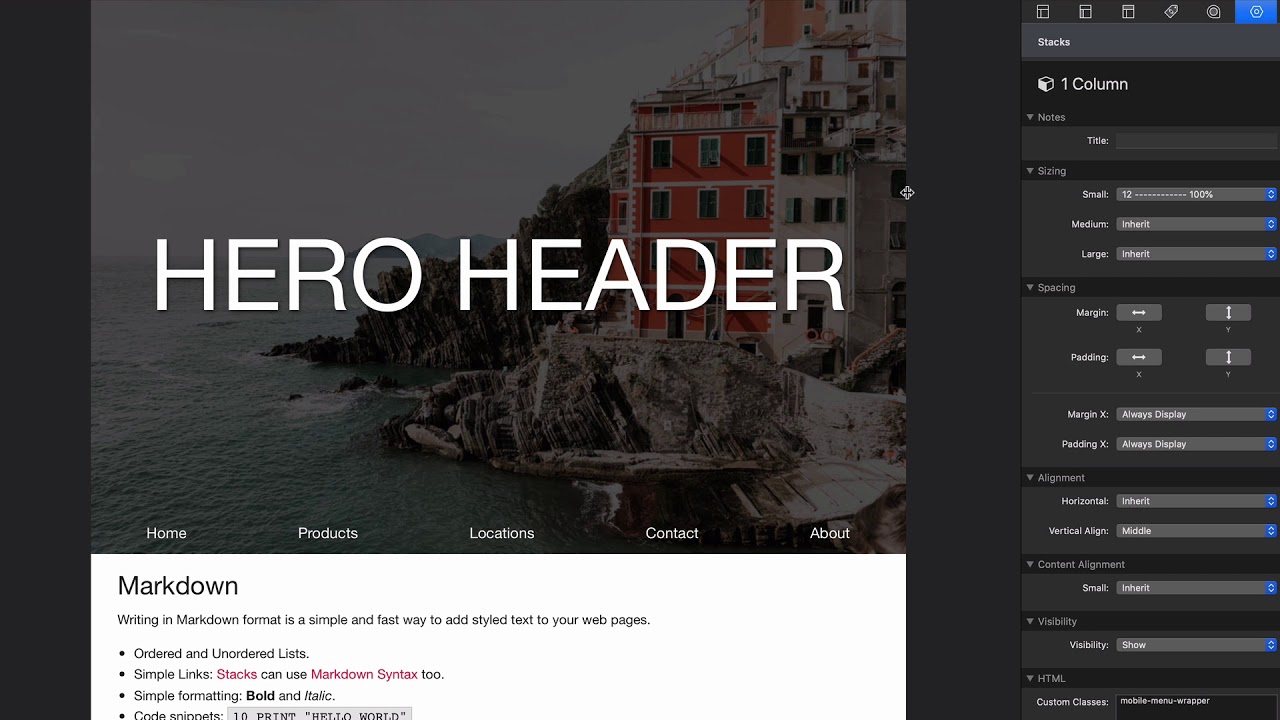
00:34 so here's a quick example like here I
00:37 just have a simple menu at the bottom of
00:40 a hero header this uses the hero header
00:42 template added menu that hub that
00:44 positions at the bottom of it and a lot
00:47 of times let's say we want you know a
00:49 request I get a lot is I need to open up
00:51 a menu in a lightbox okay well you know
00:54 as this gets you know smaller and
00:57 smaller on mobile we'll see that oh hey
00:59 I have a hamburger that showed up and
01:00 when I click on it Oh voila I have a
01:03 lightbox with my menu well there there
01:07 wasn't a stack to do that right um
01:09 because all of this is just possible we
01:12 already have a lightbox we already have
01:15 a menu we already have a hamburger stack
01:18 right we just need to learn to position
01:21 all those things together
01:23 so I want to challenge you to you know
01:26 whatever you want you can probably build
01:29 it with the stacks right now I'm gonna
01:32 show you a quick example of how I did
01:34 this but I'm not showing you just a just
01:37 a shoehorn your thoughts into using this
01:40 and this will be released as a template
01:41 if it isn't already okay
01:45 but I just want to want you to think
01:47 outside the box where how you can use
01:51 all these foundations six components to
01:55 really make what you want
01:58 okay now I'm gonna review this really
02:01 quick I'm not gonna spend too much time
02:02 in this okay but here we have the hero
02:04 header this is purely using the hero
02:07 header template okay
02:08 um up at the top I added a visibility
02:12 stack with a hamburger okay I changed
02:15 some of the hamburger styling I said
02:17 it's open a light box the light box
02:19 ideas menu box right the visibility on
02:22 this hamburger is set to show for small
02:24 only
02:26 okay now I I did add a class to the
02:29 hamburger called burger where I have a
02:31 position swatch somewhere here we go
02:34 that set it to float to the top so the
02:37 hamburgers gonna float to the top of my
02:39 of my head gyro header okay that takes
02:45 care of the hamburger it only shows on
02:47 mobile it opens up a lightbox we're good
02:52 - five minutes gone okay then I added a
02:55 menu and the menu we I had a style right
03:00 so we I created a menu style that
03:01 changed some colors and whatnot right
03:03 and I actually changed the font size as
03:06 well so it's a little bit bigger it's 18
03:08 pixels um and that's all added to the my
03:11 menu class right and of course the my
03:13 menu class is added to the menu okay and
03:17 then I also have a position swatch for
03:19 my menu that sets it surprisingly to the
03:22 bottom
03:25 okay so that takes care of our menu and
03:28 oh and the menu also is set to in the
03:33 menu I also said it's in the visibility
03:35 to hide for small only right so this
03:39 menu will hide on the small device
03:41 because we're showing the hamburger
03:42 right we don't need to see both at the
03:44 same time
03:48 then we have our lightbox right and you
03:51 know inside of her lightbox I obviously
03:54 I set the ID to the menu box
03:56 um or I'm sorry the ID here to menu box
03:59 I didn't change any other setting here
04:01 you can add some fancy animations to the
04:04 lightbox if you like right but the
04:08 lightbox is simple that's it we just
04:09 need a set of an ID we have a lightbox I
04:11 need to have a close button in the
04:13 lightbox because we want to be able to
04:14 close that lightbox
04:16 so I just added that didn't change any
04:18 settings there um then we have a menu
04:22 okay and the menu here is a vertical
04:27 menu it's the same exact mini that I had
04:28 up here so I just copied and pasted it I
04:31 did change them I made it a vertical
04:33 menu and I Center the text and I made
04:37 sure that it's always displayed not
04:39 height for mobile as we want to show
04:41 this on mobile
04:43 and I also I changed the font size and
04:46 made the font size really big I mean it
04:48 24 pixels or mobile menu
04:51 okay now III wanted to we look they
04:56 let's go to small um if we look here I
05:00 um this the many was actually centered
05:03 in the light box right so because
05:07 without what I'm about to show you the
05:09 the many would just be at the top of the
05:10 label
05:11 so what I did is I rapped the menu in a
05:15 one column and if we look here I created
05:19 a height rap a height stack swatch and I
05:23 assigned it's a menu mobile or mobile
05:25 menu wrapper and I said it's a height
05:27 100% so it's going to grow to the height
05:29 of the light box
05:31 okay so this one column is a mobile menu
05:36 wrapper it's gonna be height 100% of the
05:40 light box and then all I had to do then
05:42 is set the vertical alignment to middle
05:44 and magically we have a menu that I have
05:48 been people have been asking me left and
05:50 right for right and you've had it all
05:53 along
05:56 okay it's just it's just learning how to
05:59 use these components to to bend to your
06:03 will right and just think of it
06:06 component I need I need a hamburger that
06:08 hamburger needs to launch a light box
06:10 that light box needs to have a menu
06:12 right you get to build all this stuff
06:15 yourself I mean I'm really excited to to
06:18 see what all you you create I've already
06:21 seen some amazing menus right and
06:23 they're just built out because the
06:25 drop-down or the drill down or any of
06:28 this stuff they're they're just
06:30 components that you can use in overall
06:33 design
06:36 right use things like off canvas right
06:40 which I believe we have a another
06:43 template for where you can have your
06:45 menu slide in from this from off the
06:47 browser window right so we can use off
06:50 canvas or we can slide in from the top
06:52 or the bottom right off canvas is super
06:54 flexible
06:56 okay just think outside the box and
06:59 think how okay what do I want how can I
07:01 use the components that I have to
07:03 accomplish that let me show you one more
07:06 example that I'm definitely gonna be
07:09 shaken as the temple as of right now um
07:11 if it hasn't been released it will be
07:13 released okay and
07:18 so let's look at this um layout here
07:21 here I created a very interesting layout
07:24 where we have this fixed sidebar on the
07:26 side you know and here we go it hides on
07:31 mobile but maybe on mobile I could do
07:32 something different okay but when you
07:34 only hover over it gives us a menu
07:38 right this isn't a stack all right I I
07:41 just I built this with the stacks that I
07:44 have
07:45 I built this menu using stack actually
07:50 funny if this actually doesn't contain
07:51 any menu stacks I think these are
07:53 actually buttons okay um but I mean
07:58 we've made a menu stack
08:01 I'm gonna throw this on a partial put it
08:03 on every page we're good to go
08:05 right so again learn about what each
08:10 component does and see how you can mix
08:12 them together to make the perfect menu
08:15 that you need okay hopefully share what
08:19 you're building on Weaver space and
08:21 we'll see you soon


