
Stacks Guru is born from the need to search the vast number of videos out there on stacks built for Stacks Pro and the Stacks 5 plugin for Rapidweaver.
We have scraped over 500 videos to get the transcripts for each in order to make the spoken word searchable.
Please use this free tool to help you learn and discover the awesome power that Stacks and the stacks made for Stacks have to offer.
00:07 hello everyone this is Joe workman and
00:09 today I'd like to show you pop-up
00:10 caption the pop-up caption stack allows
00:14 you to add beautifully animated captions
00:16 to all of your images as you see when
00:19 you hover over the image the caption is
00:21 then unveiled on top of the image now
00:25 when you add pop-up caption to your
00:27 project you're simply going to add in
00:29 your favorite image and the stacks that
00:31 you want to be a part of the caption now
00:33 normally your pop-up caption will only
00:36 be text however since this is a general
00:39 Stax drop area play around with some
00:41 other stacks and see what you can do
00:43 let's jump into the stacks settings so
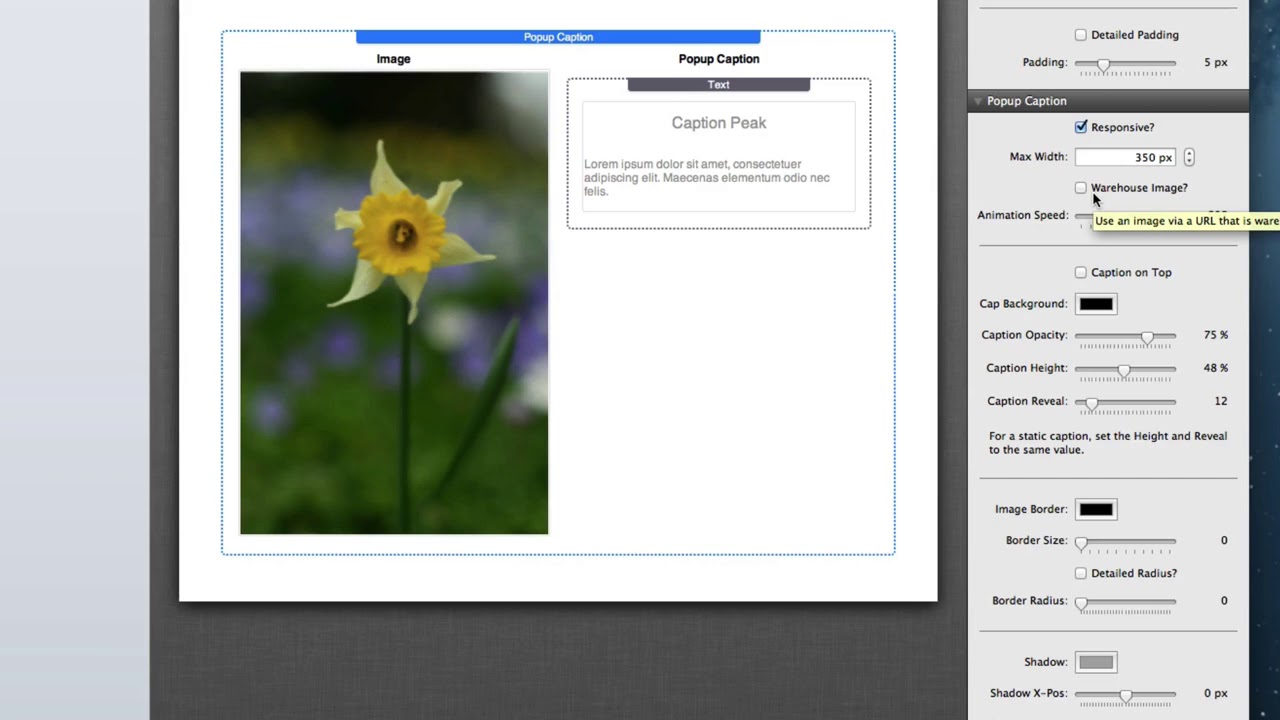
00:47 as we see at the top of the pop-up
00:48 caption settings pop-up caption does
00:51 support responsive design when you check
00:55 that box you'll have the ability to
00:56 actually define a maximum width that the
00:59 image will take you can also define a
01:02 warehouse image where you can provide an
01:05 external URL to your image and also
01:08 define alt tags width and height
01:10 settings next we have animation speed
01:14 where you can actually define the speed
01:16 that the caption will animate in by
01:20 default captions will show at the bottom
01:22 of your image however you can also
01:24 configure them to default be at the top
01:27 you then configure the background color
01:30 the opacity the height of your caption
01:33 as well as the initial reveal on page
01:35 load finally at the bottom we can add an
01:39 image border border radiuses or rounded
01:41 corners and a shadow to our pop-up
01:44 caption images this is the pop-up
01:47 caption stack and I hope you enjoy it I
01:49 hope that it makes your websites a
01:50 little bit greater thank you very much
01:52 everybody
01:52 have a great day bye bye


