
Stacks Guru is born from the need to search the vast number of videos out there on stacks built for Stacks Pro and the Stacks 5 plugin for Rapidweaver.
We have scraped over 500 videos to get the transcripts for each in order to make the spoken word searchable.
Please use this free tool to help you learn and discover the awesome power that Stacks and the stacks made for Stacks have to offer.
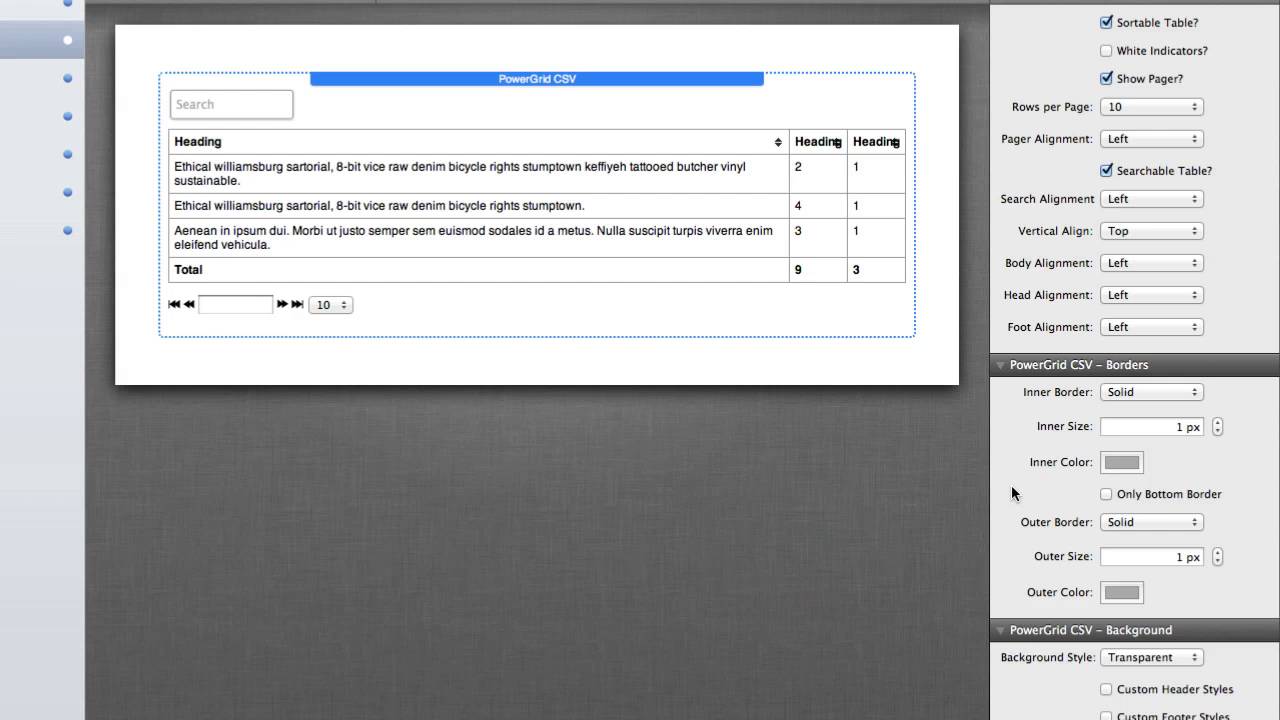
00:06 hello everyone this is Joe workman and
00:09 today I'd like to introduce you to the
00:11 new power grid CSV stack this amazing
00:14 stack allows you to build beautiful HTML
00:17 tables directly from a CSV file now
00:21 don't let the simplicity of how this
00:22 stack looks in edit mode fool you this
00:24 is definitely one powerful stack that is
00:27 the easiest and best way to build your
00:30 HTML tables there are a ton of settings
00:34 here you can turn off a header row you
00:37 can have a fuller road turned on or off
00:39 you can make a table scrollable which
00:42 essentially means that you could have
00:43 your table body a specific height and if
00:47 the constants of that table goes larger
00:49 no problem the table will scroll just as
00:52 you would expect it to you can have the
00:55 table sort so you can if the headers are
00:57 clicked on it they will sort you can
00:59 even show a pager so that if you want to
01:01 have multiple pages on your table to say
01:04 show 20 items per page and then have
01:07 your users click through each page in
01:10 your table there is also a searchable so
01:13 you can actually add a search box to the
01:15 top of your table and when text is type
01:18 into that the table is automatically
01:20 limited down to the contents that match
01:22 that text search now there are tons of
01:26 other features for setting up text
01:28 alignment inside borders outside borders
01:32 the border style the size the color um
01:35 you can even have change background
01:37 colors so let's say we want a solid
01:40 color background for our table or we
01:42 want alternating colors so we have the
01:44 odd and even rows be different colors
01:46 you can provide custom header styles to
01:49 actually customize the different colors
01:51 for not only your header but also your
01:53 footers and last but not least we have
01:57 highlights tiles what you like to
01:59 customize based on whether or not you
02:01 want a specific row or column to be
02:04 highlighted statically or when it's
02:08 hovered over and lastly for all those
02:12 users that really
02:13 get down and control the widths and
02:15 Heights and columns of everything we
02:18 have some advanced settings that you can
02:20 uncheck that allow you to customize not
02:22 only just the column width for every
02:24 single column but also the text
02:27 alignment for that column because let's
02:29 say some columns you would want text to
02:31 be centered other columns you would like
02:33 text to be flush left no problem we can
02:36 totally handle that and same thing for
02:41 row Heights if you select on row height
02:43 you can actually configure the actual
02:46 row height for every single row so if we
02:49 check out this beautiful stack in
02:51 preview you will see exactly what this
02:53 table will look like now if you know a
02:55 little bit of HTML you can actually
02:57 extend power grid to do even more than
02:59 just text such as images links and
03:02 whatever you can think of so I hope you
03:05 enjoy the new power grid CSV stack thank
03:07 you very much and have a great day
03:16 you


