
Stacks Guru is born from the need to search the vast number of videos out there on stacks built for Stacks Pro and the Stacks 5 plugin for Rapidweaver.
We have scraped over 500 videos to get the transcripts for each in order to make the spoken word searchable.
Please use this free tool to help you learn and discover the awesome power that Stacks and the stacks made for Stacks have to offer.
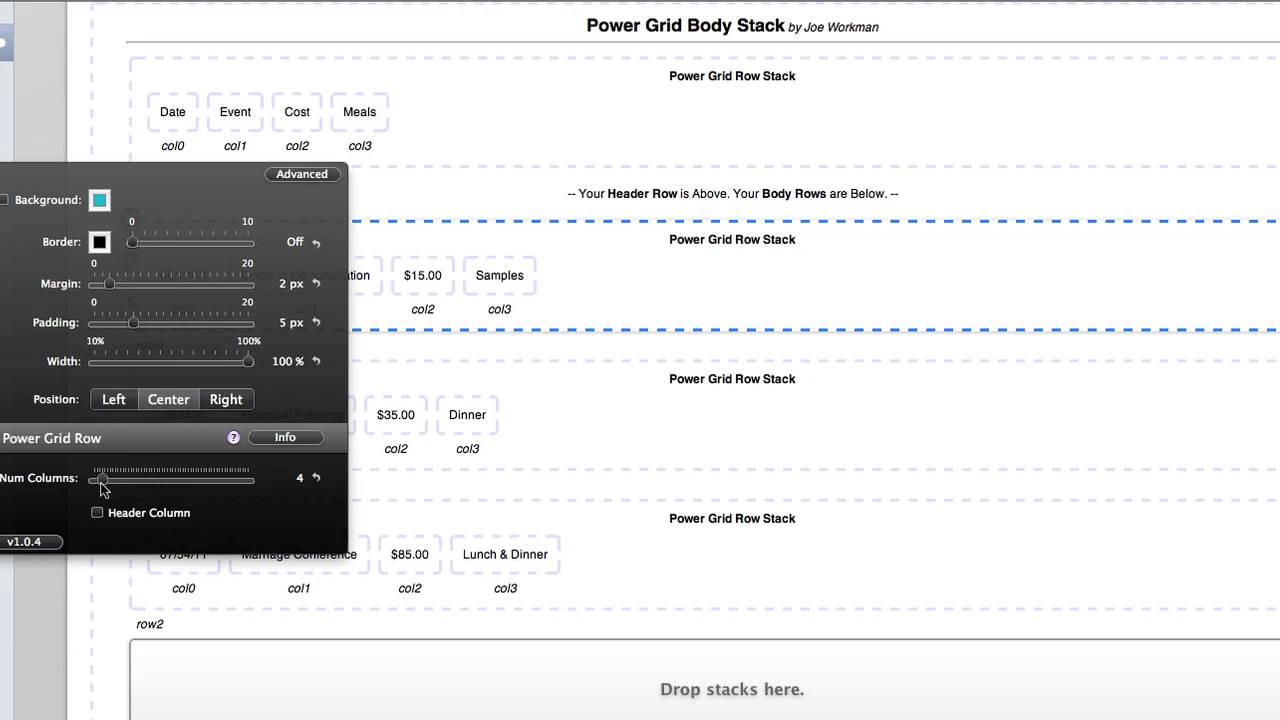
00:07 hi this is ryan from wrap Weaver
00:09 classroom calm and like to introduce you
00:11 to the power grid stack from Joe workman
00:13 power grid enables you to add HTML based
00:16 tables that are very flexible and you
00:19 can style these without any knowledge of
00:21 CSS and so you can see in this example
00:23 that we've got a basic table created
00:25 with power grid that displays upcoming
00:26 events and there are four columns with
00:29 three rows of content in one header row
00:31 and so power grid supports header rows
00:33 which you can see here in the blue and
00:36 then it also allows for rollover effects
00:39 as you go down the content of the power
00:43 grid stack and so let's take a look at
00:45 the edit mode we'll see how this is all
00:46 put together first I've got my power
00:49 grid body stack power grid comes with
00:51 both the body stack and the power grid
00:54 row stack and you can find these both in
00:57 your library once they're installed in
00:59 order to utilize power grid you first
01:02 need to add the body stack and then
01:05 place the roast X inside of it and you
01:07 have spaces presented for your rose if
01:10 you select the number of rows in the
01:13 stacks HUD for the power grid body stack
01:15 and so there are a tremendous number of
01:17 rows available you can go all the way up
01:19 to 60 rows of stacks and so if I go back
01:23 down just a bit we'll take a look here
01:26 and if I scroll down you'll see the open
01:28 slots for more roast X you would just
01:31 simply grab your row stack and drop it
01:33 into the space and then customize the
01:36 rows and so while we're looking at the
01:38 Rose stack let's look real quick at the
01:40 inspector HUD for it it's a very basic
01:42 and simple two options one is the number
01:44 of columns for the stack and then
01:47 whether or not it is a header column my
01:49 header column stack is located above
01:52 right here in this space and so if I
01:55 were clicking to the inspector HUD for
01:56 that stack you would find that header
01:58 column is selected and then I've got the
02:01 number of columns set to four it makes
02:03 the most sense of course to have all of
02:04 your roast axed set to use the same
02:08 number of columns and so these three
02:10 that I'm utilizing in this case all have
02:12 four columns
02:13 again that is through the inspector for
02:15 the roast deck itself and just what the
02:18 slider you set the number of columns
02:20 that you would like to utilize so let me
02:22 go back into the body stack itself and
02:25 we'll go and scroll down to the three
02:29 rows that I'm currently utilizing next
02:32 we have the option to use the header row
02:34 which I do if you disable that that
02:36 makes this header row disappear you can
02:39 see it reappear when I select it right
02:41 there next is the color of the header
02:44 row and the color of the header text so
02:46 once again let's take a look at that
02:47 where we've got the header row in this
02:49 blue with the white text and that gives
02:51 it a nice header at the top of the stack
02:55 next we have the border if you would
02:57 like to provide a border around each
03:00 piece of content in the stack you can do
03:02 so with a thickness size here with a
03:04 slider you can set a style for the
03:06 border in this field and in the color as
03:09 well you can also choose to only display
03:11 the border at the bottom and you can
03:13 also choose to not display a background
03:15 color unchecking that I'm checking the
03:18 option for no background color would
03:19 really make it a very basic table as you
03:22 can see here of course if you do this
03:24 you might want to adjust your roll over
03:26 and we'll look at that in just a moment
03:29 finally we have options consuming you
03:32 want background colors to set those
03:34 colors here for even odd rows in the
03:38 hover color and the hover text and
03:40 speaking of the hover you can choose to
03:42 turn that off and disable it with the no
03:44 hover option and then finally if you're
03:47 going to be building a large table then
03:49 you might want to display the show
03:51 sizing tips option that places some more
03:54 information at the bottom of the power
03:56 grid stack which talks about how to set
04:00 the width of your columns in order to
04:03 add content to those because as I
04:05 mentioned you can add I'm not only a
04:07 massive number of rows but also within
04:11 each row stack you can add a massive
04:13 number of columns and so up to 16 you
04:16 can see those stretched across the page
04:17 here and so you can really build some
04:21 very very large tables using the power
04:24 grid stack but it
04:25 very simple to set up in style without
04:28 any coding knowledge whatsoever and so
04:30 that is the power grid stack from Joe
04:33 workman
04:43 you


