
Stacks Guru is born from the need to search the vast number of videos out there on stacks built for Stacks Pro and the Stacks 5 plugin for Rapidweaver.
We have scraped over 500 videos to get the transcripts for each in order to make the spoken word searchable.
Please use this free tool to help you learn and discover the awesome power that Stacks and the stacks made for Stacks have to offer.
00:00 so we built our email now it's time to
00:02 send it
00:07 hey everybody Joerg Minh here and
00:10 hopefully you've already watched the
00:11 getting started video for the email
00:14 stacks and you've built your first email
00:16 okay now in this video what we're going
00:18 to do is we're going to show you how to
00:19 take that and then get the raw HTML for
00:23 it and then get that into your favorite
00:26 email service okay now there are tons of
00:28 various email services out there um in
00:31 this particular video I'm gonna be
00:32 showing you mine but remember this works
00:34 with MailChimp sendee um convertkit
00:38 active campaign campaign monitor you
00:40 know all of them okay because it is just
00:44 HTML on any email service will obviously
00:48 support that so without further ado
00:51 let's jump in and show you how easy it
00:53 is to get your email out of Rapid River
00:56 and into your email service okay so here
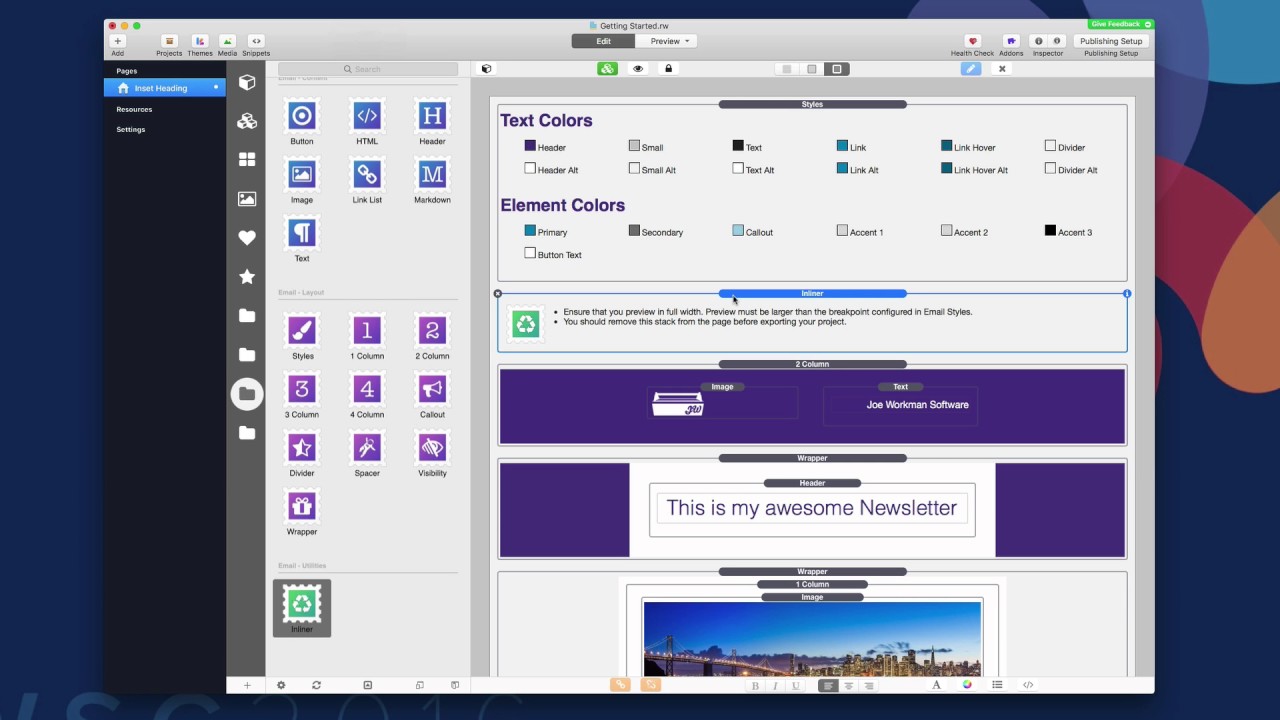
00:59 is the getting started email that we
01:01 built in the getting started with email
01:03 video okay so to get this ready to send
01:06 what we're gonna have to do is we're
01:07 gonna have to get the inliner stack that
01:10 is inside the email utilities stacks
01:12 layout group okay go ahead and drag that
01:15 onto the page now this can be added
01:17 anywhere on the page doesn't really
01:19 matter however as it says here in the
01:21 notes that if you are going to be
01:23 publishing your email make sure that
01:25 this stack is not on the page this stack
01:28 is purely to generate the email HTML and
01:31 then once you're done probably just
01:33 delete it and remove it from the page
01:34 now one thing you're also going to want
01:36 to make sure is that when you are
01:37 previewing your page you're going to
01:39 preview at full width okay so we want to
01:43 make sure you're not in mobile view you
01:44 want to make sure you're in full width
01:46 on your desktop and as you see here I
01:48 hit the preview and it magically
01:50 displays a lightbox that has two
01:53 versions of our email already compiled
01:55 for us it has the inline HTML version
01:59 and it has a plain text version of our
02:02 email okay really simple now if we want
02:05 to get this HTML all you have to do is
02:07 click this copy to clipboard button so
02:10 now I'm going to go into my email
02:11 newsletter software okay and I'm going
02:13 to paste in the HTML into the email
02:16 editor
02:20 you see here I have my email that we
02:22 designed inside rapidweaver ready to get
02:25 sent out to my email list now if you're
02:28 worried about subscribe buttons and
02:30 things of that nature make sure that
02:31 every single email service kind of has a
02:33 different macro syntax this particular
02:36 one if I want an unsubscribe link I
02:37 would put this bracket unsubscribe
02:39 bracket into the unsubscribe link okay
02:43 more details on that when we get into
02:45 the vendor specific videos on how to use
02:49 each individual service now we can go
02:52 and take a copy of that plain text
02:54 version of the email and paste that into
02:56 my service as well so now we are going
02:59 to be sending the plain text version and
03:01 the HTML version out to the customers
03:03 all at the same time so as you see it
03:06 really can't get much simpler than that
03:08 we add the inliner stack to the page
03:10 make sure that you know again we preview
03:13 in full width so that we get all the
03:14 proper media queries built properly okay
03:17 and then we click the copy to clipboard
03:20 button for the HTML and we paste it in
03:22 our email service it really is as easy
03:25 as that now I can't wait to see the
03:28 emails that you build so please go ahead
03:29 and make sure that you join our email
03:32 space on Weaver space community and and
03:35 share the email so that we can learn and
03:37 and see all the amazing things that we
03:39 are all building using the email for
03:41 rapidweaver stacks so until then thank
03:44 you very much and enjoy email bye
03:55 you


