
Stacks Guru is born from the need to search the vast number of videos out there on stacks built for Stacks Pro and the Stacks 5 plugin for Rapidweaver.
We have scraped over 500 videos to get the transcripts for each in order to make the spoken word searchable.
Please use this free tool to help you learn and discover the awesome power that Stacks and the stacks made for Stacks have to offer.
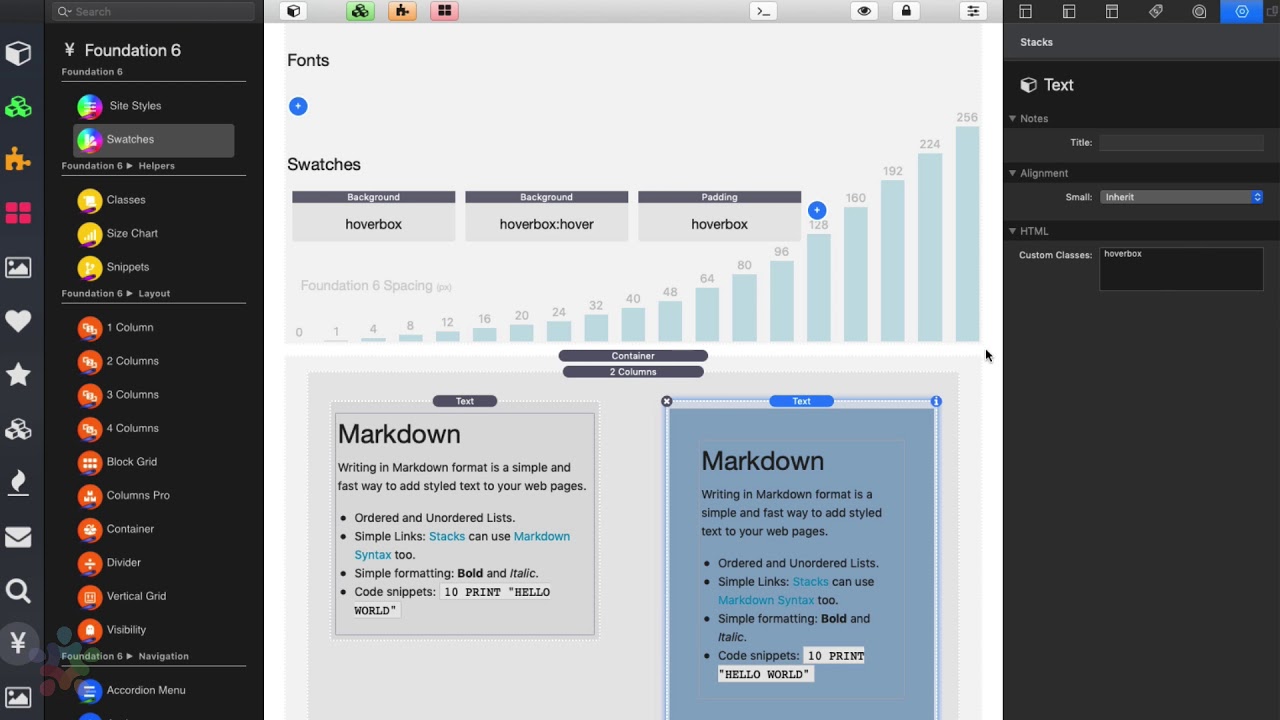
00:08 so in this video I want to teach you how
00:10 to do some hover effects so I've already
00:13 set up a couple swatches here um I have
00:16 a couple background Sierra had a
00:17 background of kind of a blue background
00:19 and I have the class set to hover box I
00:22 then have a different a swatch here with
00:26 a different background color I set the
00:29 same class to be hover box but then in
00:31 this time I set the state to be hover
00:33 okay and what you'll kind of notice here
00:35 inside the swatch it says hover box and
00:37 hover box hover right because I set this
00:40 on state to be hover next I just simply
00:44 added some padding so just for style it
00:46 looked a little bit better if this
00:47 particular box had some padding in it um
00:49 and here is the box that we're gonna be
00:52 playing with so here is a text box um I
00:55 simply added the class here called hover
00:58 box right um and so if we preview this
01:02 we'll see that my hover box is blue and
01:04 when I hover over it it turns purple
01:07 cool we created a hover effect now if
01:12 you notice that this transition when we
01:14 hover is very abrupt so what can we do
01:17 to make that better well there is
01:20 another swatch in here called transition
01:23 and if we add this transition stack um
01:25 let's go ahead and add that to our class
01:27 hover box okay we don't need to add any
01:31 other states if you want you can you can
01:33 adjust the speed and the delay and the
01:35 kind of the timing function of that
01:37 hover we'll just keep it at one second
01:40 with zero delay and let's look at that
01:43 now so now if we look at when we hover
01:46 over it the animation is no longer
01:48 abrupt and it smoothly transitions into
01:52 the new hover style
02:02 you


