
Stacks Guru is born from the need to search the vast number of videos out there on stacks built for Stacks Pro and the Stacks 5 plugin for Rapidweaver.
We have scraped over 500 videos to get the transcripts for each in order to make the spoken word searchable.
Please use this free tool to help you learn and discover the awesome power that Stacks and the stacks made for Stacks have to offer.
00:00 for everyone buying SiteLock stacks day
00:02 one
00:03 here's a quick 5-minute rundown I wanted
00:12 to just do a quick 5-minute rundown of
00:15 all the settings and all the stacks what
00:17 they do and all that so without further
00:19 ado let's jump on in okay so here is the
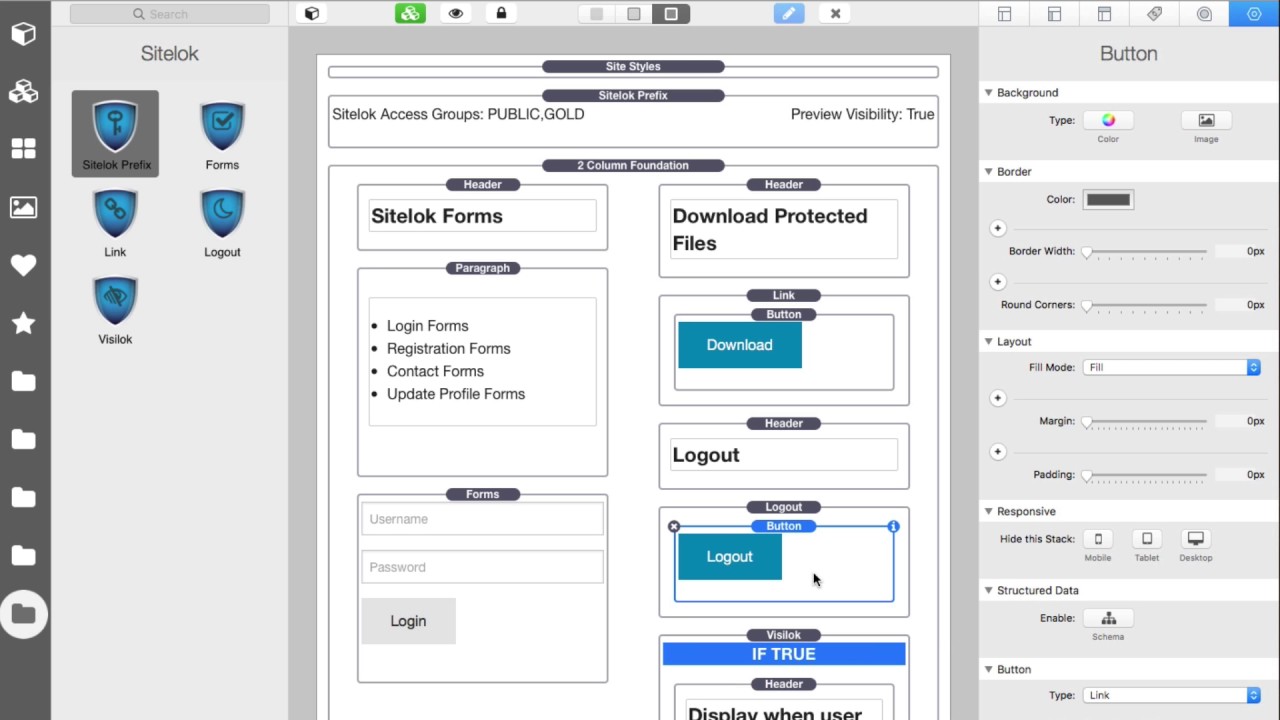
00:22 demo file that ships with the SiteLock
00:24 stacks okay um it's not really a
00:27 beautiful page it's just kind of a lot
00:28 of the stacks thrown on there with a
00:30 quick little example of how to use them
00:32 okay
00:34 the first stack and the most important
00:36 here okay is this SiteLock prefix stack
00:39 um this is going to be added to pretty
00:42 much every page that you want to lock
00:44 down with site lock okay um first off I
00:47 should say that the stacks don't install
00:49 site lock for you you still are
00:51 responsible for doing all of that okay
00:54 so make sure you check out the site lock
00:55 manual on how to download it and install
00:57 it and you know setup the database and
00:59 all that stuff okay the stacks have
01:02 nothing to do with that okay it's purely
01:04 integrating site lock into your
01:06 rapidweaver projects okay so here we go
01:10 inside the SiteLock prefix this by
01:13 default it is doing access control by
01:16 group which is probably what you're
01:17 gonna have you know going on here in
01:20 this particular instance we have it set
01:23 to public and gold group can access this
01:25 particular page as you see here you can
01:28 have multiple groups comma separated
01:30 okay and it will do that as well
01:33 you can have users again you can have
01:36 multiple users so if you want to lock
01:37 down a particular page to particular
01:40 users you can do that as well
01:41 um I think groups are just the easier
01:44 way to go because you can create groups
01:45 even if it's just one person in the
01:47 group in the future if you ever want to
01:48 add a new person it's really simple to
01:51 do if you're using groups right okay I'm
01:53 gonna skip it skip this visibility
01:55 preview really quick we're gonna go down
01:57 to site lock imports so if you're gonna
01:59 have a site lock form on the page you
02:02 want to make sure you import all the
02:04 various libraries that we need okay
02:06 basically what this site lock prefix
02:08 stack does is depending on what you're
02:11 importing here okay or what your
02:14 it has to load things in particular
02:16 orders okay so that's why these stacks
02:19 are great because it handles all that
02:21 for you because if you put import this
02:23 before this it'll break right so I
02:26 figured all that out I've worked with
02:28 Adrian over at fiber logics and got all
02:30 the orders in terms of what's gonna
02:33 order you know load in what order and
02:34 we're all good to go here okay um
02:38 remember we're gonna come back to this
02:40 SiteLock visibility preview in a little
02:42 bit um next up is the forms stack okay
02:46 so in the form stack you're gonna go
02:49 ahead and now in SiteLock there are
02:51 multiple types of forms so you have a
02:52 login form a registration form an update
02:54 profile form and a contact form so
02:57 you're going to pick whichever form that
03:00 you've designed inside SiteLock okay so
03:02 these are all forms that you've designed
03:04 inside the SiteLock admin panel uh
03:06 define the type of form and then you're
03:08 gonna give it the form ID so that's just
03:10 a number default the login form is
03:13 number five okay
03:15 and by default it's going to use the
03:19 SiteLock styles that you've defined
03:21 inside the SiteLock admin panel okay if
03:23 you would prefer to use the styles from
03:27 the theme that you're using go ahead and
03:29 check this box and it will basically it
03:31 won't use any of these CSS or styles
03:34 defined by site lock and it will use the
03:37 styles for forms that have been designed
03:40 and embedded into your theme that you're
03:43 using for rapidweaver
03:44 okay next up is the link stack and this
03:49 stack essentially allows you to have a
03:52 download a secured file download link
03:54 from a file uploaded in site lock right
03:57 so it'll make sure that you know whoever
03:59 clicks on this particular button it will
04:02 only download the file of the user is
04:04 authenticated to actually have that file
04:06 right so really simple to use um in the
04:09 link stack it's just a general drop zone
04:11 you can add any button or link into it
04:14 okay and essentially you're gonna give
04:16 it the file name of the file that you
04:18 want to download and the important part
04:20 here is you need to add a hash tag into
04:23 your link okay and what I mean by that
04:25 is inside the button here
04:26 if we look at the link okay I've gone
04:29 ahead and I just made the link a hashtag
04:31 that's it that's all you got to do um
04:33 basically when you publish this online
04:35 that hashtag will be replaced with the
04:38 special download link that comes from
04:40 SiteLock okay really simple to use next
04:44 up is the logout stack again another
04:46 generic uh you know drag and drop box
04:49 you can add any button or linked into it
04:52 okay and this particular one only has a
04:55 setting for redirect to URL and what
04:58 that means is um after the user clicks
05:01 logout do you want them to be redirected
05:03 to a particular page maybe you want to
05:05 redirect them to the home page or
05:07 something of that nature
05:08 right but any button or link added to
05:11 this logout stack okay will be will
05:14 trigger the logout okay so you could
05:17 just add any button any link inside of
05:20 this logout stack and it will behave it
05:22 when it's clicked as a logout
05:25 functionality okay and again that
05:27 redirect ability to redirect or a
05:29 particular page after the logout has
05:31 happened now the last stack in this set
05:35 right now is really cool this is called
05:38 viz alot and what this allows you to do
05:42 is to display content based on if the
05:46 user is logged in um if they're not
05:49 logged in and a bunch of other things
05:51 right so let's look at the logic here we
05:53 could say display when okay um let's
05:56 turn off the else logic so by default
05:58 the else logic isn't there and you could
06:00 say display the content if the user is
06:02 logged in display if the user is not
06:04 logged in display if the user is a
06:07 member of a particular group is an
06:10 active member of a group now remember
06:12 active members is because users can
06:15 expire their membership right so um this
06:18 you can only display information if he's
06:20 an active member okay and then if he's a
06:24 specific user so if you want to you know
06:26 do that I think doing stuff on a
06:28 specific user basis doesn't really make
06:30 too much sense I prefer using groups but
06:32 it the ability is here okay
06:35 now by default it doesn't show else
06:38 logic but if we click this
06:40 it'll basically be it'll add else logic
06:43 to this so basically if your logic is
06:47 true okay display this content else
06:50 display other content so in this
06:53 particular instance if the user is
06:54 logged in display this user is logged in
06:57 else display this user is not logged in
07:00 right this could be useful for maybe
07:03 displaying a login form right so if the
07:05 user is logged in don't display the form
07:08 maybe display hello user okay and if the
07:12 user is not logged in display the login
07:15 form so it's just a very convenient
07:18 stack that you're I'm sure you're gonna
07:19 use a whole lot of okay well I didn't
07:22 time myself but hopefully that was about
07:24 five minutes right I I went through
07:26 every stack and the settings as you see
07:29 it's really simple to use okay if you
07:31 ever use site lock before this takes
07:33 care of all the hard stuff okay all
07:36 those quirky PHP snippets that you have
07:38 to add to the prefix of a head or within
07:40 your code somewhere right the stacks
07:43 take care of all of it okay
07:44 the logout and the download link stuff
07:47 it's really cool because you can use
07:49 whatever stack you want with it right
07:51 use your favorite button stack okay cool
07:54 stuff next up is the viz alakh very cool
07:57 I think that is probably gonna be the
07:59 most used stack that you're gonna use
08:02 right displaying information based on if
08:04 the users logged in or logged out things
08:06 of that nature so really cool stuff I
08:08 can't wait to get feedback in terms of
08:11 how you're using this okay and I said in
08:14 the intro video right that you probably
08:15 watched that I'm really excited because
08:17 this is gonna open up a lot of
08:19 possibilities for people right there are
08:22 a lot of plugins for site lock
08:24 eventually over time we'll be adding
08:26 integrations with all of those as well
08:28 okay so um if you're using this this
08:32 should cover all the basics of getting
08:34 site lock boom in your rack weaver site
08:36 okay let me know if you're like hey you
08:40 know I want this feature I'm using this
08:42 plug-in really simple to you know add
08:44 this let me know quick wins of things
08:46 that you would like to see the product
08:48 do so that you know over time we can
08:51 grow it to be an even more amazing
08:53 plugin
08:54 what it is now so thank you I hope you
08:57 enjoy the SiteLock stacks and we will
08:59 talk to you soon bye
09:06 you


