
Stacks Guru is born from the need to search the vast number of videos out there on stacks built for Stacks Pro and the Stacks 5 plugin for Rapidweaver.
We have scraped over 500 videos to get the transcripts for each in order to make the spoken word searchable.
Please use this free tool to help you learn and discover the awesome power that Stacks and the stacks made for Stacks have to offer.
00:10 hey everybody so in this video we're
00:11 going to be looking at particle
00:13 generator now what is particle generator
00:16 particle generator allows you to take
00:18 one template piece of template content
00:20 and replicate it as many times as you
00:23 want
00:24 but not only that it allows you to
00:26 inject what i'm calling particle data so
00:29 that each bit can potentially be a
00:31 little bit unique
00:33 so for example in these two demos if we
00:35 look here i have a sentence saying hello
00:38 and then the name of our friend
00:41 is unique for each line
00:45 and if we look here i'm generating 5
00:46 boxes
00:48 and of these 50 boxes it can randomly
00:51 change by size and color
00:53 now when you add a particle generator
00:55 stack to the page you'll notice that
00:56 there is a drop zone
00:58 and then below that you can add in your
01:00 particle data
01:02 and you can add as much particle data as
01:04 you want
01:05 let's look at the examples here
01:07 so inside this demo you'll notice that
01:09 inside the drop zone all i've done is
01:11 added a header stack
01:14 and then inside that header stack i've
01:15 added these little curly braces with the
01:18 word name
01:20 that helps us inject our particle data
01:23 into our content
01:26 let's go ahead if we look at this
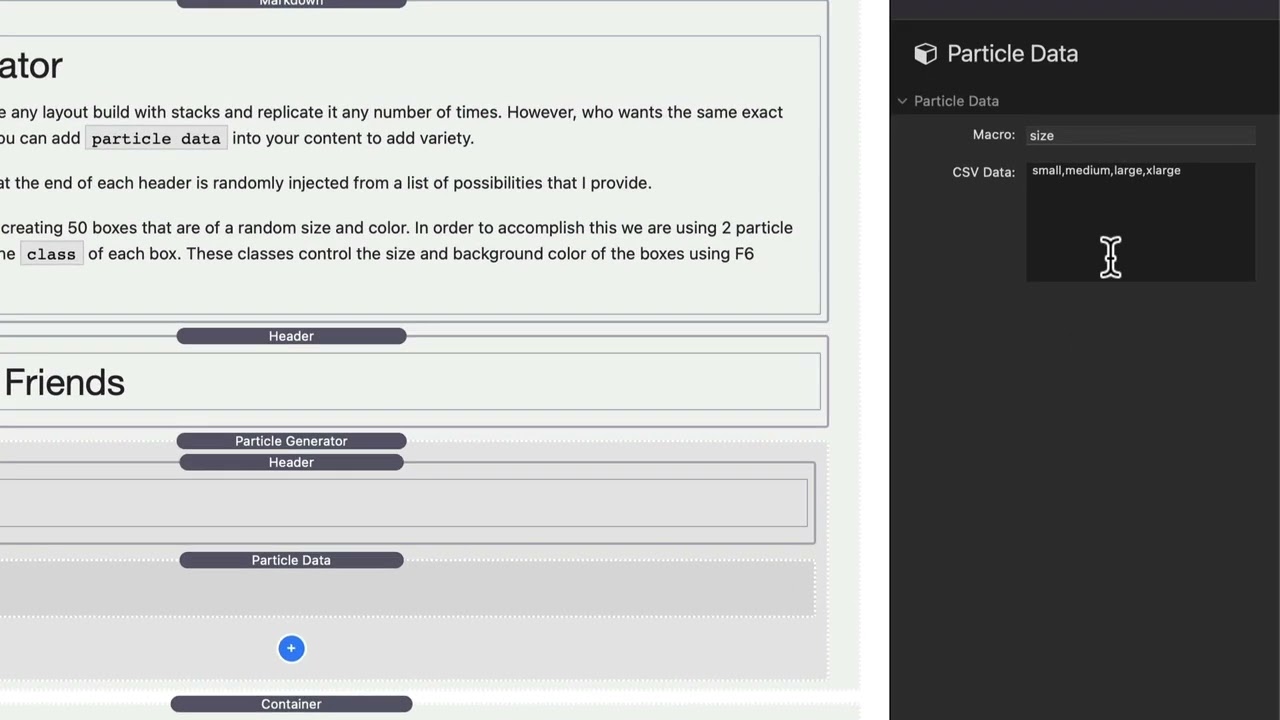
01:27 particle data let's look at the settings
01:29 here i set my name of my macro to be
01:31 name
01:32 and then here i defined a csv list a
01:36 comma delimited list of data
01:38 that can be picked from
01:41 to add to the particle data
01:44 so in this particular particle generator
01:46 look at the settings here i'm generating
01:48 five
01:51 okay and when it's gonna generate five
01:54 separate headers
01:56 it's gonna pick randomly each time
01:59 to ensure that that line has data
02:03 injected from the particle data
02:06 so in this next example we are
02:08 generating 50 random boxes
02:12 now what i have here is inside the
02:14 particle generator all i have is a
02:15 container stack
02:17 now this container stack if you'll
02:19 notice inside the custom classes here
02:23 this is where i've injected the macro
02:24 data
02:26 so basically what i'm doing is i'm using
02:27 the particle data
02:29 to add two different classes
02:32 to this particular container
02:36 so if we look at our some swatches here
02:38 you'll see that i have swatches for
02:40 different colors of boxes
02:42 so when my box has a green clasp we get
02:44 a green background color orange blue
02:46 purple red
02:48 and if we notice i have sizes
02:50 essentially with the size swatches when
02:53 i add the small medium large or extra
02:55 large it changes the actual sizing of my
02:59 box
03:01 so you'll notice here that we have two
03:02 different particle data
03:05 we have size
03:07 and inside here i have the csv data of
03:09 small medium large extra large and those
03:12 map to the swatches that i just showed
03:14 you
03:15 and then we have color
03:16 so here i have red green blue purple and
03:19 orange and again that csv data
03:22 correlates
03:24 to the color swatches that i showed you
03:28 and again you'll notice that the names
03:30 here are size and color and the stack
03:32 kind of tells us exactly what macro we
03:35 need to insert inside of our container
03:37 so if we look at this container here
03:39 that i've
03:40 hidden
03:41 we have the classes of box which gives
03:44 us our
03:45 our geometric sizing their swatches for
03:47 that as well
03:48 and then we inject our size which is
03:51 going to be either small medium large or
03:52 extra large and then inject the color
03:55 which will give us one of our background
03:58 colors if we look inside the particle
04:01 generator we'll see that i'm generating
04:03 50 of these boxes
04:06 now just for fun let's go ahead and turn
04:07 off the no sequential duplicates
04:12 and what we'll see here is we actually
04:14 have sequential duplicates
04:16 right here i have two large boxes here i
04:19 have two large boxes here i have two
04:21 medium boxes
04:22 let's go ahead and turn that back on
04:26 now you'll notice that we have we have
04:28 zero duplicates we never have two
04:30 squares of the same size or the same
04:33 color directly next to each other
04:36 so i'm excited to see what you do with
04:38 particle generator it's a really
04:40 powerful stack that can if you need
04:41 something like this will save you a ton
04:44 of time
04:45 so enjoy particle generator and can't
04:47 wait to see you build with it bye
04:59 you


