
Stacks Guru is born from the need to search the vast number of videos out there on stacks built for Stacks Pro and the Stacks 5 plugin for Rapidweaver.
We have scraped over 500 videos to get the transcripts for each in order to make the spoken word searchable.
Please use this free tool to help you learn and discover the awesome power that Stacks and the stacks made for Stacks have to offer.
00:08 hey guys this video is all about the
00:10 randomized stack and if you're not
00:12 familiar with what the randomize stack
00:13 does it essentially randomizes your
00:15 content so here this list of numbers has
00:19 been randomized on page load this grid
00:21 of numbers has been randomized and you
00:24 can also randomize by clicking a button
00:26 so when i click this button you'll
00:27 notice that both of these grids
00:30 um randomize all at the same time
00:33 so you can randomize a single thing or
00:35 multiple things all with a button or on
00:37 page load so let's see how to get all
00:39 this configured so configuring randomize
00:41 is super easy when you add it onto the
00:43 page essentially you just have a drop
00:45 zone
00:46 and if we look at the settings the
00:47 default setting allows you to simply
00:49 randomize everything that you add into
00:51 randomize or we've added integrations
00:54 with all kinds of different stacks all
00:57 the favorite columns and grid stacks out
00:59 there total cms all kinds of stuff
01:02 so there's a lot of integrations here
01:03 for randomizing stacks that you already
01:05 own
01:06 next you can define whether or not you
01:08 want to randomize on page load on click
01:11 or both
01:13 when you enable click you'll notice that
01:14 a click class is displayed and
01:16 essentially this is the class that
01:18 you're going to add to the button or
01:19 link or element that will trigger the
01:22 click event
01:23 so let's go ahead and look at the demos
01:25 in this first demo we'll notice that i
01:27 have the randomize stack and here i just
01:28 have some text stacks okay they're just
01:31 simple text stacks on top of each other
01:33 um these settings are here are set to
01:35 randomize the children on page load and
01:37 that's exactly what we saw in that demo
01:39 simply these are just going to get
01:41 reordered um and they're going to be
01:43 randomized on page load
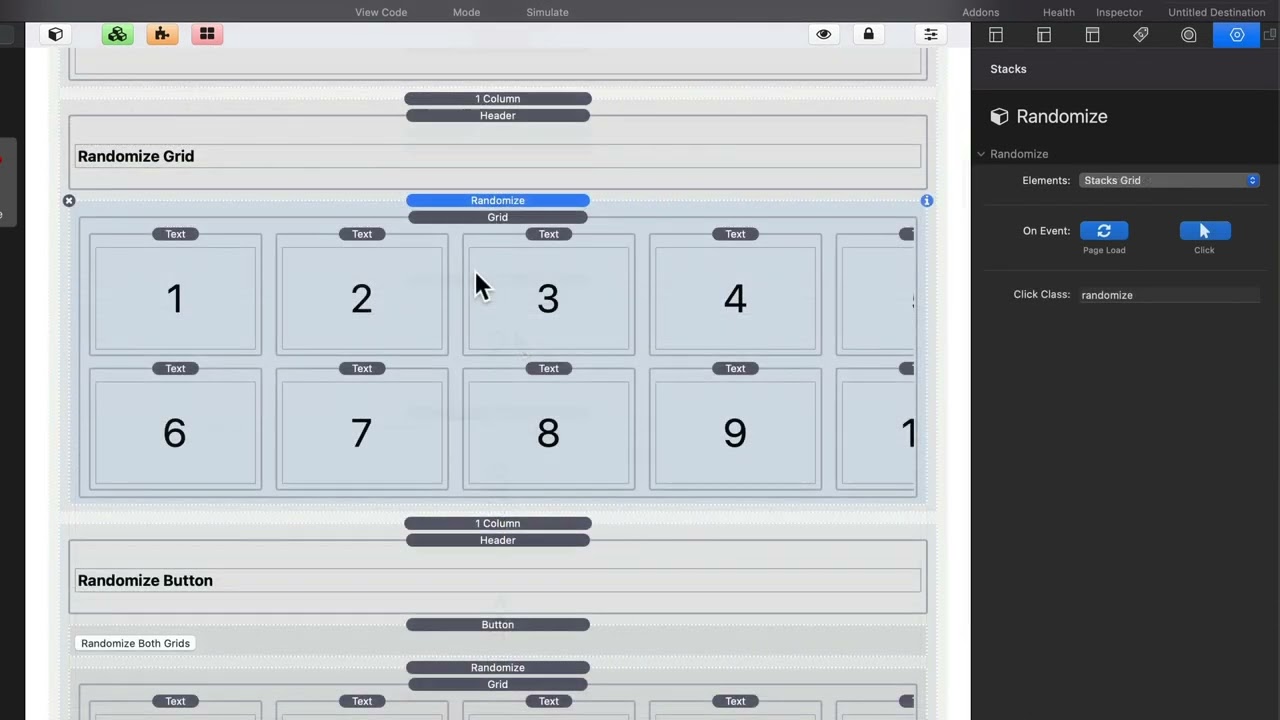
01:46 so let's have a look at this next demo
01:48 essentially inside the randomize stack i
01:50 have a traditional stacks grid that has
01:53 a bunch of numbers
01:54 and inside the randomize stack i set the
01:56 elements to be stacks grid
01:59 and here i have the uh randomize event
02:02 happening on page load and on button
02:04 click
02:06 so when we go to this button down below
02:08 we'll notice that we have the randomized
02:10 class added to this button
02:13 hence that will randomize this
02:16 particular grid
02:18 and just to show you this last example
02:20 um i don't have page load turned on it's
02:23 only on click so on page load this
02:26 particular grid is actually in order but
02:29 when you click the button it will
02:31 randomize it
02:41 you


