
Stacks Guru is born from the need to search the vast number of videos out there on stacks built for Stacks Pro and the Stacks 5 plugin for Rapidweaver.
We have scraped over 500 videos to get the transcripts for each in order to make the spoken word searchable.
Please use this free tool to help you learn and discover the awesome power that Stacks and the stacks made for Stacks have to offer.
00:08 hello everyone this is Joe workman and
00:10 today I'm excited to show you the
00:12 tabulous 25 update this updates been
00:16 long in the works and I'm really really
00:20 happy that it's finally done for you I'm
00:22 in this video I'm not going to go over
00:23 every single of feature a new feature
00:26 and fixes in this please check out the
00:28 release notes I'm going to go over four
00:30 main new features and some things need
00:33 to be careful of with this update with
00:37 your existing instances of tabulous so
00:42 the first option I've been wanting
00:44 giving a lot of requests for this it's
00:46 reverse slide order and what this does
00:49 is it allows you to add new tabs to the
00:52 beginning of the stack now when you add
00:56 new stacks in edit mode it will still
00:58 add them to the bottom however when you
01:01 preview the page it will actually show
01:03 the tabs at the beginning because you
01:07 have this reverse slide order I checked
01:10 so that's a great new feature the next
01:14 great new feature is some really great
01:17 new slide transitions so you see know if
01:21 you notice here there's a bunch of ESS
01:22 slight animations with a javascript fall
01:25 back for older browsers that do not
01:27 support css3 animations now it's great
01:32 is you can define custom in animations
01:35 so animate in as well as css3 animations
01:38 for animating out so you can have
01:40 different animations in and out now css
01:44 animations are great especially on
01:47 mobile devices because you will get a
01:48 much smoother and more fluid transition
01:52 in animation for css3 animations and the
01:56 reason for this is that browsers have
01:58 optimized themselves for these css
02:01 transitions whereas the JavaScript
02:04 transitions kind of our I have always
02:07 been kind of a background hack and are
02:09 directly supported natively by the
02:11 browsers
02:13 so CSS animations are really where it is
02:16 for fluid animations especially on
02:18 mobile devices where you know we need
02:20 some you know CP less CPU and whatnot
02:24 another really interesting transition is
02:27 you now have the ability to transition
02:29 your tabs on hover so when you hover
02:31 over at Abdullah automatically
02:32 transition or not okay that's turned off
02:35 by default now the next the last two
02:39 things I'm going to talk about are
02:40 really where you have to watch out okay
02:43 so we now added font awesome support
02:46 within tabs okay now what does that mean
02:50 um that essentially means that you can
02:54 have a font awesome icon before each of
02:57 your tab titles now this is a really
03:03 cool new feature however if you notice
03:06 it once I enable it inside these I have
03:11 instead of a cool font awesome icon I
03:15 have the name of what this first tab
03:18 used to be okay and this is the name of
03:20 the second tab and if we go to my second
03:22 tab at here's the name of what my third
03:24 tab used to be and here's the name of
03:26 what my fourth tab used to be and if we
03:28 go down to my third tab I now have edit
03:30 panel title edit panel title finally a
03:33 font awesome icon and then edit panel
03:35 title so this is a conflict of just with
03:39 existing instances of tabulous so
03:45 basically what that means is if you want
03:47 to use tabulous 25 you're gonna have to
03:50 make sure that you rename all of your
03:52 tabs before you republish now existing
03:57 um in your are not existing but new
04:00 instances of tablets that you add to the
04:02 page will not have any issues so if i
04:05 drag out a new instance here and then i
04:07 say i want font awesome tags you easily
04:11 have font awesome icons there okay and
04:14 you can customize those so it's only for
04:17 existing implementations of your tabula
04:21 stacks that you're going to have to go
04:22 through and rename every single tab to
04:24 what it was before
04:27 sorry about that but it was that this is
04:32 a trade-off for having some awesome new
04:34 font awesome features and I'll show you
04:36 why the font awesome features are really
04:39 awesome in a bit now the next thing that
04:43 we're gonna have to be aware of is with
04:47 tabulous navigation before was either
04:50 you had arrows or you didn't have arrows
04:52 but now we have the ability to have text
04:54 navigation now why you need to be
04:58 careful is by default now the navigation
05:00 is set to none so if you were using
05:02 arrows before you have to go to style
05:06 and just select arrows at that point all
05:09 of your other arrow settings will be
05:11 remembered but you have to make sure
05:13 that you set that from none to arrows
05:15 and if you would like to switch to text
05:18 you can easily do that and switched to
05:21 text navigation so let's preview and see
05:25 what some of the cool things are with
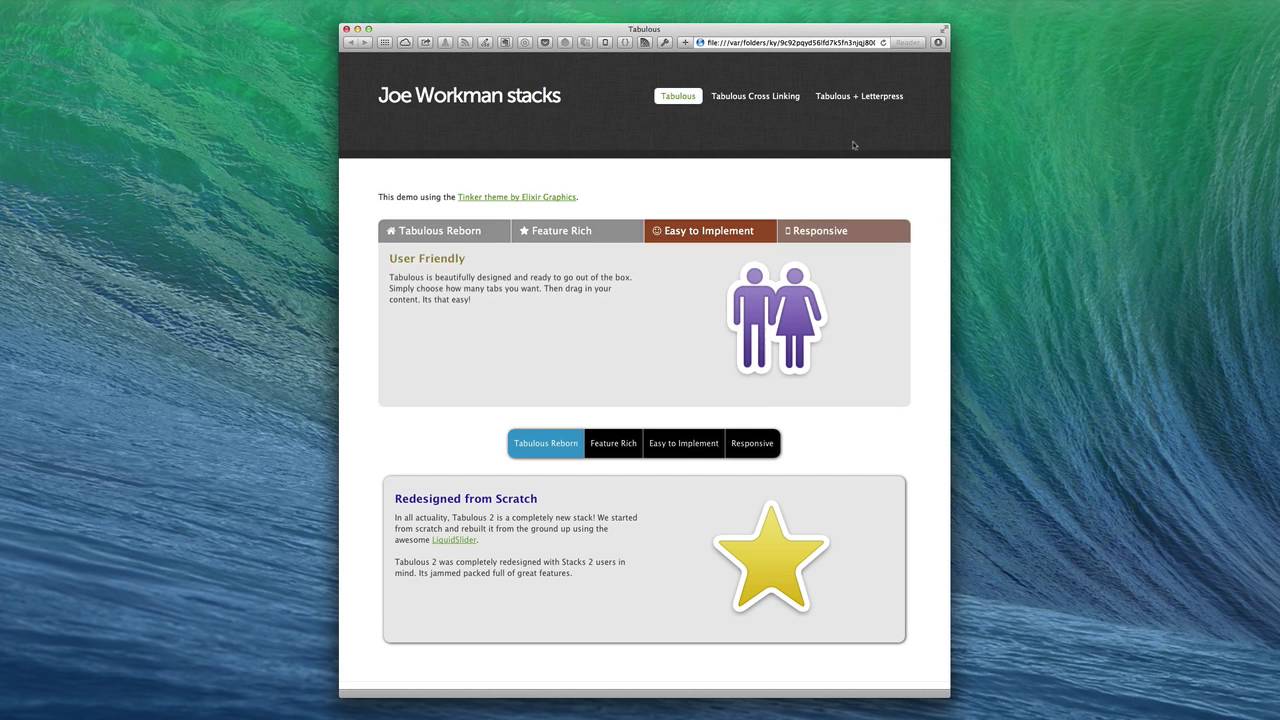
05:27 tabulous 25 as you notice here I have a
05:29 nice tabulous stack here that uses that
05:33 some of the new css3 animations and I
05:37 have the font awesome tabs built in okay
05:39 um now if you also notice I now have
05:42 full with tabs and that's another great
05:45 addition to tabulous 25 is that if you
05:48 set the tablets to variable in this
05:50 instance I set them to twenty-five
05:52 percent with and they nicely filled up
05:55 the entire width of the tabulous
05:58 container this is really awesome I'm
06:00 glad that we I finally figured this out
06:03 for you guys you also notice that as I
06:06 hover over the tabs the animation is a
06:10 little bit nicer it's not as harsh and
06:12 abrupt the the actual style changes for
06:16 each tab are nicely transitioned into
06:20 each other now another thing we'll
06:22 notice as I resize the browser just a
06:24 bit is that the text will flow and we
06:27 can actually have tab titles onto
06:30 multiple lines now and all of the tabs
06:33 will react to the size and height of the
06:37 proper
06:38 tab height if we make our browser a
06:41 little bit smaller we will notice that
06:44 we now have two mobile tab settings now
06:48 we can use the font awesome tabs which
06:52 is basically the same tabs with just the
06:54 font awesome icon or we can still have
06:57 the existing mobile navigation menu that
06:59 we had in preet in the previous tabulous
07:01 to addition so these mobile tabs with
07:05 font awesome icons is really an awesome
07:07 way to display a your tabula stacks on
07:11 your website now one last thing I'm
07:14 really excited to show you is I've been
07:17 given a lot of requests for image tabs
07:18 and so we've done it as you see here in
07:22 this example I have some images and as I
07:24 tap on the images tabulous transitions
07:27 to the assigned tab now what's actually
07:31 going on here is that I'm using what's
07:34 called cross-linking support within
07:37 tabulous and cross-linking support
07:39 allows me to add links to a particular
07:42 tab to anything I want so these image
07:45 tabs are actually not a part of tabulous
07:47 they're just some images that I added to
07:49 my website and you know I assigned them
07:52 to some responsive grid so that I can
07:54 you know have a nicely responsive and
07:56 whatnot and they still function properly
07:58 so that's really really cool um but I
08:03 like the cross-linking because it really
08:07 allows you a lot of flexibility to
08:09 design anything that you'd want and
08:12 still navigate to the proper content
08:14 within your tabulous slider this demo
08:18 that you're seeing here is on the sample
08:20 project within the tabulous dmg so make
08:24 sure you if you want to check this out
08:25 go ahead and download it and see exactly
08:27 how it's done we also have a full-blown
08:30 faq and video tutorial on how to
08:32 accomplish this on our documentation
08:34 portal so make sure you check that out
08:36 this is really going to wrap up the
08:39 update for 25 I hope you really enjoy it
08:41 I'm very excited about it and have a
08:44 great day thanks bye
08:47 you


