
Stacks Guru is born from the need to search the vast number of videos out there on stacks built for Stacks Pro and the Stacks 5 plugin for Rapidweaver.
We have scraped over 500 videos to get the transcripts for each in order to make the spoken word searchable.
Please use this free tool to help you learn and discover the awesome power that Stacks and the stacks made for Stacks have to offer.
00:06 hello everyone this is joe workman and i
00:09 am excited to show you the TARDIS stack
00:11 now if you've been around me any amount
00:15 of time you probably know that I am an
00:17 automation fiend right I like to be
00:20 automate as much things as possible I
00:22 mean I have over a hundred fifty
00:24 products I need automation right so you
00:29 know I get a lot of customers come to me
00:31 all the time saying you know I I'd want
00:33 to be able to automate this content so
00:34 that you know I can schedule content to
00:37 be displayed at particular points in
00:38 time and that's exactly what karda
00:43 solves for us it allows us to display
00:46 our content on web sites based on time
00:51 so let's see exactly what TARDIS does
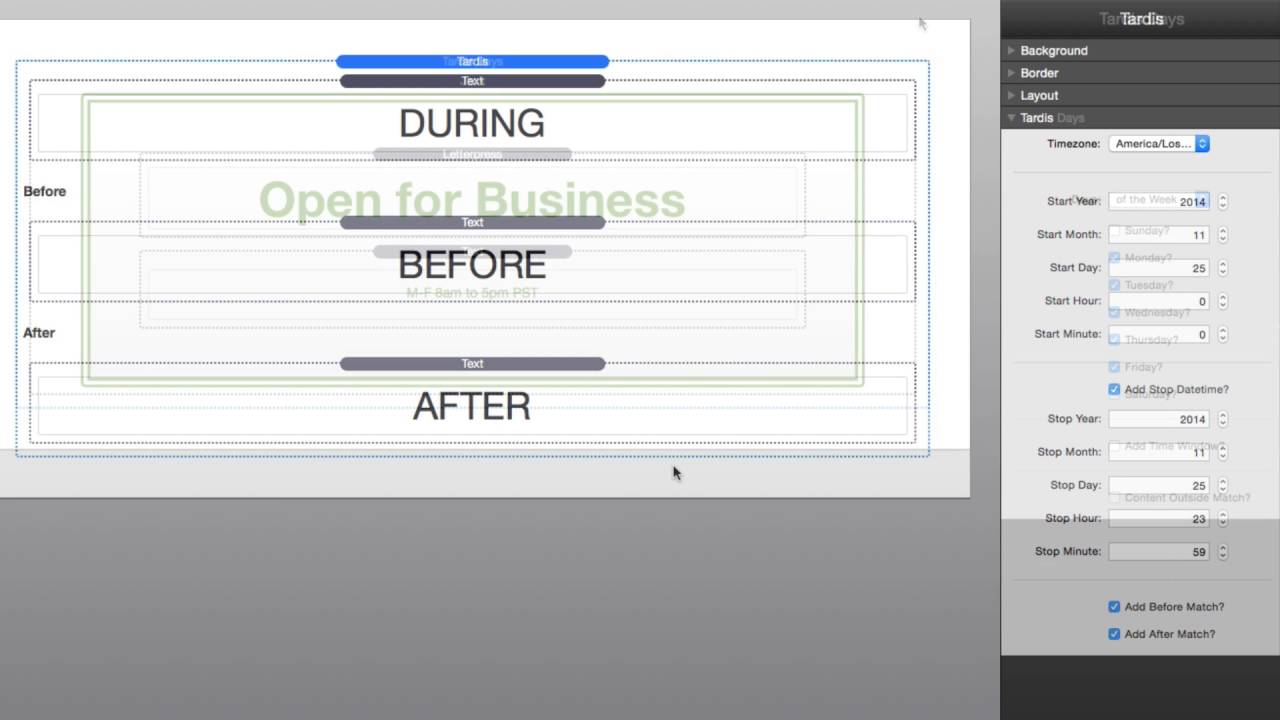
00:54 for us so here we are in the TARDIS demo
00:57 file and we'll see that TARDIS is a
00:59 three stacked set the first step is
01:02 called TARDIS and that allows you to
01:05 control your content based on a start
01:09 date and an end date and then you can
01:13 display content whether or not the
01:15 content shows before during and after
01:18 that time period the TARDIS days stack
01:22 allows you to define exactly which days
01:25 and even times of those days that your
01:28 content will be displayed for example on
01:32 this page we see that I have an open for
01:35 business sign this is configured to be
01:37 displayed 8am to 5pm monday through
01:40 friday anything outside of that I can
01:44 actually show different content and
01:46 lastly we have the TARDIS time stack and
01:49 this allows you to display time localize
01:53 time in many many different formats so
01:58 here we have a really simple example of
02:01 tortoise I've added a tech stack inside
02:03 Sardis and basically what i want to do
02:05 is I want to configure my time zone and
02:07 then the actual start date on when that
02:10 content will be displayed as
02:12 here it's set to November 25th 2014 now
02:16 since we're on it's currently December
02:18 11th right now if I preview my page the
02:21 content will be displayed because it's
02:23 showing after the start date next I can
02:27 actually add a stop time so if I want to
02:30 stop showing this particular content on
02:33 a particular day then I can do that so
02:35 now this content will only show in
02:37 between the start day and the end time
02:40 now if you want more control you can
02:42 actually add a before match so what this
02:45 means is that if your current date is in
02:48 between the start date and the end date
02:51 the during content will be displayed
02:55 however if the current date is before
02:59 your your start date has begun then the
03:02 before content will be displayed and in
03:07 this situation if the time is after your
03:10 end time nothing will be displayed
03:13 however we can fix that too now if you
03:16 add an after match you can now display
03:18 different content before during and
03:21 after your configured times now let's
03:25 have a look at the tardis days stack now
03:28 as we see when tardis days you can
03:30 define the days of the week that you'd
03:32 like your content to be displayed and if
03:36 you'd like you can also add a time
03:38 window so that not only the days of the
03:41 week but also a particular times
03:43 throughout the day the content will be
03:46 displayed now also you can add a Content
03:50 outside match this allows us to do open
03:54 for business and sorry we're closed
03:56 messages for monday through friday 8am
04:01 to 5pm now not only can we do days of
04:04 the week but we can also do days of the
04:07 month and what this allows us to do is
04:10 configure up to five different days of
04:12 the month to display a particular piece
04:15 of content now there's also an option
04:18 for doing the last day of the month
04:21 because each month has a different last
04:24 day this allows you to say
04:26 on the last day of the month display
04:29 this particular content now when you set
04:31 the day number 20 that essentially
04:34 disables that day so in this particular
04:36 example I'm going to display my content
04:39 on the first and the 15th of the month
04:42 now you can also use the add time window
04:45 so if you want to do the first the 15th
04:47 and then in between a particular time
04:49 window you can do that as well now the
04:52 last stack in the set is the TARDIS time
04:55 stack and this allows us to really
04:57 configure an exact date string that we'd
05:00 like to display first off let's look at
05:03 the settings you can define your locale
05:06 so you can actually customize the date
05:07 for your language you then choose the
05:10 time zone in which you want the date to
05:13 be displayed you can add a label which
05:17 is basically a text that you can prepend
05:19 to the date and then lastly do you want
05:23 to display the current time or the
05:25 actual date that this web page was last
05:28 published on now we're not going to go
05:30 through all the formats but there are
05:31 tons of different formats that you can
05:33 now configure the date for and you can
05:36 configure different formats for the date
05:38 and the time so if you just want to
05:40 display the date you can do that if you
05:42 want to display just the date and the
05:43 time you can do that as well and also at
05:47 the bottom is some basic formatting
05:49 options so you can configure the size
05:51 the alignment and the color of the
05:54 actual date text so there we have it
05:58 that's TARDIS as you see it has a lot of
06:01 flexibility to schedule your content
06:04 maybe it's office hours maybe you want
06:06 to schedule a sale and you know as soon
06:10 as the sales over you you know take down
06:12 the content that displays information
06:14 about the sale display thank you
06:16 messages it really allows you a lot of
06:20 flexibility for not having to worry
06:22 about waiting for a particular date and
06:25 changing the content on your page just
06:27 do it right and what's beautiful is
06:29 TARDIS is all done on the server it's
06:32 all done with PHP so that all that extra
06:34 content is never ever shipped down to
06:36 the browser at all only the content that
06:39 is actually
06:40 matched inside the time will actually be
06:43 set down to the browser so this is a
06:45 huge win I hope that you use it i hope
06:47 that it saves you lots and lots of time
06:49 and without further ado have a great day
06:53 I hope you enjoy TARDIS and thank you
06:56 very much bye


