
Stacks Guru is born from the need to search the vast number of videos out there on stacks built for Stacks Pro and the Stacks 5 plugin for Rapidweaver.
We have scraped over 500 videos to get the transcripts for each in order to make the spoken word searchable.
Please use this free tool to help you learn and discover the awesome power that Stacks and the stacks made for Stacks have to offer.
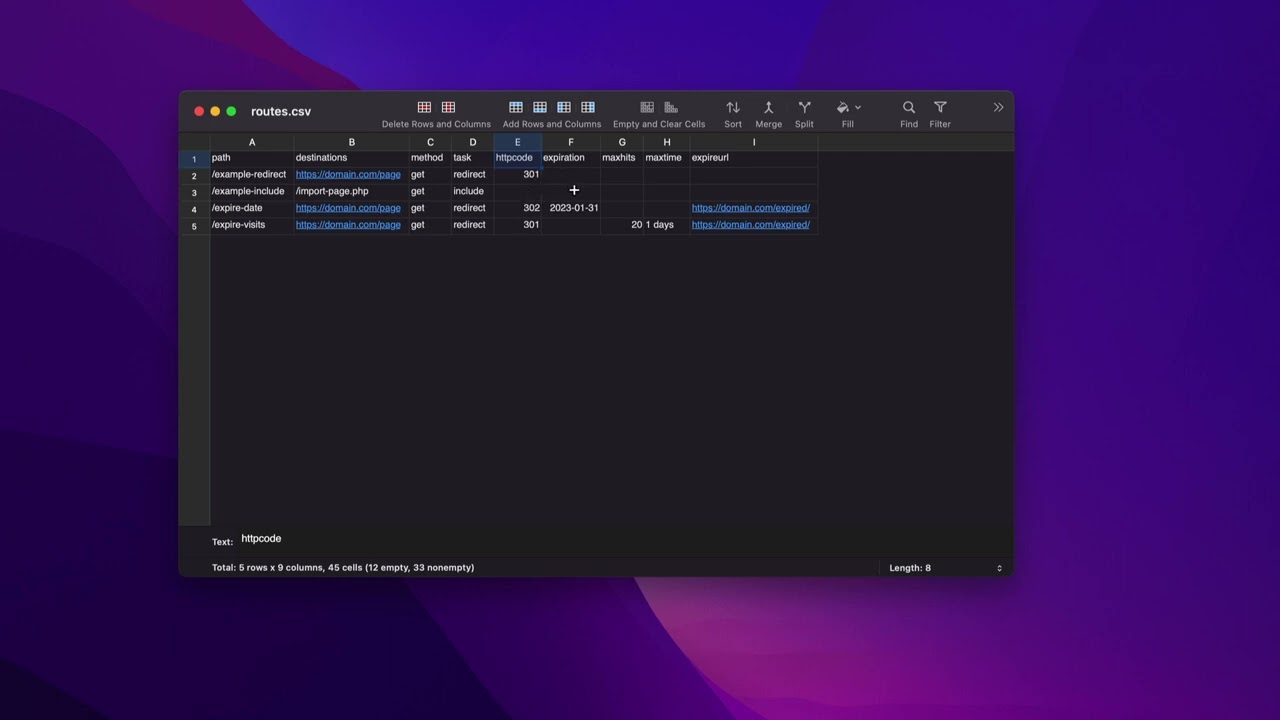
00:09 so in case you didn't know csvs aren't
00:11 all that magical they're just simply
00:14 comma delimited text files
00:17 okay
00:18 any at the very top of our csv
00:20 must be the actual
00:23 field names
00:25 so this first line has to be this
00:28 then essentially each other line is a
00:31 comma delimited list
00:33 now if editing via a text file is
00:37 not your cup of tea
00:39 there are many other ways to do this you
00:41 can use apps such as excel or numbers my
00:44 preferred method is actually a dedicated
00:46 csv editor
00:48 so this is an app called easy csv editor
00:52 it's super cheap on the app store
00:55 i'm sure there's other apps out there
00:57 but essentially this just reads in and
01:00 saves directly to a csv
01:02 normally if you use apps like excel or
01:04 numbers you have to export
01:06 and sometimes i find the export
01:08 functionality of those apps to be not
01:11 the best okay
01:12 so here we have just an easy way that we
01:15 can maintain this csv file and it easily
01:18 makes so we can add in data and so on
01:21 and so forth
01:22 all these settings should look pretty
01:24 familiar to you based on the
01:27 actual settings from the stack so
01:29 first we have the path this is our route
01:32 okay we have our destination now if you
01:35 want to supply multiple destinations
01:38 in terms of for a b testing you can do a
01:40 comma delimited list of destinations
01:42 here
01:44 next is your method so get or post or
01:46 delete or put things of that nature
01:49 um your task most time it's going to be
01:51 redirect but you can also use include
01:54 your http code this is going to be
01:57 either 301 30
02:00 so on and so forth right
02:01 the default will be 30
02:04 if you don't supply anything
02:06 um your expiration date so this is the
02:08 date stamp um that you would like the
02:12 url or the route to actually expire
02:15 max hits is if you want that to actually
02:17 be expired by a certain number of hits
02:20 and then you can also do time so for
02:22 example if i wanted this to be 20 times
02:24 per day i can do 2
02:27 every one days
02:29 okay and then you can also supply an
02:31 expire url for that particular route
02:34 and so each route could have their own
02:36 custom expire url
02:38 now you can simplify this so if you only
02:41 want to supply let's say path and
02:42 destination and you want the defaults
02:45 for the rest of these things um you can
02:48 just delete these and then you can only
02:49 have two you know and then your csv file
02:51 would only have two fields path and
02:53 destination those are the only two
02:55 required fields in your csv file
02:59 the rest will send to defaults so the
03:01 default method is get the default task
03:03 is redirect the default http code is 30
03:08 expiration is none hits is none max time
03:11 is none expire url is none
03:14 so if you just want to
03:15 quickly set up
03:17 a routes file that will quickly redirect
03:20 from one
03:21 path to another to another url you can
03:25 easily do that with the
03:26 um path and destination fields
03:29 so let's look at a live example here so
03:32 here i am on my test server and what
03:34 you'll notice is
03:36 i have a file at the very top of my
03:38 website called routes.csv
03:40 now
03:41 in order for this to work you have to
03:43 name the csv file that exact name it
03:45 must be named routes.csv
03:50 no other names will be allowed
03:52 now if you're worried about this
03:54 security of people potentially getting
03:56 to this file the htaccess rules that you
03:59 pasted from traffic control will
04:01 actually block access to the csv file
04:03 from the browser
04:06 let's go and edit this csv file
04:09 so first off what you should notice is
04:11 this csv file it only has one example in
04:13 it currently but it also doesn't have
04:15 every field i only have the fields that
04:17 i think that i will need and the order
04:20 of the fields doesn't really matter as
04:21 well
04:22 as long as the each row matches the
04:25 order of the header row the very first
04:28 one
04:28 so here i'm just applying my path my
04:30 destination
04:32 a task which is redirect um an
04:34 expiration date this particular one
04:36 doesn't have any so that field's blank
04:38 max hits and then the expire url
04:41 so this particular route will expire
04:43 after 10 hits total so once this this
04:46 route has been hit 10 times it will have
04:49 expired


