
Stacks Guru is born from the need to search the vast number of videos out there on stacks built for Stacks Pro and the Stacks 5 plugin for Rapidweaver.
We have scraped over 500 videos to get the transcripts for each in order to make the spoken word searchable.
Please use this free tool to help you learn and discover the awesome power that Stacks and the stacks made for Stacks have to offer.
For more information about Pi, head over to https://www.weavers.space/stacks/pi
00:06 [Music]
00:10 hey everybody so in this video we're
00:11 going to be looking at how to upgrade
00:13 your existing Pi version one Stacks to
00:16 Pi version 2 so here we're going to look
00:19 at the demo one from the Pi Project file
00:22 and here already have the old
00:23 implementation and here I have the new
00:25 implementation with pi 2 and we're going
00:27 to look at the differences that we have
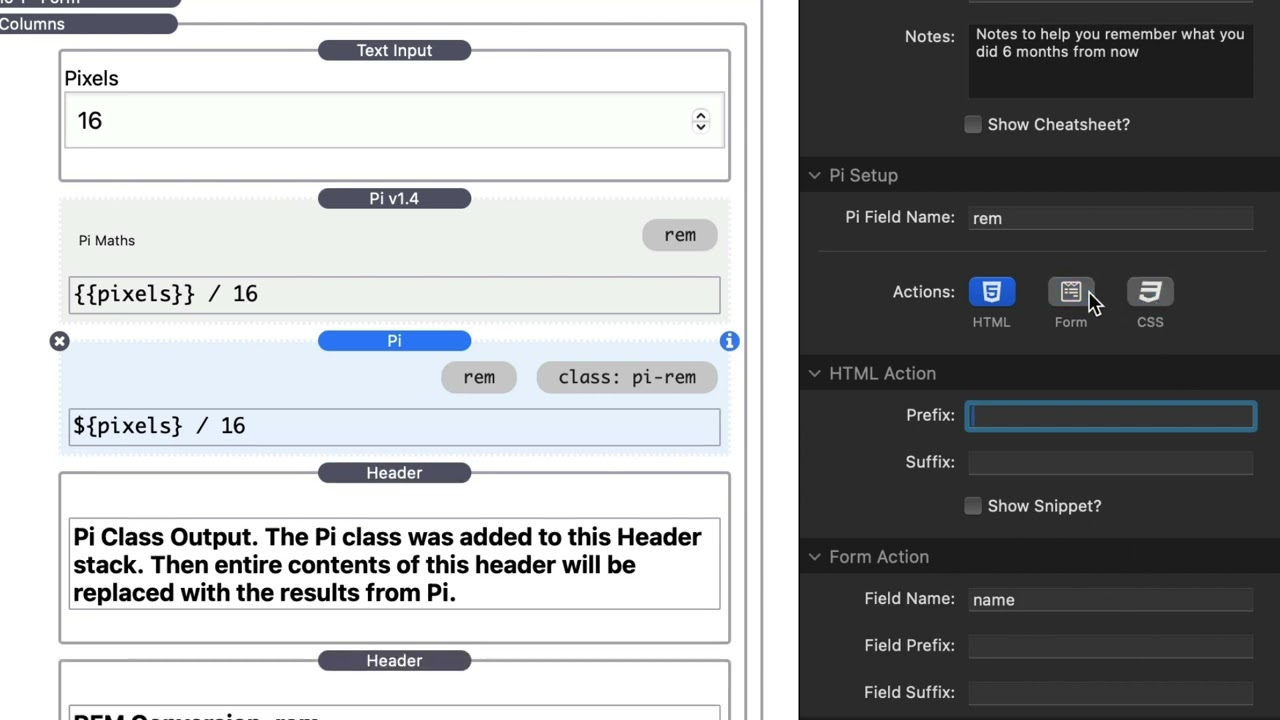
00:30 so first off you'll notice uh that the
00:33 syntax and probably the biggest change
00:35 here is the syntax with the
00:37 macros so before when we wanted to
00:40 access the pixels which again is this
00:42 text input here that has the field name
00:44 of pixels you'll noticed that we had two
00:46 curly
00:47 braces uh that syntax has changed and
00:50 now we're going to use a dollar sign
00:52 with single curly braces so uh a minor
00:56 change but a really good one the reason
00:58 this was done was so that we have less
01:00 conflict with um Stacks such as feeds
01:03 and total CMS that use the two curly
01:05 brace
01:06 syntax some other changes that we'll
01:08 notice here um is that the process
01:11 formula as text U that setting is now
01:14 gone um Pi essentially is now kind of it
01:17 added a bunch of smarts to figure out on
01:20 its own whether or not you want to
01:21 process something as text or as a math
01:24 um so that's a nice thing uh that again
01:27 that setting has been completely
01:29 eliminated so if you were using the
01:31 setting before you don't need to worry
01:32 about it any
01:33 longer now in pi version 4 um it had
01:37 three actions you had the ability to uh
01:39 update the HTML edit a form and CSS now
01:43 updating the HTML was something that
01:45 just always happened all the time
01:47 however in version two um if you were
01:50 using that feature basically updating
01:52 something with a class such as this
01:54 pi-r you're going to want to make sure
01:56 that you check the HTML action here and
02:00 then if you had any prefixes and
02:01 suffixes there um that's where you would
02:04 add that and then conversely if you
02:06 wanted to use form we now have form
02:08 fields and CSS uh we have the CSS
02:11 properties as well all of this here has
02:14 pretty much remain the same from version
02:15 one um it's just that the settings and
02:18 the organization of them have been
02:20 modified slightly to be easier to
02:23 use so the last bit that we have here is
02:26 the Syntax for demo 15 um and
02:29 essentially what happened in here is uh
02:32 we wanted to make sure that the syntax
02:34 was kind of similar to what we did for
02:37 the generic macros so here before we a
02:40 we had to enclose this in quotes because
02:42 we had this process Texas formula again
02:45 that's been automated now so we don't
02:46 need those quotes any longer uh and then
02:49 we have the two curly braces and a
02:50 hashtag cities and then here we had uh
02:54 two curly braces with the dot to
02:55 actually put in the city and then here
02:58 we would then close out that Loop for
03:00 cities with a slash two curly braces
03:02 around it not too dissimilar here is if
03:06 we look at the syntax we have an at sign
03:09 with one curly brace and then for the
03:12 dots we again eliminated and went down
03:14 to just one curly brace as well and then
03:16 to close it out we have a one curly
03:19 brace with the slash to close out our
03:22 Loop
03:29 [Music]


