
Stacks Guru is born from the need to search the vast number of videos out there on stacks built for Stacks Pro and the Stacks 5 plugin for Rapidweaver.
We have scraped over 500 videos to get the transcripts for each in order to make the spoken word searchable.
Please use this free tool to help you learn and discover the awesome power that Stacks and the stacks made for Stacks have to offer.
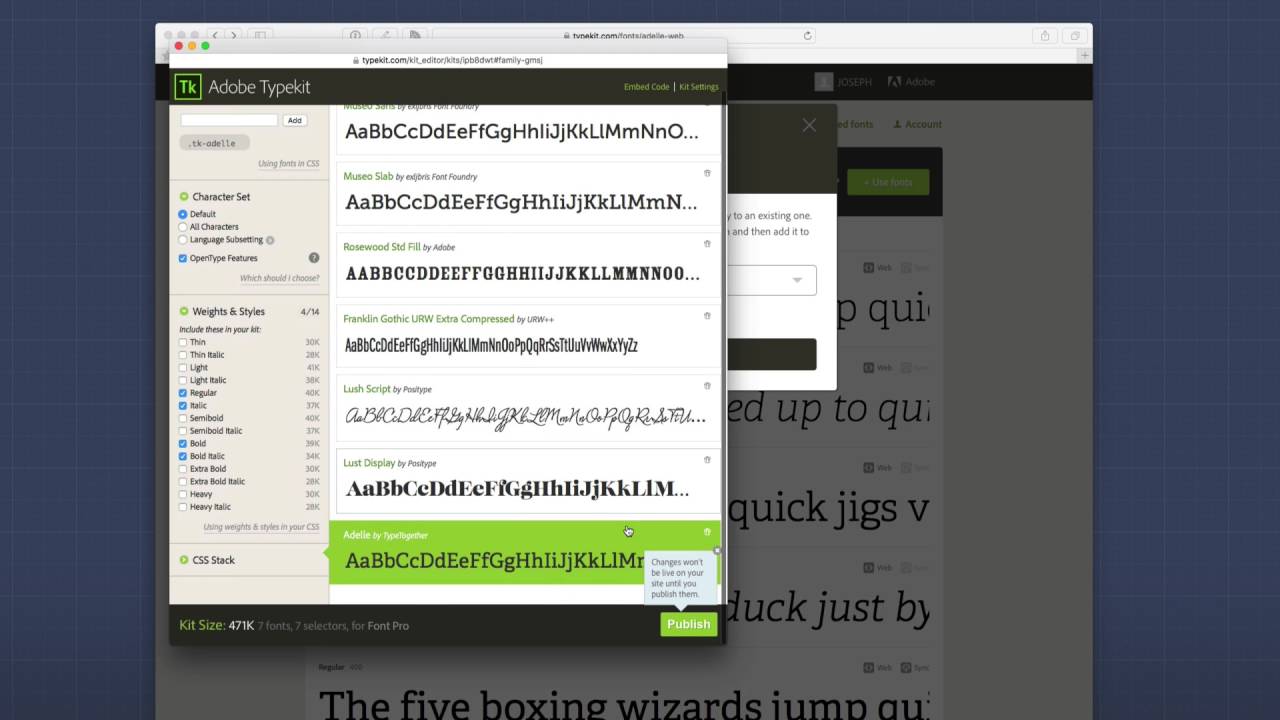
00:00 it's time to step up our font game with
00:02 Typekit hey everybody so in this video
00:12 we're gonna be reviewing how to use type
00:15 kit inside font Pro now I have to say I
00:19 was quite surprised with type kit I
00:22 typically don't like subscription based
00:26 products right especially you kind of
00:29 have a chip in my shoulder about Adobe
00:30 right cuz I don't really use Photoshop
00:34 very much and you know there's so many
00:36 other alternatives but um you know I was
00:39 reluctant to ever try type kit or a look
00:41 at it because well it was an Adobe
00:43 product so good better or different I
00:46 did now because type kit is so popular I
00:51 decided to you know integrate it in
00:53 diff'ent Pro and I gave it a shot and I
00:56 have to say it's really good value right
00:59 for 50 dollars a year you can access
01:04 thousands of fonts and then you know
01:08 probably with as many pages as you're
01:11 ever gonna need right I think it's like
01:13 a quarter million page views a month or
01:15 something like that right so a lot of
01:17 page views a month and you have access
01:19 to a lot of really top-notch fonts for
01:23 that price now they do have a free tier
01:25 okay and I think that is like up to like
01:29 twenty-five thousand hits a month or
01:31 something like that right but look into
01:32 that okay but with that said type kit is
01:36 a great value and I think if you want to
01:39 upgrade from you know using the standard
01:42 fonts to a great library of fonts then
01:47 type kit is definitely something you
01:48 should you should definitely look into
01:50 so without further ado we're gonna jump
01:53 into type kit okay and I'm gonna give
01:55 you a little tour of the interface now
01:58 just let you know I'm not an expert on
02:00 the interface at all um but I'll show
02:03 you what I know about it and hopefully
02:06 it will help you get jump-started and
02:08 obviously I'll show you how we can then
02:10 integrate that
02:11 information in their rapidweaver so
02:13 let's jump in and have a gander so here
02:17 we are on Typekit comm and i've logged
02:19 into my account and it's primarily a way
02:22 of browsing through and finding the
02:26 fonts that you like okay so you'll
02:30 probably notice this sidebar on the
02:32 right tier and this is really awesome
02:36 way to find exactly the fonts that
02:37 you're gonna want now chances are you're
02:40 gonna want to make sure that the fonts
02:41 support web fonts so you're gonna click
02:43 web right and that will filter
02:45 everything then you could say I want
02:47 everything that's you know recommended
02:49 to be a header right so let's filter
02:52 that so then you know it dynamically
02:54 filters out all the fonts for the
02:57 headers then you can say you know I
02:59 really want a lightweight um you know
03:02 header font so what it does is and then
03:04 it filters everything it shows you all
03:06 lightweight fonts and you can keep going
03:08 down and you know you could say I want a
03:10 a sans serif font okay or if you want a
03:14 serif font or a script font right this
03:17 is a really great way to filter through
03:21 the fonts to find the ones that you
03:23 potentially will want to use now once
03:27 you find a font that you like let's say
03:30 that I want to use Adel okay so you can
03:35 click on Adel and once you click in the
03:38 font you'll see that you have a lot of
03:40 font weights available right so every
03:44 single font it'll show you a sample of
03:45 every single one so a thin 100 thin
03:48 italic which is a 100 weight all the way
03:51 down to you know the nine hundred weight
03:53 with the bold version okay the bold
03:55 style of that typeface you can also use
04:00 specimens which kind of shows you what
04:03 that font looks like from small to large
04:06 you can see what it looks like on dark
04:09 or grey text on white and then on a dark
04:12 background right because some fonts
04:14 really look great on a black background
04:17 and maybe not so great on a white
04:19 background and vice versa right so
04:22 really play around with this it gives
04:23 you a great
04:24 I'm idea of how the font will look when
04:27 you're using it on the web then they
04:30 have this type tester where you can you
04:31 know click and add your own text that
04:34 you want change the size of that text
04:36 and then choose the exact weight of the
04:39 type in the typeface that you want for
04:41 this font family now if you decide that
04:45 this is the font that you're gonna want
04:47 want to use basically you're gonna click
04:48 on the big green use fonts button
04:50 surprise right and primarily for web
04:54 we're gonna go to the web tab okay and
04:56 then what you're gonna do is you're
04:58 going to select a kit now if you don't
05:01 have a kit here you can create a new one
05:03 okay and you give this kit a name and
05:06 basically this is going to be kind of
05:09 like the kit that will be loaded on your
05:12 website so you're gonna have a kit for
05:14 every single website so as you see I've
05:16 already created a kit called font Pro
05:18 and if you click on that what it will do
05:20 is that it will actually add that font
05:23 to your kit so you see now I have a del
05:26 inside my kit
05:28 now I'll jump all dive back into this
05:30 kit thing in a little bit but let's
05:33 finish perusing on different ways that
05:35 we can browse a type kit so obviously as
05:39 you're using type kit you probably
05:41 notice that there's these hearts and if
05:43 you heart a a font you you are
05:46 favoriting that font and then you can
05:48 always view those favorites inside your
05:50 favorites tab which is nice now another
05:53 great feature is the lists inside type
05:56 kit these lists give you nice ways of
06:02 alternatives so as you see here we have
06:04 alternatives to Helvetica so if you
06:07 traditionally use Helvetica inside your
06:09 web designs right these are some fonts
06:12 that Adobe feels are nice alternatives
06:15 to Helvetica same thing for Georgia
06:17 here's some favorite fonts right which
06:20 is Proxima novo which is one of the most
06:22 widely used fonts on the web right
06:25 extremely popular font that you now have
06:28 access to on insight type kit these
06:31 lists are a great way to explore new
06:35 fonts
06:36 from predefined lists that adobe has
06:38 created for us so I skipped over that
06:42 kit window so what we're gonna do now is
06:44 I want to go to kits and view my kit
06:47 okay
06:48 now you may have multiple kits I only
06:50 have one for my font Pro site okay and
06:54 essentially when you click on the kit it
06:56 will open up inside an external window
06:59 and this kit is loading all of the web
07:03 fonts that I have loaded for font Pro to
07:06 work with net okay and you see you can
07:09 click on each one and you can define
07:11 exactly which font weights and styles
07:14 you want to load for a particular font
07:16 now what you'll notice in me so slab is
07:19 that I have multiple weights and styles
07:23 selected the reason is I'm using this
07:26 particular font for paragraph text and I
07:29 wanted to make sure that I have the bold
07:31 and italic styles also loaded so that I
07:35 can actually bold and use italic styles
07:38 in my content and not have to worry
07:40 about the browser or Foe rendering my
07:42 text now there's a couple key settings
07:46 that we're gonna have to take note of
07:47 inside my kit first off if you click on
07:51 the use fonts in CSS you will see the
07:55 font family name okay this is the exact
07:59 font family name that you have to
08:01 configure inside the font Pro stack next
08:07 up is inside the embed code and if you
08:10 click on embed code you'll see that here
08:13 is my type kit ID we're gonna want to
08:16 make sure that we have access to this
08:17 type kit ID as well now one more thing
08:22 that you're gonna want to make sure that
08:24 you take care of inside your type kit
08:25 settings is inside the type kit settings
08:28 if you want to be able to preview your
08:31 fonts inside rapidweaver make sure that
08:35 when you set up your domains okay you
08:38 have a local host listed as well okay
08:41 now once you go to production you might
08:44 want to turn that off it's up to you but
08:47 essentially if you
08:49 set up your domains okay now you can
08:52 also do stars for subdomains so I have
08:54 star dot Joe workman net and then I also
08:57 have localhost okay
08:59 this localhost option allows me to use
09:02 type kit inside rapidweaver preview so
09:08 here we are inside rapidweaver and I
09:11 have my font family stack and I've added
09:13 two Typekit fonts tax to the font
09:16 families now let's see exactly what I've
09:19 done here so here I'm using new so sans
09:22 and mu so slab for my header and text so
09:28 what I've done here is I've added the
09:30 label so I know that I'm going to be
09:32 using this font for my headers so I just
09:34 give that a label of header now here in
09:37 the settings under the family name this
09:40 has to be that family name that we saw
09:43 inside the kit settings okay it has to
09:46 be identical so you need to make sure
09:49 you match the case any dashes and need
09:52 everything it has to be identical to
09:54 what you saw inside the kit for that
09:57 particular font family now next further
10:02 down you'll see that we have load
10:04 Typekit and by default it'll be set to
10:08 default loader and this is where you're
10:10 gonna put your type kit ID and what this
10:13 does is this instructs font pro to
10:16 import that entire type kit into your
10:20 web page then we're gonna set what our
10:25 default weight was so here basically if
10:29 I set my default weight to be 300 so I
10:32 wanted to make sure I use the 300 font
10:34 weight okay um now you don't need to
10:36 worry about bold and whatnot just make
10:38 sure you set your whatever your default
10:40 wait for that font will be inside that
10:43 particular typeface okay and then
10:45 whether or not your you want to force
10:48 italic or normal as the default 99% of
10:52 the time you're probably going to leave
10:53 this as normal okay then you can set
10:56 your fallback font obviously you're
10:58 gonna want to set that to be if it's a
11:00 sans serif font you're gonna want to set
11:01 that to be Sancerre
11:02 and if it's a serif font you set that to
11:04 be serif now just a quick rundown what
11:07 is serif verses sans-serif right serif
11:10 has those little nice serif accents to
11:13 every single letter right so you know in
11:15 the back of the peas or the DS or you
11:17 know how you know the R's have little
11:19 accents right where as a sans-serif
11:23 means it doesn't have serifs okay so
11:26 it's more linear in terms of there are
11:30 no accents to every letter they kind of
11:32 squared or rounded off at the ends of
11:35 each letter right then of course here
11:38 I'm gonna assign this to a vault there's
11:40 a lot of ways we can apply this font
11:42 family to our content but just for
11:44 easiness in this video I'm just going to
11:46 apply it to a vault right and remember
11:49 that I can apply that vault to my
11:50 headers via the font vault settings now
11:55 next we're gonna look at the type kit
11:58 that I've set up for the paragraph so
12:00 you're our just set the label as text
12:02 you see I set my family name to be meu
12:04 so slab okay and again that has to match
12:07 it identical to what's in type kit now
12:10 what's different here is if you look
12:12 inside lo type kit what I set I set this
12:15 to be already loaded okay and what that
12:19 means is I've already loaded this kit
12:21 via another stack right so we loaded it
12:25 via this header stack so I don't need to
12:28 load that again so what we do here is we
12:31 set it to be already loaded now one
12:35 thing I didn't mention is there's also a
12:36 rocket loader now with the rocket loader
12:40 it will cause the page to load the font
12:44 faster however it could also potentially
12:48 expose the fallback font for a spot for
12:52 a split second until the actual Adobe
12:55 Typekit fonts have been downloaded so
12:58 it's up to you and whether or not you
13:00 want to actually use the rocket loader
13:01 or the default loader again the rocket
13:04 loader will cause the font to load
13:06 faster because it's gonna load in the
13:08 background but because of that it will
13:11 potentially cause a flash of unstyled
13:13 content on your page
13:16 and if we preview our page you'll see
13:18 that we have beautiful Typekit fonts
13:21 loading crisp gorgeous text on our page
13:24 so that does it for Typekit as you see
13:26 type kit is an amazing service that has
13:29 a plethora of fonts and then nice UI for
13:32 us to browse and find the fonts that we
13:34 would like ok and inside front pro it's
13:37 really simple to import our type kids
13:40 into font Pro right now make sure that
13:44 you are only loading your kit one time
13:46 on a page right we don't want to load it
13:48 more than once okay and then the rocket
13:50 loader is great but it could potentially
13:52 cause some flaut as it's called or flash
13:56 of unstyled content on our page so
13:59 experiment if you if you notice it all
14:02 depends on where the text lies in your
14:04 page right if you don't have any of that
14:06 text that's up at the view right when
14:09 the page first loads might be fine okay
14:12 but um it's really up to you play around
14:14 with it and see how things load and
14:17 that's basically it for Typekit I hope
14:19 you are enjoying font Pro and I hope you
14:23 give tight keep a shot again remember
14:24 they have free account to give it a shot
14:25 I have no affiliation obviously with it
14:28 but I do think it is a great value um if
14:31 you want to up your font game right and
14:33 use great fonts like the miso sans and
14:35 you so slab and próxima Nova right some
14:38 of those are really stellar fonts that I
14:41 think can really make your website shine
14:44 so thank you very much everybody take
14:46 care and I hope you're enjoying
14:48 everything
14:48 happy weaving bye


