
Stacks Guru is born from the need to search the vast number of videos out there on stacks built for Stacks Pro and the Stacks 5 plugin for Rapidweaver.
We have scraped over 500 videos to get the transcripts for each in order to make the spoken word searchable.
Please use this free tool to help you learn and discover the awesome power that Stacks and the stacks made for Stacks have to offer.
00:06 hello everyone this is Joe workman and I
00:09 would like to welcome you to the 14th
00:11 episode of Weaver cast now we haven't
00:14 done this podcast in quite a long time
00:16 and we're changing the format up a
00:18 little bit we're gonna do shorter
00:20 tutorials instead of the long one hour
00:23 hour and a half tutorials that we used
00:24 to do and in today's podcast we're going
00:28 to go over font awesome and we're gonna
00:30 go over really quickly how do you
00:32 integrate it into your websites and even
00:34 add it to like your menu options
00:36 Weaver cast is no longer than 10 minutes
00:38 so let's get started so today's podcast
00:41 is gonna be about font awesome and how
00:44 we can use it to actually have great
00:46 rich retina ready icons not only in our
00:49 website content but also inside of our
00:51 menus so before we get started I really
00:55 want to talk about how there are
00:57 actually two versions of font awesome
00:59 not too long ago font awesome four is
01:01 released and it's really really great
01:04 it was a nice update however it's not
01:06 backwards compatible with the font
01:09 awesome 3.0 which a lot of your older
01:12 themes and plugins may be using so in
01:17 today's podcast I'm gonna be going over
01:19 all of the latest and greatest with font
01:20 awesome for however you can follow the
01:24 same exact steps with the old font
01:27 awesome 3.2 staight as well so if you go
01:30 to the font awesomes website you'll
01:32 notice that there is the old 3.2.1 doc
01:35 site if you click on that button you
01:37 will get to the documentation for font
01:39 awesome 3 so if you're if you know that
01:44 you're using the theme that already has
01:45 font awesome 3 loaded you're probably
01:48 gonna want to follow the instructions
01:50 based on font awesome 3 instead of font
01:54 awesome 4 again you're gonna follow the
01:57 same exact steps it's just the stuff
01:59 that you're going to copy and paste into
02:01 your project will be slightly different
02:05 so I've created a really simple wrapping
02:08 for project for us to play in now the
02:10 first thing that we need to do is make
02:11 sure that font awesome is loaded
02:13 on our web pages and this is really
02:16 simple now if you already know that your
02:19 theme is using font awesome
02:21 it probably lists it on the product page
02:24 for that particular theme whether or not
02:26 it supports font awesome and again
02:27 you're gonna want to make sure that if
02:29 it supports font awesome 4 or font
02:31 awesome 3 okay now if your theme does
02:34 not have font awesome included in it
02:36 let's see how easy it is to add so here
02:40 we are on font awesomes website we'll go
02:43 to the get started tab and then all we
02:47 need to do is go down and copy this one
02:49 line of code and then we're gonna paste
02:54 this into the header tab inside of our
02:57 page inspector now there's one change
03:00 that we're gonna have to make in order
03:02 for this to work inside of our
03:03 rapidweaver projects and that is inside
03:07 this href we're gonna have to make sure
03:09 that we add HTTPS colon
03:12 this basically will make sure that this
03:15 URL is fully realized within your
03:18 rapidweaver preview mode and that's all
03:20 the setup that you need to do now there
03:22 are other stacks out there such as my
03:24 letterpress stack that actually will
03:26 load font awesome for you so if you're
03:28 using my letterpress stack on the page
03:30 you don't need to do that step either
03:32 now I didn't font awesome to your web
03:34 page is really simple all I need to do
03:36 is drag out the text stack and simply
03:40 paste in the code from font awesome and
03:44 we'll look at where to find these codes
03:45 in just a little bit so if we preview
03:48 the page we'll notice that we have a
03:49 small anchor icon now it's really now
03:53 that's really small let's style it up a
03:55 little bit now since this is a text area
03:56 I could just simply make my text a
04:00 little bit bigger let's say I want to
04:05 Center it and we're gonna color it red
04:14 okay
04:16 and there we go I have a anchor that is
04:19 rather large red so where do we get the
04:23 code snippets for these icons well
04:25 simply go to the font awesome web page
04:27 and then go to the icons page and you'll
04:30 notice that they have a catalogue of
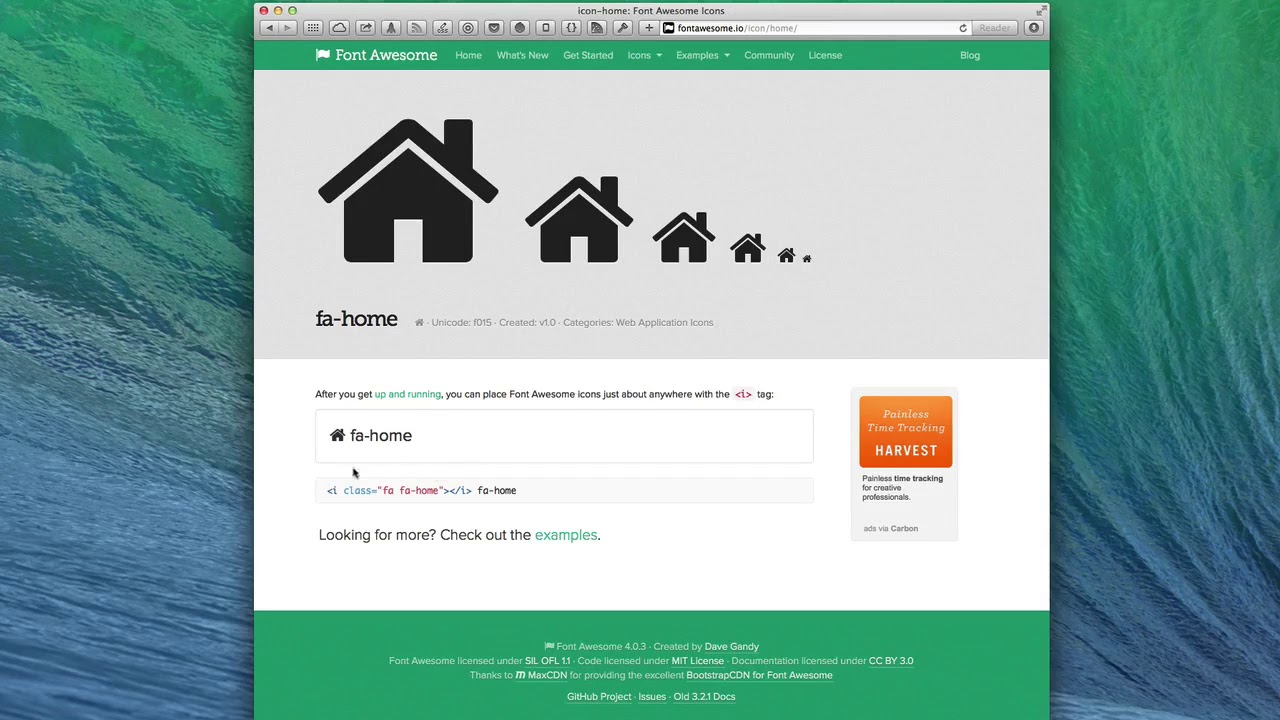
04:31 over 300 available icons and when you
04:35 find the icon that you would like to use
04:37 for instance let's find the home icon
04:41 you'll notice that when you go there
04:43 you'll see previews of different sizes
04:45 of that font and you'll notice the code
04:50 snippet here so simply highlight that
04:53 code snippet copy it and then paste that
04:56 snippet just as we did in the wrap
04:58 Weaver project so we saw how easy it was
05:02 to add font awesome icons into our page
05:04 content but what if we wanted to add it
05:07 to our navigation for example let's say
05:11 my home page instead of my home page
05:13 saying home what if I wanted to actually
05:15 have the icon a home icon from font
05:18 awesome well that couldn't be easier
05:21 so in rap waivers navigation pane on the
05:24 Left we have all of our page names and
05:26 if you notice these are the exact names
05:29 that show up inside of our menu well
05:32 what if instead of actually having the
05:34 word home we put in the font awesome
05:37 code like so we notice immediately that
05:43 because we added the font awesome code
05:46 into the page name we now have a home
05:51 icon instead of just the word home now
05:56 if you want to have the icon as well as
05:58 some text that is perfectly okay as well
06:00 just go here and add the word home after
06:03 and we now have our icon and the home
06:08 button or a me home text so as you see
06:12 this is really powerful you can use
06:14 these font awesome snippets everywhere
06:16 inside your wrap Weaver project you can
06:19 use them in your footer use them in your
06:21 sidebar use them in your content use
06:23 them in your navigation wherever you see
06:25 fit it's very easy to do and very
06:28 powerful
06:29 now one last great tip if you go to the
06:32 examples page on the font awesome
06:34 website you'll notice that there are
06:36 some awesome other utility classes that
06:38 you can add to your font awesome code
06:41 for example if you want larger icons
06:43 instead of using the text stack to
06:45 control the size you can actually just
06:47 add some classes to your icon code that
06:52 allows you to actually control the size
06:54 of that particular code as well hey well
06:58 thanks for watching today's podcast I
07:00 hope you enjoyed it I hope you learned a
07:02 lot if you have any show ideas please
07:04 let me know I'm always looking out to
07:06 see exactly what you the users actually
07:09 want to learn so you can reach me
07:11 anytime you probably know this you can
07:13 reach me anytime on app net or Twitter
07:15 at Joe workman and you can always send
07:18 ideas to our support email which is
07:21 support at Joe workman net and as always
07:23 if you haven't checked out my awesome
07:25 products and do toriel's do so at joe or
07:27 net thanks everybody I hope you have a
07:29 great day bye
07:37 you


