
Stacks Guru is born from the need to search the vast number of videos out there on stacks built for Stacks Pro and the Stacks 5 plugin for Rapidweaver.
We have scraped over 500 videos to get the transcripts for each in order to make the spoken word searchable.
Please use this free tool to help you learn and discover the awesome power that Stacks and the stacks made for Stacks have to offer.
00:06 hello everyone welcome to Weaver cast
00:08 Weaver cast is a weekly podcast
00:10 providing tips and tricks for
00:12 rapidweaver and web design i am your
00:14 host to joe workman an independent mac
00:16 and web developer based in san francisco
00:18 this is show number 16 and today is
00:21 sunday january 26th Weaver cast is never
00:24 longer than 10 minutes so let's get
00:25 started so in today's podcast we're
00:29 going to talk about different ways of
00:31 previewing your web sites outside of
00:34 rapidweaver so why would we want to do
00:37 this there's a couple reasons um one of
00:39 the obvious reasons is that we're going
00:42 to go over today is PHP so there are two
00:45 different types of kind of page
00:46 extensions commonly used inside
00:48 rapidweaver the first is HTML and that
00:51 is basically you know basic HTML and
00:53 JavaScript and CSS and that should
00:55 actually preview just fine inside
00:56 rapidly we should have no problems
00:58 however there are a lot of complex
01:01 add-ons and that are really cool that
01:03 use a something called PHP and PHP is a
01:07 server-side programming language and so
01:11 what that means is that if a user visits
01:13 a web page the server will process PHP
01:17 first if it's required if it's the page
01:20 extension so the server will process
01:21 your PHP and then based on that results
01:24 it'll serve down HTML to the web browser
01:27 so since rapidweaver does not have a web
01:31 server built into it it actually has
01:34 some issues displaying complex PHP and
01:37 it works for simple things and we'll go
01:39 over a couple examples that work and
01:41 what won't work inside but what if we
01:45 don't actually want to publish our
01:47 website and we want to preview these
01:49 more complex add-ons well it's really
01:52 simple I will go over how you can
01:54 actually create a web server on yours on
01:55 your Mac and and then preview your
01:58 wrapper websites inside of it okay it's
02:01 really simple it's going to be really
02:02 cool now another great reason to use
02:05 this is um let's say for example you're
02:07 working on a complete redesign of your
02:09 website or maybe you're working on a
02:10 couple new web pages and you actually
02:12 don't want to pub
02:13 them online yet and you want to actually
02:15 preview them locally as if your users
02:18 were visiting them on actually web
02:19 server so what what this allows you to
02:22 do is you know substantiate a local web
02:24 server on your machine and then you know
02:27 preview that inside a browser just as if
02:30 your users were visiting your live
02:32 production website so without further
02:36 ado let's jump in and see how cool this
02:38 is so you're up set up a sample
02:41 rapidweaver project and I've used my
02:43 slot machine stack now my slot machine
02:45 stack uses some simple PHP that randomly
02:48 selects on data that you've added into
02:51 it so here I've defined five different
02:53 slots and slot machine will randomly
02:55 pick one of those to display so every
02:59 time I go back in and out of preview
03:01 different items are chosen and displayed
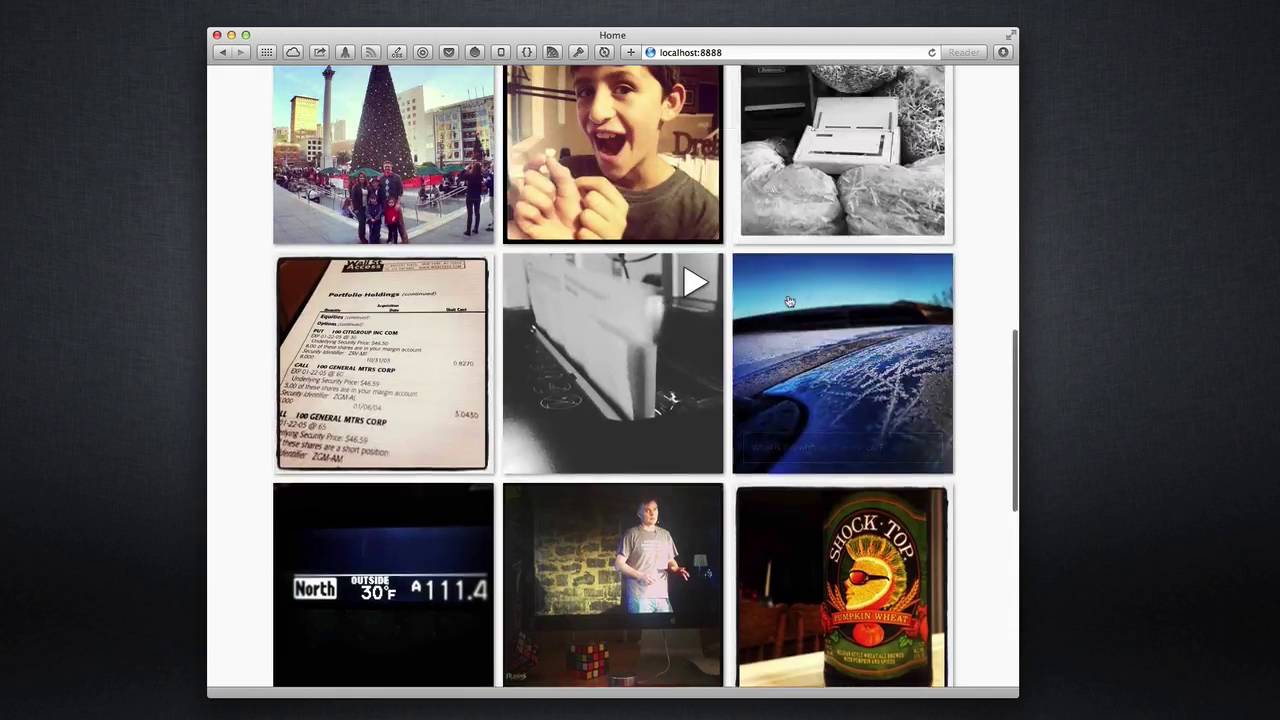
03:04 to the users so here I've added my quick
03:06 pics Instagram stack now quick pics is a
03:10 great stack that actually uses PHP on
03:12 the server to query your Instagram
03:14 photos and then feeds them down to the
03:17 browser using Ajax now this is really a
03:21 great stack however it will not work in
03:24 rack Weaver preview mode because it uses
03:26 a lot of really fancy PHP classes on the
03:29 server that rep it's just too much for
03:32 rapidly were to handle with in preview
03:34 mode so how can we view this live on our
03:37 max before we actually publish our
03:39 website to our servers well the answer
03:43 to that question is mam mam is a dead
03:46 simple web server that you put on your
03:49 machine and you can substantiate a web
03:51 server with just a click of a button and
03:53 what's even better is it's completely
03:55 free just simply go to mamta info and
03:59 download the free version and you'll be
04:01 good to go now I'll show you how to
04:03 actually configure the free map version
04:05 however you'll probably seem to use MAMP
04:07 pro as well ma'am Pro isn't necessarily
04:11 required at all I've been using MAMP for
04:15 so long that I purchased the pro version
04:17 mostly to show support for this great
04:19 project however the free version will
04:22 serve you perfectly for all your
04:25 previewing needs for
04:26 rapidweaver now before we can configure
04:28 MAMP to preview our Rapid River sites
04:30 we're going to actually have to create
04:32 some content locally on our machine for
04:35 it to actually use and basically what
04:37 we're going to do is we're giving use
04:38 rapid weavers export functionality so
04:41 within your wrap Weaver project you can
04:43 go ahead and go into file export site or
04:47 if you're a keyboard junkie like me you
04:50 can simply use shift command e and that
04:53 will trigger the export for you so let's
04:56 go ahead and do that shift command e and
04:59 it will ask me do without do I want to
05:01 save my site I will say yes and then a
05:05 window will pop up now I've already
05:07 created a folder here so basically
05:09 you're going to create a folder and then
05:11 you're going to export your site to that
05:13 folder and then it's probably best to
05:16 check mark the make this the default
05:18 export folder just for ease of use later
05:20 on so after you've done that we're done
05:23 so now that we've exported our files
05:27 locally to finder we can point mamp to
05:31 it so when you launch mamp you're going
05:33 to go to your preferences a tab and go
05:36 to apache and you'll see here where you
05:39 can define the document root for your
05:40 web server simply click select and find
05:45 the folder that you want to use as your
05:49 website click open and okay and then
05:54 you're going to want to start your web
05:55 servers and this is how it looks inside
05:57 ma'am pro simply us configure your host
06:01 by clicking on the choose button here
06:04 for disc location select your folder
06:07 that you need and then click the start
06:09 button now once that's completed whether
06:12 or not you've done it via the free
06:13 version of map or ma'am pro you actually
06:15 don't need to touch mamp again minimize
06:17 the window and let's get rockin and
06:20 rollin now in order to visit the website
06:23 that we've now created using MAMP in our
06:25 rapidweaver export as you go to the open
06:28 up safari or your favorite web browser
06:30 and you go to localhost colon 8080 8
06:35 and magically you'll see that we have
06:38 our website that we've expo
06:40 from rapidweaver there I've clicked and
06:43 set up my Instagram authentication and I
06:45 magically have all the images that are
06:48 going to show up if i were to publish my
06:50 site online but they did not get
06:52 displayed within rapidweaver so here i
06:55 have my rapid river project and safari
06:58 with my local web server that we've
07:00 created with man now let's say I didn't
07:03 like the small images and I want to go
07:04 ahead and make the medium again so I go
07:06 ahead and change that and let's go go
07:09 ahead and re-export our site and will
07:13 notice is once it's exported my what my
07:17 safari browser automatically detected
07:20 that changes were made and the browser
07:22 was refreshed I get instant feedback for
07:26 my particular changes that I've made now
07:29 that's really awesome it's yes you could
07:31 just go to Safari and manually refresh
07:34 the page but how cool was it that it
07:36 autumn did it all automatically for us
07:38 how did we do that this was accomplished
07:40 with a really cool app called live
07:42 reload that's available on the mac app
07:44 store check out the show notes for a
07:46 link to it now when you load live reload
07:49 you'll basically configure the folder
07:52 that you want to watch by clicking the
07:54 plus button and you navigate to the
07:55 folder that you'd like and then
07:57 basically you're done from that point on
07:59 for rapidweaver now live reload does do
08:02 a whole bunch of other options for
08:04 compiling sass and coffee script and
08:06 whatnot but you don't need to worry
08:07 about that for rapidweaver the next
08:09 option is going to want to install
08:11 browser extensions so click on the
08:13 install browser extensions link here and
08:15 install the browser extension for Safari
08:19 so after you've installed the live
08:22 reload browser extension you're going to
08:24 make want to make sure that you actually
08:25 refresh the page if you're already on
08:27 your map page that we've created earlier
08:30 so basically go to localhost 8 a-8 colon
08:34 888 refresh your browser window and that
08:37 will make sure that the live reload will
08:40 actually be working with the current web
08:42 page and it loads now if you look at the
08:45 icon you'll notice that the center
08:47 circle is a transparent okay if you if
08:51 we click on the icon you'll see that it
08:53 goes opaque and
08:54 that means that live reload is now
08:55 working and will auto refresh this page
08:58 let's see it in action again so here i
09:01 have my rapidweaver window again and
09:03 let's go ahead and make the thumbnail
09:05 sizes small again so i'm going to hit
09:07 small and i'm going to export my sight
09:09 again shift command e enter enter that
09:13 exports my site and fill notice
09:15 immediately my page was refreshed inside
09:18 safari because live reload auto detected
09:21 the changes and refresh my browser for
09:23 me that is really cool instant feedback
09:26 for the configuration changes that
09:29 you've made within a wrap weaver now
09:32 what's great is I never left edit mode I
09:34 can continue editing whatever I like
09:36 with a simple couple keyboard shortcuts
09:39 I can automatically preview my page in a
09:42 live web browser web server on my local
09:46 machine that's really cool thanks for
09:49 joining today everyone I hope you
09:51 learned a little bit improve your little
09:53 your workflows and some you know save
09:56 you a little bit of time so if you have
09:58 any questions comments or concerns go
10:00 ahead and please don't be scared to
10:01 email me or contact me you can reach me
10:04 on the internets at Joe workman on
10:06 Twitter and app net you can reach me via
10:09 email at support at jo'orom net and
10:13 leave a comments in itunes if you like I
10:16 you know so we get gained some
10:18 popularity and some ratings I would be
10:20 greatly appreciated as always check out
10:23 my great products to help support these
10:25 free podcasts coming along you can check
10:27 out my products at Joe workman net /
10:30 rapidweaver or some of my mac apps at
10:32 joe workman net / mac so i hope you have
10:35 a great day everyone talk to you later
10:37 bye
10:40 you


