
Stacks Guru is born from the need to search the vast number of videos out there on stacks built for Stacks Pro and the Stacks 5 plugin for Rapidweaver.
We have scraped over 500 videos to get the transcripts for each in order to make the spoken word searchable.
Please use this free tool to help you learn and discover the awesome power that Stacks and the stacks made for Stacks have to offer.
00:05 hello everyone welcome to Weaver cast
00:08 Weaver cast is a weekly podcast where we
00:11 go over some great tips and tricks for
00:12 rapidweaver and web design i am your
00:15 host Joe workman I am an independent mac
00:18 and web developer based in this san
00:20 francisco bay area today is show number
00:23 20 it is Monday februari 24 2014 and
00:28 Weaver cast is never long in the 1
00:30 minutes so let's get started so today
00:33 we're going to go over pretty quickly
00:35 but really depends on how how much I
00:38 talk we'll see um but we're going to go
00:40 over some cool little tips and tricks
00:42 for some geeky stuff with web design the
00:45 htaccess file and then we're going to
00:48 quickly touch on the robots.txt file
00:51 that's really quick one just for you
00:54 know controlling what search engine see
00:56 and what not but what is an htaccess
00:59 file now it only works if your web
01:03 server is running Apache and that is
01:06 probably going to be most users that are
01:08 running wrap weaver websites and whatnot
01:11 because most hosts run apache on the
01:13 linux is by far probably the most
01:16 implemented web server technology out
01:19 there is apache so HT access is a file
01:23 configuration file for Apache for your
01:26 website and you can do all kinds of
01:29 things and I'm going to quickly just
01:31 kind of spurt out I think I have like 1
01:34 different tips for you today I'm going
01:36 to quickly show you the the blurb that
01:38 you're going to put into the HT Access
01:40 file and what it does and how you can
01:43 tweak it and and all that jazz now
01:46 traditionally HT access files it's just
01:49 a plain text file the name of it is dot
01:52 HT access ok so you name the file that
01:56 any transfer it to the root of your
01:58 website so it will be in the root folder
02:02 of your website needs to be there now
02:06 there are newer versions of patchy which
02:09 probably most of you are running newer
02:11 versions of the latest versions
02:13 that support this what I'm going to talk
02:15 about is you can actually th TXS files
02:18 so what that means is at the root of
02:21 your web server you can have HT access
02:24 and that is like your global
02:26 configuration file right for your entire
02:29 site then you can actually define
02:32 htaccess files in various folders
02:34 throughout your website and basically
02:38 these settings that you have in those
02:39 sub HT access files will take effect for
02:42 the folder and blow that you have it in
02:44 right so if you want some specific
02:46 settings for parts of your website you
02:48 can do that most of the time even for me
02:52 I don't do that I have file a
02:55 centralized file that I manage for my
02:57 website at the root of my website and
03:00 that pretty much does everything that I
03:02 need it to but if you need that ability
03:07 to basically have different
03:08 configurations for different parts of
03:10 your website totally possible just take
03:13 that same htaccess file and throw in a
03:15 different sub folder so that's basically
03:19 it let's jump in and get geeky now I
03:24 should note that every snippet that
03:25 we're going to be seen today is
03:27 available inside the rapidweaver
03:28 snippets open source project this is a
03:32 project that I created that is available
03:34 to everybody for free so if you are
03:37 interested in the rack Weaver snippet
03:39 share go ahead and check out my github
03:41 account and there's full instructions on
03:43 how you can download and access this
03:46 great share of snippets okay so tip
03:49 number one is doing a simple redirect so
03:53 here's a perfect example I have a mac
03:56 app currently called climate it wasn't
03:58 always named climate its original name
04:01 was my nest and if users now go to / max
04:07 / my nest which used to be a teen URL on
04:10 my website they will get redirected in
04:13 this instance to Jagran annette / mac /
04:17 climate as you see this is really simple
04:20 to do you simply start your line with
04:24 redirect
04:25 space 301 because we're saying that we
04:30 want to do a 301 redirect now there are
04:32 different redirects and look those up if
04:34 you need to but a 301 redirect is mostly
04:37 what you're going to be doing that tells
04:39 the search engines that this is a
04:41 permanent redirect this web page has
04:43 permanently moved from location a which
04:46 we defined here as / mac / my nest so
04:50 let's move from location a to location B
04:53 which is Joe workman net / mac / climate
04:56 now there's one thing I should probably
04:58 should noted before his comments in HT
05:01 access if you ever start a line with a
05:04 hash sign or a pound sign this is where
05:08 you can actually define and add comments
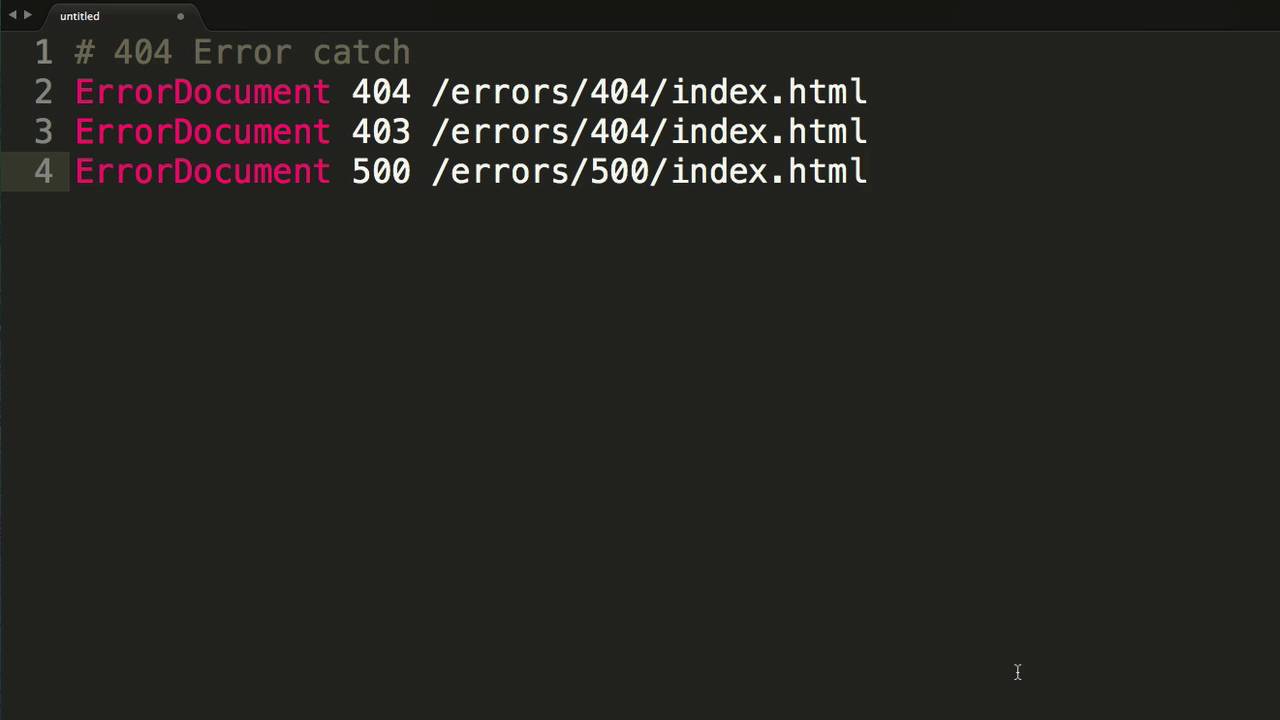
05:11 to your HT access files okay so tip
05:14 number two here really simple it is
05:16 defining custom 404 pages or custom
05:20 error pages so most the time if a user
05:23 goes to a URL on your site and that URL
05:26 doesn't exist you get a page not found
05:28 error so it's really simple to do that
05:30 as we see the few sample configurations
05:33 here it's just saying error document
05:35 space the error code that you want to
05:38 capture so in our case we want a 404 and
05:41 then you're going to define the path to
05:43 the actual file that is going to get
05:47 redirected to the user so inside your
05:50 rep remover projects or whatever tool
05:51 using you're going to create a I have a
05:54 slash errors / 404 in my configuration
05:57 so I have in rap weaver i created a fate
06:01 a page where the folder is set to slash
06:04 errors / 40 for the page name is set to
06:07 index 2.html and then you could design
06:09 the page to be whatever you want okay
06:12 and then inside your htaccess file that
06:14 way whenever anyone visits a error page
06:17 or a page that doesn't exist they will
06:19 get redirected to your 404 page pretty
06:22 cool okay so this next tip is all about
06:26 speed and what this configuration here
06:30 does is it checks if your apache server
06:32 supports a couple modules that are
06:34 installed and if said modules are
06:37 installed it will
06:39 before the contents of particular files
06:43 are sent to the web browser they will be
06:45 compressed so really what's going on
06:48 here is we are improving the transfer
06:50 speed from the web server TV web browser
06:53 now here's another tip for compression
06:56 uh this is very similar maybe your web
06:59 server supports mod gzip which is
07:01 another again this configuration your
07:03 chest tests for that first now normally
07:06 you're not going to use this tip and
07:07 then one I just went over you're going
07:09 to use one or the other so check if your
07:11 if your web server supports mod gzip
07:13 then you can use this one and this
07:15 essentially does the same thing where
07:17 it's compressing CSS HTML javascript
07:20 files before they actually get sent down
07:23 to the web browser now this next tip is
07:26 really simple this is essentially
07:29 disables directory access so you know
07:33 sometimes you go to a website directory
07:34 you know a web URL and you don't have to
07:37 page name in there and sometimes if you
07:39 just have the directory you can actually
07:41 see a list of files inside the web
07:44 browser this will disable that
07:47 functionality this will allow that not
07:49 to happen so if you don't have an index
07:51 2.html or an index PHP file in a
07:54 particular directory this will not allow
07:57 the user to view the contents of that
08:00 directory okay so this next tip here is
08:04 around security of files what files can
08:08 be viewed in the browser or not viewed
08:10 in the browser a perfect example is
08:13 you'd never ever want your HT Access
08:16 file to be seen inside the web browser
08:19 right this is a very secret file we
08:21 don't want you know hackers or anyone to
08:24 be see exactly what the configurations
08:25 of our web server are to potentially
08:27 exploit any holes right so this first
08:30 one here we're saying files HT access so
08:33 explicitly naming a particular file and
08:35 then we're saying you know order is
08:38 allowed to nigh and we're going to deny
08:40 for all we want 0 access to this HT
08:43 Access file on the web browser now you
08:46 can do this with any file let's say
08:47 there's a you know a secret file dot jpg
08:50 where you don't want that to be viewable
08:51 in the browser at all for
08:52 some unknown reason you can definitely
08:54 prevent people from seeing that file and
08:57 last thing we can do file match so you
09:00 can basically say anything that has HT
09:04 access to HC password ini files PSD
09:07 files so a lot of these you know dot log
09:10 files if you don't want any of those to
09:13 be seen within the web browser you
09:15 basically deny from all for all of those
09:18 well everyone that wraps up today's show
09:21 I hope you learn some tips and tricks I
09:23 you know we hope I being get too
09:25 confusing for you again all of these are
09:29 available on the open source snippet
09:31 chair so make sure you check that out
09:33 it's a great resource for everybody and
09:35 you know pls contribute the more that
09:38 people contribute to the share the
09:40 better it can be for everybody right so
09:42 it's pretty cool as always if you have
09:45 any questions comments or concerns go
09:47 ahead and send us an email or hit me up
09:50 on the various internets I am at Joe
09:52 workmen at Twitter and app.net send us
09:56 an email Joe support at Georgia net and
09:59 go check out my products they make these
10:01 cool podcasts free and available for you
10:03 so Joe we're going out net / rap
10:06 Weaver's all my great rap Weaver add-ons
10:08 Joe or net / mac is some light awesome
10:12 mac apps and check out my book
10:13 rapidweaver book calm so thank you very
10:16 much everybody I hope you have a great
10:18 week and all talk to you later bye


