
Stacks Guru is born from the need to search the vast number of videos out there on stacks built for Stacks Pro and the Stacks 5 plugin for Rapidweaver.
We have scraped over 500 videos to get the transcripts for each in order to make the spoken word searchable.
Please use this free tool to help you learn and discover the awesome power that Stacks and the stacks made for Stacks have to offer.
00:05 hello everyone this is Weaver cast
00:07 Weaver cast is a weekly podcast that we
00:10 go over tips and tricks for rapidweaver
00:12 and web design I am Joe workman your
00:15 host I am an independent mac and web
00:18 developer based in the San Francisco Bay
00:19 Area today it is show number 21 it is
00:24 Tuesday februari 25th 2014 and Weaver
00:28 cast is never longer than 15 minutes so
00:31 let's get started so I actually recorded
00:35 show 20 yesterday and as I was editing
00:39 it I realized that this was it was a
00:41 huge just big old fire hose right and I
00:44 was just like pumping data out so I
00:48 decided because I talked so much and
00:50 that the data was just so in your face
00:53 so much that I would split it up into
00:56 two shows so instead of plus I talked
01:00 for like 20-30 minutes and I tried to
01:03 edit it down couldn't so to keep true to
01:06 our 15 minutes I split it up into two
01:09 and now we have two 10-minute shows um I
01:11 think that's really great because I
01:14 assume like after 10 minutes of all the
01:16 stuff I was going over and firing at you
01:18 your eyes which is class over right so
01:20 it's good that we split up so I'm not
01:23 really going to go over what htaccess
01:26 file is please watch show 21st um none
01:30 of the contents here really relies on
01:31 show 20 unless you don't know what
01:33 htaccess file is so you probably want to
01:36 watch show 21st and then move on to show
01:39 21 after you've had a cup of coffee
01:41 after you wash code 20 so without
01:45 further ado let's jump into the
01:47 tutorials ok now here's another tip that
01:50 deals with performance and this has to
01:52 do with caching and expires now inside
01:56 wrap Weaver and you know if you're just
01:58 hand coding things you do know that you
02:01 can provide expire headers on each web
02:04 page individually now a lot of times we
02:07 forget to do that I myself never do it I
02:10 always forget so doing it in the
02:12 htaccess level is
02:13 a great way because you can actually do
02:15 it across all the files on your site
02:17 centrally by default basically what we
02:21 do is we we make sure that expires
02:23 active is on so we actually enable this
02:27 feature now this next one is kind of
02:30 controversial some people have it some
02:31 people don't what this does is it sets a
02:34 default expired date for every file on
02:37 your web server then basically that
02:39 requires if you want to change from the
02:41 default that you explicitly say so in
02:43 this configuration file now a lot of
02:46 people say that you know maybe not
02:48 providing the default at all is the best
02:50 way because then it just takes the
02:52 default mentality of always get the
02:54 latest but it's there if if you deem
02:59 that a default would be good if we look
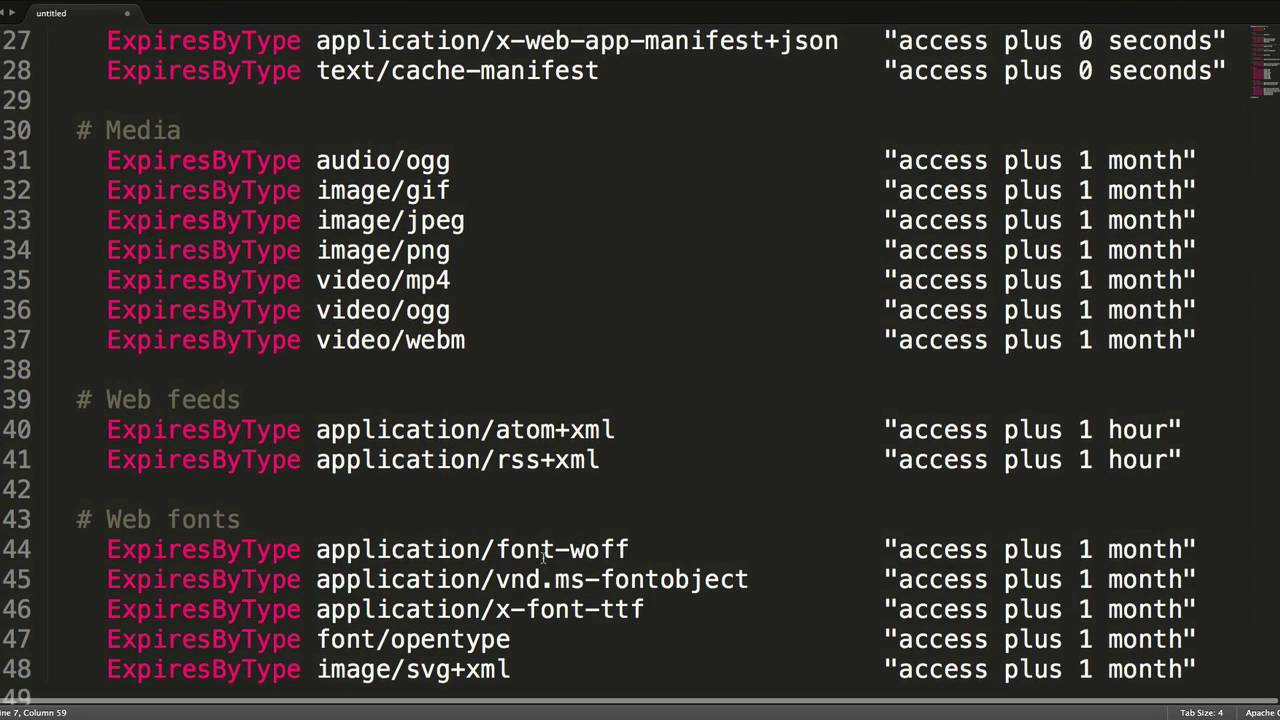
03:01 at the syntax here for the rest we have
03:03 expires by type and then we have the
03:07 what's called the mem type of a file or
03:09 the type of file that that is going to
03:12 be accessed on that for this rule so we
03:15 have a text CSS there's application json
03:18 text xml these are called mem types so
03:22 if you want to look for a particular mem
03:24 type you know make sure that i should
03:27 have inside this example all the
03:28 possible mem types that you would want
03:30 so definitely look at that then so we do
03:34 expire by type and then you can actually
03:36 then define the type of file and then
03:39 here is access plus 1 year we see in the
03:42 CSS example and what that says is access
03:47 time which is the date that the user
03:49 hits your hits that web page so it's
03:53 telling the browser you can cash this
03:55 CSS file for one year now this may be a
04:00 little uh you know conservative you know
04:03 I think one year is probably a lot a
04:05 little much because we're updating our
04:07 websites a little more frequently than
04:09 once a year ok so this is telling the
04:13 web browser that they're able to cash
04:15 the CSS file for up to a year then at
04:19 that point it can it will force it to be
04:22 redownloaded as you see there are all
04:25 kinds of other things we could
04:27 you know you can do images you can do
04:29 you know font files now a lot of these
04:32 you know a lot of time font files are
04:34 not going to change so you can
04:36 definitely cash those we saw in the
04:39 previous example something called a mime
04:41 type what this is is it defines the type
04:45 of file and ties that to an extension so
04:50 for example let's say video mpeg-4 so
04:53 here we have ad type video / mp4 and if
04:57 we ever have a file called mp4 or with a
05:01 dot m4v it's going to tell the browser
05:04 that this file is a type of video mp4 if
05:08 the web server does not serve up a file
05:11 with a proper mem type it could it won't
05:14 be interpreted properly by the browser
05:16 so for video that means maybe the video
05:19 won't get played because maybe it thinks
05:21 it's a dot movie file or if it's an
05:24 audio maybe you think since is mp3 file
05:26 instead of a video file so there are a
05:30 lot of times where hosts do not properly
05:31 have every possible page extension
05:34 defined so if you do have some issues
05:37 where maybe a font that you've tried to
05:39 load isn't working or a video that
05:42 you've loaded or a mp3 file that you've
05:45 loaded doesn't quite work properly it
05:48 could definitely be a mime type issue
05:51 and you might need to add some of these
05:53 lines into your HT Access file so this
05:57 is a quick rule that allows you to stop
05:59 users from you know being able to embed
06:02 your images that are hosted on your
06:04 website on other domains now this next
06:07 rule isn't really going to apply to a
06:09 lot of people this is if you're using
06:10 HTTPS on your web browser or on your web
06:13 server and you want users if they get
06:16 actually go to HTTP colon slash slash
06:19 your domain you want them to
06:21 automatically redirect to https this is
06:25 how you would do that now kind of a
06:27 similar rule that we just saw let's say
06:30 if you go to www workmen net right now
06:34 you'll get redirected basically the www
06:37 gets stripped off this is essentially a
06:40 way
06:40 of accomplishing that in your htaccess
06:43 file where you can put in your domain ww
06:45 your domain com and then redirect that
06:48 to be you know HTTP colon your domain so
06:52 basically you're stripping off the dub
06:54 dub dub so really simple thing you have
06:57 to change the domain but easy good to
07:00 know now in the last couple examples we
07:03 looked at at some things that redirected
07:05 and restructured the URL those those use
07:08 something called a URL rewrite and here
07:11 are some more complex situations on this
07:14 where instead of you know just you know
07:18 removing HTTPS we're actually
07:19 restructuring how URLs are defined now I
07:23 use this and this is documented for my
07:25 tumblr stack and we see examples of that
07:27 here where if a user had gone to slash
07:31 blog / index.php / post dash and then
07:35 some digits I rewrite that rule to be /
07:39 blog / index.php ? ID equals and then
07:45 dollar one is what is used in is what is
07:48 placed from these parentheses so it's a
07:51 way of making some URLs prettier it's
07:54 another way of doing more generic broad
07:57 URL rewrites for example on the set
08:02 second example here it might really old
08:05 a few years ago my URLs were drastically
08:08 different than they are now I had Joe
08:12 work net / product / product name and
08:15 when I redid my website and had my new
08:19 my new URL structure which is Joe net /
08:22 rapidweaver / stacks / product name I
08:27 wanted just a really quick and simple
08:29 way where you know people weren't
08:31 getting 404 is if they went to an old
08:33 product page so what I did was if you go
08:36 to Joe workman net / products / anything
08:40 which is a dot star this uses regular
08:43 expressions it'll basically redirect
08:47 them with a 301 redirect to /
08:51 rapidweaver on my site
08:54 now if you do notice a lot of these
08:55 rules use you know regular expressions
08:59 I'm not going to go over all the
09:00 intricacies of what a regular expression
09:02 is here definitely do some research
09:05 maybe search from stack overflow or
09:07 Google various examples of what you
09:09 potentially would want but some generics
09:14 here carrot is the beginning of a line
09:17 dollar is the end of a URL anything that
09:21 is in parentheses will be assigned to a
09:23 variable so here we have parentheses and
09:26 everything inside of that gets assigned
09:29 a dollar one dot star is a way of saying
09:33 anything okay so any character it could
09:38 be slashes spaces anything dots are
09:41 matches anything and then so that's that
09:46 that is the last HT access rule let's
09:49 jump into some robot txt files so robot
09:53 txt files um it is like I said earlier
09:56 it is simply a text file that you add to
10:00 the root of your web server the name is
10:03 explicitly going to be robots dot txt
10:06 and search engines look for this file
10:10 and they will abide by the rules that
10:13 you define within this file so the first
10:18 line of a robots.txt file is going to be
10:21 user agent star now you could if you
10:26 like actually target specific search
10:28 engines and give rules for specific
10:30 search engines and by doing that you can
10:32 do user agent colon Google or Bing or
10:36 something else right I don't really
10:39 recommend that I don't know of any great
10:41 use cases for doing that because pretty
10:43 much I think most of our problem is
10:45 actually getting found by search engines
10:47 not restricting specific search engines
10:50 from finding us so most of the time
10:53 you're going to do user agent star and
10:55 that will affect these so the rules that
10:57 we're defining here will affect every
10:59 single search engine that finds your
11:01 site then essentially is some disallow
11:06 commands where you can say
11:07 search engine do not find or source
11:11 anything inside / temp or / junk in this
11:15 example here that we see in this file
11:16 and there are no regular expressions
11:19 allowed here it is simply statically
11:22 defining the exact folders that you do
11:24 not want your search engines to search
11:27 and that's basically it the robots.txt
11:30 file i zc here is really simple you say
11:33 all search engines and then define
11:35 folders that you do not want the search
11:37 engines to source and they won't go in
11:39 and look at anything inside there and
11:42 that's it for more information check out
11:44 robots.txt org and they have a few more
11:47 examples and whatnot for you but this is
11:49 going to serve you ninety-nine point
11:51 nine percent of the time so good luck
11:54 everybody thanks well that's a wrap
11:56 everyone i hope you enjoyed this two
11:58 part series on HT access files and robot
12:01 files they're really some great stuff in
12:04 here i hope you take the time to play
12:06 around with it and i hope it wasn't too
12:08 much for you um you know definitely take
12:10 reference to you know the files so look
12:14 at the snippet share that i pointed to
12:16 in show 20 on github and i'll pry just
12:19 throw it an access file that we saw all
12:22 the tips in the show notes as well so
12:24 that if you don't want to you know join
12:27 the snippet share you'll still have
12:29 access to all that stuff so make sure
12:30 you check out the show notes for links
12:32 and everything above all the sample
12:34 snippets that we've seen here today so
12:37 as always if you have any questions
12:40 comments or concerns you could reach me
12:42 on all the various internets at Joe
12:44 workman on Twitter and app.net you can
12:48 send us an email at support at joe
12:51 workman net so please you know give us
12:54 your ideas tell us what you want to
12:55 learn my list is starting to get a
12:57 little bit shorter so please go ahead
12:59 and tell me what you want to know so
13:02 that I can teach you and as always make
13:05 sure you go to Jagran uh net and check
13:07 out my awesome products they make this
13:09 great podcast free for everybody so if
13:12 you enjoy it go check out my products
13:14 and pick up a couple so thank you very
13:16 much everyone I hope you have a great
13:17 day talk to you later bye


