
Stacks Guru is born from the need to search the vast number of videos out there on stacks built for Stacks Pro and the Stacks 5 plugin for Rapidweaver.
We have scraped over 500 videos to get the transcripts for each in order to make the spoken word searchable.
Please use this free tool to help you learn and discover the awesome power that Stacks and the stacks made for Stacks have to offer.
00:06 hey everybody Jill workman and I hope
00:09 you had a wonderful holiday season and
00:11 look forward to an amazing 2018 because
00:15 we have a lot of really great things
00:17 coming in we were space here this year
00:20 right and I just wrapped up phase one
00:23 and that was getting the new community
00:25 upgraded move to a new subdomain if you
00:29 notice it is now on community dot
00:31 weavers space right because the main
00:35 domain we have some special really
00:37 special stuff going on later on this
00:39 year hopefully not too soon a couple
00:41 months away but for now what I'm gonna
00:44 do in this video is I just want to give
00:45 you an overview of some of the small
00:47 little refinements that I think are
00:49 gonna make a world of difference for you
00:51 guys and just the pleasure of using and
00:55 interacting inside Weaver space so let's
00:57 jump on in and have a look at the new
00:59 community so here we are inside Weaver
01:02 space community and all in all it is
01:04 pretty much identical to what we've had
01:06 right with a few refinements you might
01:08 notice the text is how we updated the
01:11 fonts that we're using right so I think
01:14 they're really crisp especially unlike
01:16 my iPad everything is just like super
01:18 crisp really nice I enjoy the font it's
01:21 good
01:23 pretty much interacting with all the
01:26 posts is identical you can still use
01:27 markdown you notice that the little
01:31 hearts are now thumbs up I thought that
01:32 was interesting a little change just to
01:34 kind of change things up a little bit
01:37 the big changes are with notifications
01:39 actually so if we look at the
01:41 notifications if you remember before
01:43 like we used to get notifications for
01:45 every single little thing right we would
01:47 get you know for every liking for every
01:49 comment on every post but now everything
01:52 is kind of consolidated into single
01:54 notifications so if you look at this
01:56 post here we see that Jeff Taylor and 1
01:59 others like to post right instead of
02:01 getting 13 separate notifications we now
02:05 have one this is amazing especially
02:08 those that are RIT for those that are
02:09 really interactive on the community
02:11 because you know I'd come in some days
02:13 and have like 50-plus notifications and
02:15 it was just really tough to get through
02:17 so that's really nice um there's also a
02:19 all notifications there is a new
02:21 notifications view that has a nice
02:23 little filter on the side so if you want
02:25 to filter your notifications and whatnot
02:27 it just it's very full-featured now for
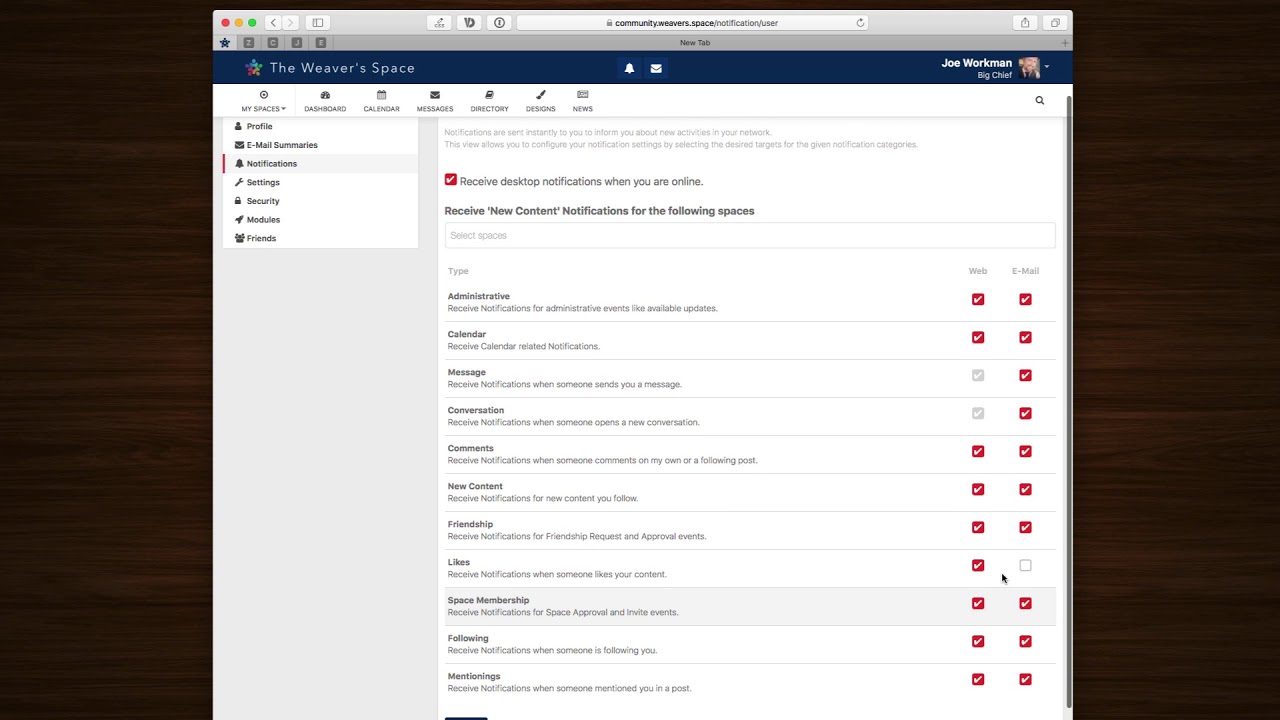
02:30 notifications now you'll also notice
02:33 this new version by default it actually
02:35 it has Web notifications as well as
02:38 email notifications ok now I know we're
02:41 probably gonna give a ton of email about
02:42 this so what you do is you go to your
02:45 account settings up at the top right
02:47 corner and what you'll notice inside the
02:49 notification setting is that you can
02:52 customize all the notifications that you
02:54 see you can even specify them by which
02:58 space so if you only want to have
03:00 notifications for specific spaces you
03:02 can do that as well which is really nice
03:04 if you want to receive desktop
03:06 notifications like from Notification
03:07 Center on your Mac this is how you do
03:10 that
03:10 ok and if you look here you can
03:12 configure whether or not you want web
03:14 and email notifications for everything
03:16 so go ahead and you know check or
03:19 uncheck if you don't want any emails go
03:21 ahead and uncheck all of those ok it's
03:24 actually quite interesting having the
03:26 email because it
03:27 I think it'll let people know about
03:29 things quicker potentially if they're
03:31 not on the site right and then we get
03:34 more interaction with people so I think
03:37 the email is a good thing again it could
03:39 definitely promote you know people to
03:42 come back to comment more and interact
03:44 with each other so I think this is
03:46 really a winner for the Weaver space
03:49 community now the general email
03:51 summaries that we used to get right like
03:53 if you haven't been logged in all day
03:55 you kind of get like a summary email we
03:57 now have more ways to configure that ok
03:59 and you can get daily weekly hourly or
04:02 never if you want to turn those summary
04:04 emails off ok and then you can customize
04:07 what sort of activities you would like
04:09 to see in those emails so this is very
04:12 cool a lot more powerful the next thing
04:17 we have in Weaver space now is you can
04:19 now friend people so if you go to
04:21 someone's profile do so if we go to my
04:27 profile well you can't friend myself can
04:30 I here let's go to if I
04:32 - Rob's profile I can now add Rob as a
04:35 friend this just kind of turns
04:40 Weaver space and a little bit more of a
04:42 social network we've always had the
04:44 ability to post to our profiles right so
04:47 if you were to go to your profile and
04:49 you can make a post here and what
04:52 happens is if people follow you or
04:53 they're your friend you then see posts
04:55 that they create here um I'm not sure if
04:58 really if we're gonna be using this a
05:00 lot but it's interesting new feature
05:02 we'll see where it kind of takes us and
05:05 see how that how this feature evolves in
05:07 Weaver space and if we use it and things
05:09 of that nature so that's all like the
05:12 pretty main features of this update
05:14 right um we all sorted see things a
05:16 little bit zippier a little faster right
05:18 um because I really upgraded the
05:21 software tweaked the the hardware and
05:23 some of the upgrade to the OS and a lot
05:26 of the Apache and the PHP instances and
05:28 I did a lot of work since Christmas to
05:30 New Year's was pretty much all I had
05:33 worked on to was to get Weaver space the
05:36 community up and running and moved over
05:38 and just a little bit nicer for us to
05:39 use so I hope you enjoy it please feel
05:42 free to leave some feedback um you know
05:45 either in general space or in the cafe
05:47 and just get a conversation of what
05:50 you'd like to see right um would you
05:52 like to see some different styling
05:53 incident coloring some whatever you know
05:55 just let me know I'm open to all kinds
05:57 of feedback so please let me know what
05:59 you like what you don't like and I look
06:02 forward interacting with you on the
06:03 community so without further ado we will
06:06 talk to you very soon we have a lot of
06:08 amazing things coming out this year I'm
06:10 really excited about them not only the
06:12 Weaver space site and community but I
06:15 got a bunch of stacks ready to unload on
06:17 you guys just really cool stuff really
06:20 excited about this stuff so until then
06:24 we will talk to you later bye
06:32 you


