
Stacks Guru is born from the need to search the vast number of videos out there on stacks built for Stacks Pro and the Stacks 5 plugin for Rapidweaver.
We have scraped over 500 videos to get the transcripts for each in order to make the spoken word searchable.
Please use this free tool to help you learn and discover the awesome power that Stacks and the stacks made for Stacks have to offer.
00:00 what does the zero say to the eight nice
00:04 belt
00:10 hey everyone Jordan here and in this
00:13 video we're gonna have a really quick
00:14 video to show you how to use pi to
00:18 update existing form fields so we're
00:20 gonna be looking at demo seven and it's
00:24 just gonna be this gonna be a really
00:25 quick video because it's a pretty simple
00:27 concept but I want to have this this as
00:29 a separate video just to kind of show
00:30 you how to do that if you wanted to do
00:33 it so here we are looking at the pi demo
00:37 project that ships with pi and this is
00:39 demo seven and we're not going to look
00:41 at all the details of this demo but we
00:44 want to see how we can update form
00:46 fields so here we have a simple slider
00:48 that is named month slider and this pi
00:53 essentially what it does is it is it has
00:55 a custom function and to learn more
00:57 about custom functions check out our
00:59 advanced PI video on using custom
01:01 functions but basically uses a custom
01:04 function that passes the value from the
01:06 slider and it returns the name of a
01:08 month so if it returns if we pass one it
01:12 returns January if it passes two it
01:15 returns February so on and so forth
01:17 right now what we wanted to do is if we
01:20 let's look at the demo
01:23 if we look at the demo we can see as I
01:25 move this slider it updates the content
01:29 right and chances are you probably know
01:30 how to do that that's really simple but
01:33 also we have a form field here and it
01:35 actually updates the form field so it
01:37 actually takes our value from the slider
01:40 and pi can do a bunch of calculations
01:42 and doing various things and then it can
01:44 also and then update the form field so
01:47 how do we do that
01:48 first off let's look at the this is the
01:51 form field that we actually want to
01:53 update and if we look at the settings I
01:55 set this to have a field name of month
01:58 output so it has the we're outputting
02:02 the month to it right so I have a field
02:03 name of month output on this textbox now
02:07 if we go to the PI setting for this
02:08 you'll notice that in extra actions I
02:10 clicked on Form and basically all you
02:14 have to do is put in the field name
02:15 that's it now what's cool is you can
02:18 actually do prefix and suffix here so if
02:21 you want to do
02:24 my fav month is right and then um you
02:28 know maybe put a period after this first
02:32 suffix so it's gonna create a proper
02:33 sentence right so you can have the field
02:36 name and then you can have a field
02:37 prefix and then a suffix so what this
02:40 should do is it should do my fav month
02:42 is January period right that's what this
02:47 should do let's have a look so here we
02:50 have my fav month is January period so
02:53 it created a proper sentence based on
02:56 the slider right pretty cool so here
03:00 we're using PI to populate form fields
03:02 now in this example I'm just updating
03:05 the text input but you can use this to
03:07 update number values as well maybe you
03:09 have you're doing a calculation and then
03:11 you're gonna output that to the to a
03:12 form field right now I also want to note
03:16 if we look at pi okay well notice that I
03:18 gave this PI a name of month text now
03:24 what a PI does you'd have to do this it
03:27 does it by default every time you add it
03:28 to the page it will create a hidden
03:32 value on the page called month text so
03:36 it's going to create a hidden form value
03:38 called month text so if you have PI
03:41 inside of a form month text will get
03:43 submitted as if it was a actual input
03:47 inside the form so that you can actually
03:49 process that data whether you're
03:51 inserting into a database or processing
03:53 it in an email text things of that
03:55 nature right so let's have a look at
03:57 this right if if I go back to this demo
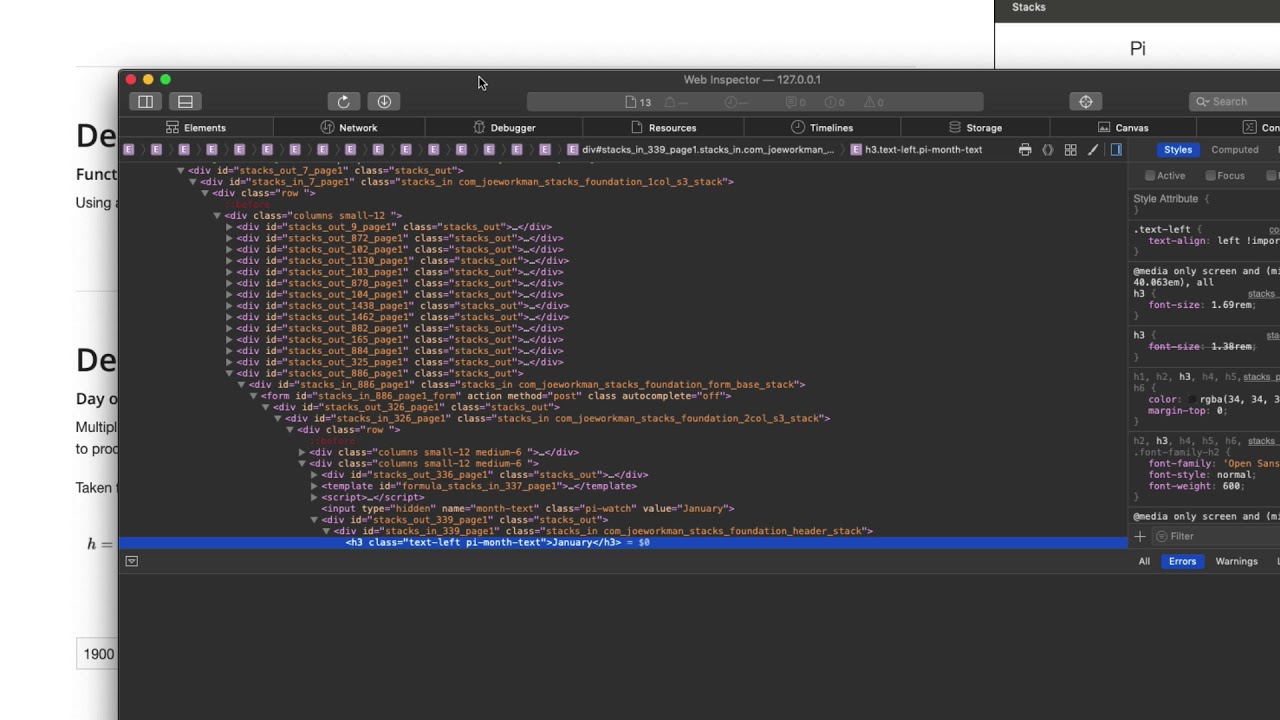
04:00 let's go ahead and I'm going to inspect
04:02 this just to kind of show you how all of
04:05 this happens
04:07 if we look here okay if we zoom in here
04:11 we'll notice that there is a type and
04:13 input with type hidden' that has a name
04:16 of month text remember that's the name I
04:18 gave pi don't worry about the class pi
04:21 watch and then it has a value of January
04:23 right and if I if I change this we'll
04:27 notice that inside the Dom it changes as
04:30 well so here we have a value of April
04:33 because I've changed that input now
04:35 again you don't see this at all on the
04:37 page it's hidden it's just a invisible
04:40 value that will actually get submitted
04:42 with the form and the value name is
04:45 going to be what you give pi name right
04:48 so the name of pi
04:50 so the value that gets submitted is
04:52 actually the name of the pie stack here
04:54 which is month text
04:57 so that's just a quick video on how you
04:59 can use pi with form fields right so you
05:02 can update existing form fields to you
05:05 know output calculations then you can
05:07 use kind of the pre facin prefix and
05:09 suffix settings to you know augment that
05:11 data with something else right so you
05:13 can have dynamic data within the
05:15 middle-right
05:16 pretty cool stuff now remember that pi
05:19 also has a hidden form field by default
05:21 it does this just by adding pi to the
05:23 page it will automatically create that
05:26 hidden field for you you don't need to
05:28 do anything to get that to happen it
05:30 happens out of the box so I hope you can
05:33 use PI up you know powerfully to you
05:36 know improve your database inserts or
05:38 your Evo they're not using it in email
05:40 and so on and so forth right there's a
05:42 lot of various use cases you can you do
05:43 with this but this is pot this is
05:46 powerful of Pi that it can actually
05:47 update a form field automatically for
05:50 you with dynamic content that the user
05:52 chose based on data in the form so it's
05:55 pretty cool I hope you're enjoying PI
05:57 please make sure that you share your
05:59 cool creations on Weaver space so that
06:01 others can benefit and we can see all
06:03 the cool things that you're doing with
06:05 it I hope that you're enjoying pie and
06:07 that it's making your life just a little
06:08 bit easier so we'll talk to you later
06:11 hope you enjoy it bye


